
Introduction
The Samson MBA38 Microphone Boom Arm is a highly-adjustable microphone desktop stand designed for radio, podcast, broadcast, or streaming setups. The MBA38 provides 38 inches of horizontal and vertical arm reach, offering flexibility for optimal microphone placement. Its silent rotating design features internal springs for quiet and effortless positioning, minimizing noise in recording environments. This manual provides detailed instructions for setup, operation, and maintenance of your MBA38 boom arm.
Features
- Articulating microphone boom arm for flexible positioning.
- Durable steel construction ensures longevity and stability.
- Internal springs provide silent and effortless positioning, reducing operational noise.
- 38" maximum arm reach for extensive coverage.
- Equipped with 5/8"-27 mic clip threading for simple microphone integration.
- Supports a maximum weight capacity of 5 lb (2.3 kg).
What's in the Box
- Samson MBA38 38" Microphone Boom Arm
- C-clamp mount (2" maximum grip)
- Flange mount (with wood screws)
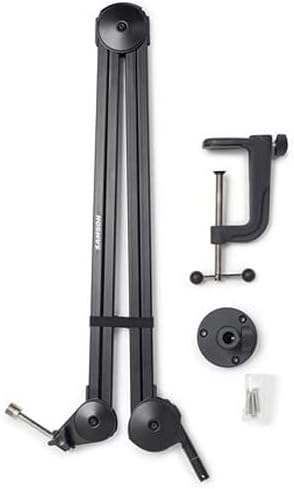
Image: The Samson MBA38 boom arm disassembled, showing the main arm, the C-clamp for desk mounting, and the flange mount with screws for permanent surface installation.
Setup
1. Choose Your Mounting Option
The MBA38 offers two versatile mounting options:
- C-Clamp Mount: Ideal for temporary or non-permanent installations. Attach the C-clamp to the edge of your desk or table (up to 2 inches thick) by tightening the screw mechanism until it is secure.
- Flange Mount: For a more permanent setup, the flange mount can be screwed directly into a surface using the provided wood screws. Ensure the surface is sturdy enough to support the boom arm and microphone.
2. Attach the Boom Arm
Insert the base of the boom arm into the chosen mount. The arm should slide smoothly into place and rotate freely within the mount.
3. Attach Your Microphone
Screw your microphone or microphone clip onto the 5/8"-27 threaded post at the end of the boom arm. Ensure it is securely fastened.
4. Cable Management
Utilize the integrated cable management straps or the groove along the arm to neatly route your microphone cable. This helps maintain a clean setup and prevents cable interference during adjustments.

Image: The Samson MBA38 boom arm illustrating both the C-clamp mount (with 3" maximum grip) and the flange mount for permanent installation, along with the 5/8"-27 mic clip threading.
Operating Instructions
The Samson MBA38 is designed for silent and effortless positioning. Simply grasp the arm and move it to your desired horizontal or vertical position. The internal springs will hold the arm in place without the need for tightening knobs or levers. The arm can extend up to 38 inches, providing ample reach for various setups.
Video: Official product video demonstrating the silent and effortless positioning of the Samson MBA Series Microphone Boom Arms, highlighting their durable steel construction and various reach options.
Maintenance
- Regularly wipe down the boom arm with a soft, dry cloth to remove dust and debris.
- Check all mounting points and connections periodically to ensure they remain secure.
- Avoid applying excessive force or hanging heavy objects on the boom arm beyond its 5 lb (2.3 kg) weight capacity.
Troubleshooting
- Arm not holding position: Ensure your microphone and any accessories do not exceed the 5 lb weight capacity. Check that the mounting clamp or flange is securely fastened to the surface.
- Excessive noise during movement: The internal springs are designed for silent operation. If you experience unusual noise, ensure the arm is clean and free of obstructions. Avoid over-lubricating the joints, as this can affect tension.
- Mounting instability: If using the C-clamp, verify your desk thickness is within the 2" maximum grip. For flange mounts, ensure screws are properly seated in a solid surface.
Specifications
| Specification | Value |
|---|---|
| Item Weight | 4 pounds |
| Product Dimensions | 22.44 x 7.09 x 1.57 inches |
| Item Model Number | MBA38 |
| Body Material | Alloy Steel |
| Color Name | Black |
| Connector Type | Threaded Mount |
| Size | 38" |
| Maximum Weight Capacity | 5 lb (2.3 kg) |
Warranty and Support
For warranty information, technical support, or further assistance, please refer to the official Samson Technologies website or contact their customer service department. Keep your purchase receipt for warranty claims.


