
PKPOWER AC/DC Adapter
Contents
PKPOWER AC/DC Adapter User Manual
Model: AC/DC Adapter for LaCie N2870 External Hard Disk Drive
1. Introduction
This manual provides essential information for the safe and effective use of your PKPOWER AC/DC Adapter. Please read this manual thoroughly before using the product and retain it for future reference.
This adapter is designed to provide reliable power to compatible LaCie N2870 Design by F.A. Porsche FA External Hard Disk Drives requiring 5Vdc and 12Vdc power with a big 4-prong connector.
2. Package Contents
Upon opening the package, please verify that all components are present and undamaged:
- 1 x PKPOWER AC/DC Adapter

Figure 2.1: The PKPOWER AC/DC Adapter with its attached power cords.
3. Setup and Connection
Follow these steps to properly connect your AC/DC adapter:
- Identify the Correct Port: Locate the power input port on your LaCie N2870 external hard disk drive. Ensure it is compatible with a big 4-prong connector.
- Connect the Adapter: Carefully insert the 4-prong connector from the PKPOWER adapter into the corresponding port on your hard disk drive. Ensure a firm and secure connection.
- Connect to Power Outlet: Plug the AC power cord of the adapter into a standard 100-240V wall outlet.
- Verify Connection: Once connected, the hard disk drive should receive power. Refer to your hard disk drive's manual for indicators of successful power connection.

Figure 3.1: An alternative view of the adapter, showing the input and output cables.
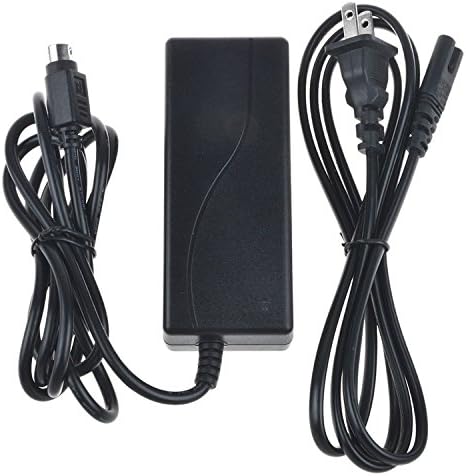
Figure 3.2: Top-down view of the adapter, highlighting the compact design.
4. Operating Instructions
The PKPOWER AC/DC Adapter is designed for straightforward operation. Once connected as described in the "Setup and Connection" section, it will automatically provide the necessary power to your compatible device.
4.1 Safety Protections
This adapter incorporates multiple safety features to protect your device and the adapter itself:
- Over Voltage Output Protection (OVP): Prevents damage from excessive voltage.
- Over Current Output Protection (OCP): Protects against damage from excessive current.
- Short Circuit Output Protection (SCP): Safeguards against short circuits.
- Over Charge Protection: Prevents overcharging of connected devices (if applicable).
- Over Temp Protection: Protects against overheating.

Figure 4.1: Visual representation of the adapter's built-in safety protections, including Over Charge, Over Voltage, Short-circuit, Over Current, and Over Temperature protection.
5. Maintenance and Care
To ensure the longevity and optimal performance of your PKPOWER AC/DC Adapter, follow these maintenance guidelines:
- Cleaning: Disconnect the adapter from the power outlet and the device before cleaning. Use a soft, dry cloth to wipe the surface. Do not use liquid cleaners or abrasive materials.
- Storage: When not in use, store the adapter in a cool, dry place away from direct sunlight and extreme temperatures.
- Cable Care: Avoid bending or kinking the cables excessively. Do not place heavy objects on the cables.
- Ventilation: Ensure the adapter has adequate ventilation during operation. Do not cover it or place it in an enclosed space that could restrict airflow.

Figure 5.1: Close-up details of the adapter, showing the Plum Blossom Thread design, the 2-pin plug for safety and durability, and the copper interface for stable output.
6. Troubleshooting
If you encounter issues with your PKPOWER AC/DC Adapter, please refer to the following common problems and solutions:
| Problem | Possible Cause | Solution |
|---|---|---|
| Device not powering on. | Adapter not properly connected to device or power outlet. | Ensure all connections are secure and the power outlet is functional. Try a different outlet. |
| Adapter feels hot. | Normal operation under load, or insufficient ventilation. | Ensure the adapter is not covered and has adequate airflow. If excessively hot or emitting smoke/smell, disconnect immediately. |
| Device powers on but behaves erratically. | Incompatible device or power requirements not met. | Verify that your device is the LaCie N2870 or a compatible model requiring 5Vdc and 12Vdc with a big 4-prong connector. Consult your device's manual. |
If the problem persists after attempting these solutions, please contact customer support.
7. Product Specifications
| Feature | Detail |
|---|---|
| Product Type | AC/DC Adapter |
| Compatible Model | LaCie N2870 Design by F.A. Porsche FA External Hard Disk Drive |
| Input Voltage | 100-240V AC, 50-60Hz |
| Output Voltage | 5Vdc and 12Vdc |
| Connector Type | Big 4-Prong Connector (Not Mini 4 Pin) |
| Safety Certifications | CE, FCC, RoHS certified |
| Protection Features | OVP (Over Voltage Protection), OCP (Over Current Protection), SCP (Short Circuit Protection), Over Charge Protection, Over Temp Protection |
| Included Components | 1 adapter |
| Manufacturer | PKPOWER |
| Country of Origin | China |
8. Warranty and Support
PKPOWER products are manufactured to high standards. For any issues or inquiries, our friendly and reliable customer service team is available to assist you.
Customer Service: Our customer service will respond to you within 24 hours. Please refer to your purchase documentation for specific contact details or visit the official PKPOWER store on Amazon: PKPOWER Store.
For information regarding product warranty, please refer to the terms and conditions provided at the time of purchase or contact customer support directly.
Documents and downloads
Ask a question about this manual
Ask about setup, troubleshooting, compatibility, parts, safety, or missing instructions. Manuals+ will review the question and use this page’s manual context to help answer it.