
1. Introduction
This manual provides essential information for the safe and effective operation of your DROK 2-in-1 Digital AC Voltmeter Ammeter. Please read this manual thoroughly before installation and use, and retain it for future reference.
1.1 Product Description
The DROK 2-in-1 Digital Multimeter is an advanced instrument designed for precise measurement of AC voltage and current. Featuring a clear LCD display, it provides real-time readings of voltage (80-300V AC) and current (0-100A AC) on a single screen. It includes a dedicated 100A current sensor transformer for accurate current measurement and operates with a simple 2-wire connection, eliminating the need for an external power supply.
1.2 Key Features
- Wide Measurement Range: Measures AC voltage from 80V to 300V and AC current from 0A to 100A.
- High Accuracy: Provides readings with an accuracy of 1% ±2 digits.
- Dual Display: Simultaneously shows voltage (in green) and current (in blue) on the same LCD screen.
- Integrated Current Transformer (CT): Comes with an accurate CT, eliminating the need for separate purchase.
- Self-Powered: Draws power directly from the measured circuit, simplifying installation.
- Flexible Installation: Compact design allows for versatile placement.
2. Safety Information
WARNING: Improper connection can lead to permanent damage to the instrument and potential electrical hazards. Always ensure power is disconnected before wiring.
- Do not connect the voltage input (green terminal) and the current transformer's secondary input (blue terminal) incorrectly. Incorrect connection will cause permanent damage to the instrument.
- This meter is only suitable for pure AC 50Hz power sources. Measuring square waves, DC/AC inverter outputs, or modified sine waves will result in permanent damage to the meter.
- Ensure all connections are secure and insulated to prevent short circuits.
- Installation should only be performed by qualified personnel familiar with electrical wiring and safety standards.
- Do not exceed the specified voltage and current ranges.
3. Product Overview
3.1 Components
- 1x DROK Digital Voltage and Current Meter
- 1x Current Transformer (CT)
3.2 Visual Reference

This image displays the front of the DROK 2-in-1 Digital AC Voltmeter Ammeter. The LCD screen clearly shows voltage (green digits) and current (blue digits) readings. The attached current transformer (CT) is visible on the left, connected by green wires.

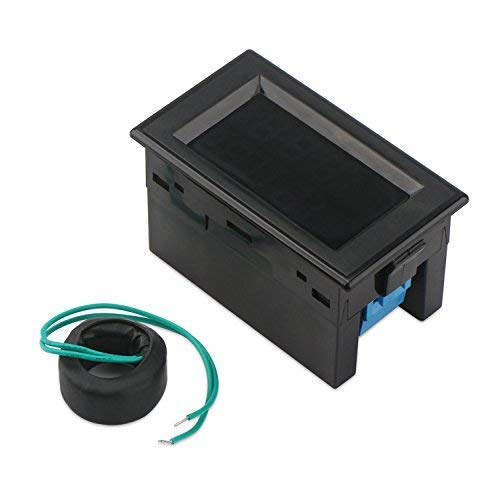
This image provides a side view of the meter, emphasizing its compact form factor. The current transformer (CT) is shown detached from the meter, with its connecting wires visible. The side of the meter reveals the connection terminals.

An angled view of the meter, showcasing the rear connection terminals (green and blue) and the attached current transformer. This perspective helps in understanding the physical layout for wiring.
This diagram provides precise measurements for both the meter unit and the current transformer, including length, width, height, and the diameter of the CT's opening. These dimensions are crucial for panel mounting and installation planning.
4. Specifications
| Parameter | Value |
|---|---|
| Brand | DROK |
| Model Number | US200308 |
| Voltage Measurement Range | AC 80-300V |
| Current Measurement Range | AC 0-100A |
| Accuracy | 1% ±2 digits |
| Display Type | LCD with dual color (Green for Voltage, Blue for Current) |
| Power Source Type | AC (Self-powered from measured circuit) |
| Operating Frequency | 50Hz (for pure sine wave AC) |
| Item Weight | 90 g |
| Package Dimensions | 13 x 6.7 x 4.7 cm |
5. Setup and Wiring
Proper wiring is crucial for the correct and safe operation of the meter. Refer to the diagrams below for connection details.
5.1 Wiring Diagram

This diagram illustrates the basic wiring concept. The green terminals are for voltage measurement, and the blue terminals are for the current transformer input. The load wire must pass through the CT.

A more detailed connection diagram showing the meter's terminals and the current transformer. It clearly labels the 'Measure voltage (green terminal)' and 'Transformer input (blue terminal)' connections, along with the path of the measure wire through the CT.

This diagram provides another perspective on the connection, reinforcing the correct wiring sequence and the importance of passing the measurement wire through the current transformer's aperture.
5.2 Connection Steps
- Voltage Input: Connect the green terminals of the meter to the AC 80-300V power source you wish to measure. These terminals provide power to the meter itself.
- Current Transformer (CT) Connection: Connect the blue terminals of the meter to the secondary output of the current transformer.
- Current Measurement Path: Pass the wire of the circuit whose current you want to measure through the hole of the current transformer. Ensure the wire passes completely through the CT.
- Verify Connections: Double-check all wiring to ensure correct polarity and secure connections before applying power.
6. Operating Instructions
Once properly wired and powered, the meter will automatically display the measured voltage and current values on its LCD screen.
6.1 Display Information
- The upper display (green digits) indicates the AC voltage in Volts (V).
- The lower display (blue digits) indicates the AC current in Amperes (A).
- The meter provides continuous real-time readings.
7. Maintenance
The DROK 2-in-1 Digital AC Voltmeter Ammeter requires minimal maintenance. Follow these guidelines to ensure its longevity:
- Keep the meter clean and free from dust and moisture. Use a soft, dry cloth for cleaning.
- Avoid exposing the meter to extreme temperatures, direct sunlight, or corrosive environments.
- Do not attempt to open the casing or modify the internal components, as this will void the warranty and may cause damage or injury.
- Regularly inspect wiring connections for any signs of wear or looseness.
8. Troubleshooting
If you encounter issues with your meter, refer to the following common problems and solutions:
| Problem | Possible Cause | Solution |
|---|---|---|
| No display or meter not powering on. | No voltage input; incorrect wiring; power source issue. | Ensure AC 80-300V is connected to the green terminals. Check all wiring for correct connections and secure contact. Verify the power source is active. |
| Incorrect or fluctuating readings. | Non-pure AC 50Hz power source (e.g., square wave, modified sine wave, DC/AC inverter output); loose CT connection; wire not properly through CT. | Ensure the meter is connected to a pure AC 50Hz sine wave power source. Check the blue terminals for secure CT connection. Verify the measured wire passes completely through the CT hole. |
| Meter burned out or damaged. | Incorrect wiring (e.g., voltage input connected to CT input); exceeding maximum ratings; non-compatible power source. | This indicates severe damage. Review the safety information and wiring diagrams carefully before attempting any re-installation with a new unit. The unit is likely irreparable. |
9. Warranty and Support
DROK products are designed for reliability and performance. For specific warranty information, please refer to the product packaging or the retailer's terms of sale at the time of purchase. For technical support or inquiries, please contact your point of purchase or visit the official DROK website.
Note: Specifications are subject to change without notice.


