
1. Introduction
Thank you for choosing the BAOFENG BF-888S Two-Way Radios. This manual provides essential information for the safe and efficient operation of your device. Please read it thoroughly before use and retain it for future reference. The BF-888S is a portable, handheld two-way radio designed for reliable long-range communication, ideal for various outdoor activities, professional use, and personal communication where cell signals may be unreliable.
2. Safety Information
To ensure safe operation and obtain the best performance from your radio, please observe the following precautions:
- Do not disassemble or modify the radio. Repairs should only be performed by qualified technicians.
- Do not expose the radio to direct sunlight for prolonged periods or to extremely high temperatures.
- Avoid using the radio in explosive atmospheres (e.g., near flammable gases, dust, or fine metallic powders).
- Do not transmit without an antenna attached.
- Keep the radio away from medical devices, as it may interfere with their operation.
- Use only BAOFENG-approved batteries and chargers. Improper use may lead to fire, explosion, or injury.
- Adjust the volume to a comfortable level to prevent hearing damage.
- When driving, always prioritize road safety. Do not operate the radio in a way that distracts you from driving.
3. Package Contents
Upon opening your BAOFENG BF-888S package, you should find the following items:
- BAOFENG BF-888S Two-Way Radio Unit(s)
- Antenna(s)
- 1500mAh Li-Ion Battery Pack(s)
- Desktop Charger(s) (Charging Tray and AC Adapter)
- Belt Clip(s)
- Hand Strap(s)
- User Manual (this document)
Note: The quantity of radio units and accessories may vary depending on the specific pack purchased (e.g., Pack of 2).
4. Product Overview
Familiarize yourself with the main components of your BF-888S radio:

Image 4.1: Front and back view of the BAOFENG BF-888S Two-Way Radio. The front shows the speaker grille and microphone, while the back displays the battery compartment and belt clip attachment points.
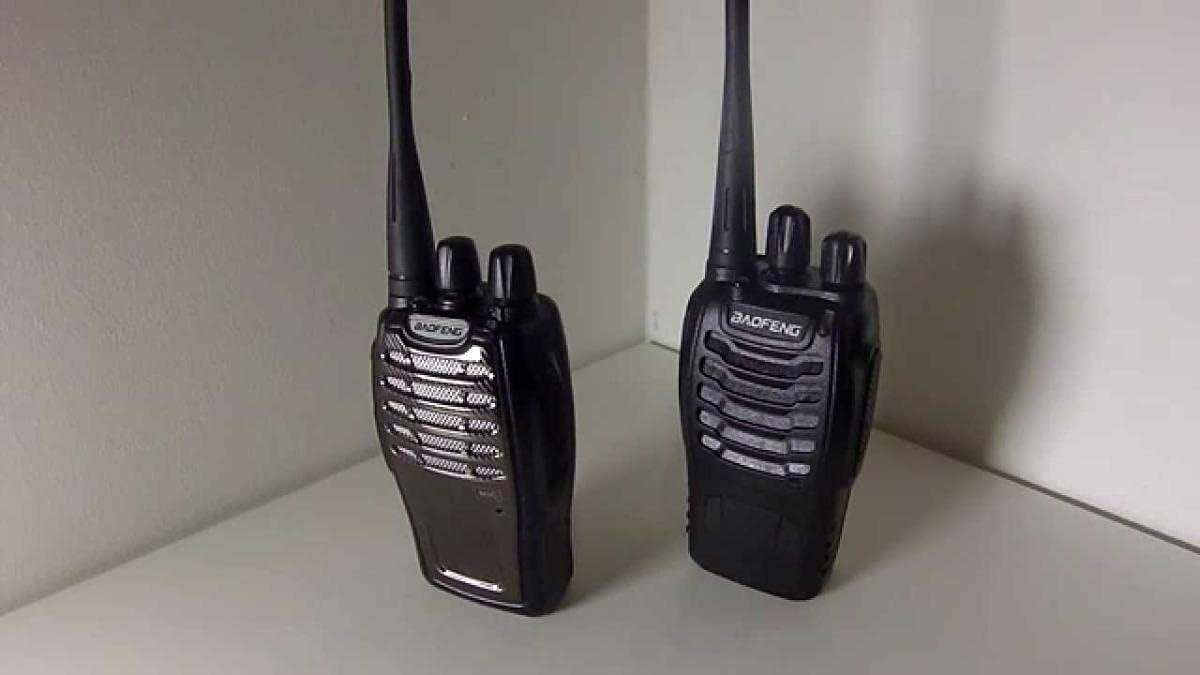
Image 4.2: Two BAOFENG BF-888S radios displayed together, highlighting their compact and identical design. Each radio features an antenna, two rotary knobs on top, and a Push-to-Talk (PTT) button on the side.
- 1. Antenna: For transmitting and receiving signals.
- 2. Power/Volume Knob: Rotate clockwise to turn on the radio and increase volume; rotate counter-clockwise to decrease volume and turn off.
- 3. Channel Selector Knob: Rotate to select one of the 16 available channels.
- 4. PTT (Push-to-Talk) Button: Press and hold to transmit; release to receive.
- 5. Speaker/Microphone: Integrated unit for audio output and input.
- 6. Battery Pack: Removable 1500mAh Li-Ion battery.
- 7. Belt Clip: For attaching the radio to clothing or a belt.
- 8. Accessory Jack: For connecting an external earpiece/microphone.
5. Setup
5.1. Charging the Battery
- Connect the AC adapter to the charging tray.
- Plug the AC adapter into a wall outlet.
- Place the battery pack (or the radio with the battery attached) into the charging tray.
- The charger's LED indicator will typically show red while charging and turn green when fully charged.
- A full charge takes approximately 3-4 hours.
5.2. Attaching the Antenna
Screw the antenna into the connector on the top of the radio by turning it clockwise until it is firmly seated. Do not overtighten.
5.3. Attaching the Belt Clip
Align the belt clip with the two screw holes on the back of the radio's battery compartment. Secure it with the provided screws.
5.4. Powering On/Off and Adjusting Volume
Rotate the Power/Volume knob clockwise to turn on the radio. You will hear a "Power On" voice prompt. Continue rotating clockwise to increase the volume. Rotate counter-clockwise to decrease the volume and turn off the radio.
6. Operating Instructions
6.1. Selecting a Channel
Rotate the Channel Selector knob on top of the radio to choose one of the 16 pre-programmed channels. The radio will announce the selected channel number.
6.2. Transmitting and Receiving
- To Transmit: Press and hold the PTT (Push-to-Talk) button on the side of the radio. Speak clearly into the microphone, holding the radio approximately 2-5 cm from your mouth. The LED indicator will glow red during transmission.
- To Receive: Release the PTT button. The LED indicator will glow green when a signal is being received.
6.3. VOX Function (Voice Operated Exchange)
The BF-888S supports VOX, allowing hands-free operation. When VOX is enabled, the radio will automatically transmit when it detects your voice. Refer to the programming software (if available for your model) for VOX sensitivity adjustment.
6.4. Scan Function
The scan function allows the radio to automatically scan through all programmed channels to find active conversations. To activate or deactivate the scan function, refer to your radio's specific button assignments or programming guide.
6.5. Low Battery Alert
When the battery level is low, the radio will emit an audible alert. Recharge the battery promptly to ensure uninterrupted communication.
6.6. CTCSS/CDCSS (Tone Squelch)
The BF-888S supports 50 CTCSS (Continuous Tone-Coded Squelch System) and 105 CDCSS (Continuous Digital-Coded Squelch System) tones. These tones help filter out unwanted conversations on the same channel, ensuring you only hear transmissions from radios using the same tone setting. Tone settings are typically configured via programming software.
7. Maintenance
7.1. Cleaning
Clean the radio's surface with a soft, damp cloth. Do not use harsh chemicals or abrasive cleaners. Ensure the radio is dry before use or charging.
7.2. Battery Care
- Do not short-circuit the battery terminals.
- Do not dispose of batteries in fire.
- If the battery is not used for an extended period, charge it fully before storing and recharge it every three months to maintain its lifespan.
7.3. Storage
Store the radio in a cool, dry place away from direct sunlight and extreme temperatures. Remove the battery if storing for long periods.
8. Troubleshooting
| Problem | Possible Cause | Solution |
|---|---|---|
| No Power | Battery low or not installed correctly. | Charge battery; ensure battery is properly seated. |
| No Sound from Speaker | Volume too low; squelch level too high; speaker damaged. | Increase volume; adjust squelch via programming; contact support. |
| Cannot Transmit or Receive | Wrong channel selected; antenna loose; out of range. | Select correct channel; tighten antenna; move closer to other radio. |
| Short Communication Range | Obstructions (buildings, hills); low battery; antenna issue. | Move to open area; charge battery; check antenna connection. |
9. Specifications
| Feature | Detail |
|---|---|
| Model | BF-888S |
| Frequency Range | 400-470MHz |
| RF Rated Power | ≤ 5W |
| Number of Channels | 16 |
| CTCSS/CDCSS | 50 CTCSS / 105 CDCSS |
| Battery Type | 1500mAh Li-Ion Battery |
| Operated Voltage | 3.7V |
| Battery Life (approx.) | 8 Hours |
| Dimensions (H x W x D) | 1.97 x 1.26 x 0.39 inches (excluding antenna) |
| Item Weight | 0.44 Lb (approx. 1 pounds with packaging) |
| Talking Range Maximum | 4 Kilometers (terrain dependent) |
| Water Resistance Level | Waterproof |
| Special Features | VOX Function, Low Voltage Alert, Time-Out Timer |
10. Warranty and Support
For warranty information, technical support, or service inquiries, please refer to the documentation included with your purchase or visit the official BAOFENG website. Keep your purchase receipt as proof of purchase for any warranty claims.
Official BAOFENG Store: BAOFENG Store on Amazon