
1. Product Overview
Product Description
The Vogel's THIN 445 full-motion TV bracket is designed for TVs ranging from 26" to 55" (66-140 cm) and supports a maximum weight capacity of 18 kg (40 lbs). This ultra-slim mount allows your TV to be positioned very close to the wall, with a distance of only 35 mm (1.4 inches). It offers extensive flexibility with a maximum turning angle of 180° (90° left/right) and a maximum tilting angle of 20° (downwards). The THIN 445 ensures an optimal viewing experience from any position in the room by allowing you to easily turn and tilt your TV to eliminate reflections and achieve the perfect angle.
Key Features
- Extra-Thin Design: Mounts TV just 1.4 inches (35 mm) from the wall.
- Full-Motion Capability: Swivels up to 180° (90° left/right) and tilts down 20° for optimal viewing angles.
- Universal Compatibility: Suitable for 26-55 inch TVs with VESA patterns up to 400x400 mm.
- High Weight Capacity: Supports TVs up to 40 lbs (18 kg).
- Easy Installation: Supported by the Vogel's TV Mount Guide app for simplified setup.
- Integrated Cable Management: Helps to hide and guide cables for a neat appearance.
- TÜV Certified: Ensures safety and quality standards are met.

Figure 1: The Vogel's Thin 445 Full-Motion TV Wall Mount, showcasing its sleek design and articulating arm.
2. Safety Information
Please read all instructions carefully before installation and use. Improper installation or use can lead to serious injury or damage to your TV and property.
- Professional Installation Recommended: If you are unsure about the installation process, consult a qualified professional.
- Wall Type: Ensure the wall structure can safely support the combined weight of the mount and your TV. Do not install on drywall alone without securing to studs or concrete.
- Weight Limit: Do not exceed the maximum weight capacity of 18 kg (40 lbs).
- TV Size and VESA: Verify your TV's size (26-55 inches) and VESA mounting pattern (up to 400x400 mm) are compatible with this mount.
- Tools: Use appropriate tools and wear safety gear (e.g., eye protection) during installation.
- Cable Management: Ensure all cables are routed safely and do not interfere with the mount's movement.
- Children and Pets: Keep children and pets away from the installation area.
3. Package Contents
Before beginning installation, please verify that all components are present and undamaged. If any parts are missing or damaged, do not proceed with installation and contact Vogel's customer support.
- Wall Mount Assembly (pre-assembled articulating arm and wall plate)
- TV Interface Bars (x2)
- Mounting Hardware Kit (various screws, washers, spacers for TV and wall attachment)
- Drill Template
- Spirit Level
- Cable Ties/Management Clips
- Installation Manual
4. Setup and Installation
Before You Begin
- Gather necessary tools: drill, stud finder, measuring tape, pencil, screwdriver, socket wrench.
- Determine the ideal viewing height and position for your TV.
- Locate wall studs if mounting on a wooden stud wall.
- Download the Vogel's TV Mount Guide app (available for Android & iOS) for interactive installation assistance.
Installation Steps
- Mark Drilling Holes: Use the provided drill template and spirit level to mark the precise drilling locations on your wall. Ensure the template is level and at the desired height. The Vogel's app can assist with finding the perfect position.

Figure 2: Dimensional drawing of the Vogel's Thin 445 mount, showing VESA mounting hole patterns and articulation ranges.
- Drill Holes and Attach Wall Plate: Drill holes at the marked locations. Insert wall anchors if required for your wall type (e.g., concrete). Secure the wall plate of the mount firmly to the wall using the appropriate screws from the hardware kit.
- Attach TV Interface Bars: Carefully place your TV face down on a soft, clean surface. Attach the two TV interface bars to the back of your TV using the correct screws and spacers from the hardware kit that match your TV's VESA mounting holes. Ensure they are securely fastened.
- Mount TV to Wall Plate: With assistance, carefully lift the TV and hook the interface bars onto the wall plate. Secure the TV to the mount according to the instructions in the manual, typically by tightening screws or engaging locking mechanisms.
- Level Your TV: The Vogel's Thin 445 allows for post-installation leveling adjustments. Use the integrated leveling mechanism to ensure your TV is perfectly horizontal.
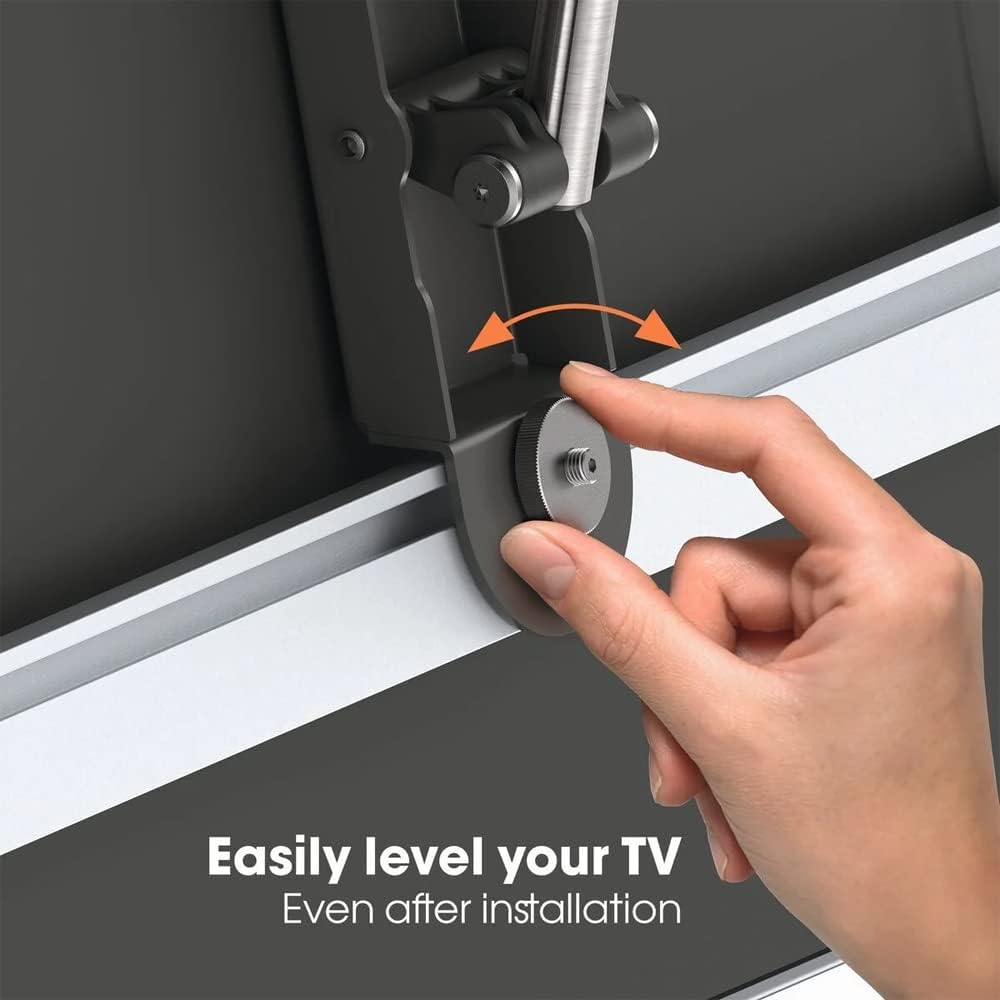
Figure 3: A hand demonstrating how to easily level the TV even after installation using the adjustment screw.
- Cable Management: Route all necessary cables (power, HDMI, etc.) through the integrated cable management channels on the mount's arm. Use the provided cable ties or clips to keep them tidy and prevent snagging during movement.

Figure 4: View of the back of a mounted TV, showing how cables are neatly hidden and guided along the mount's arm.

Figure 5: A close-up view highlighting the "ExtraThin" design, demonstrating the minimal distance between the TV and the wall.
5. Operating Instructions
Adjusting Your TV Mount
The Vogel's Thin 445 mount allows for easy adjustment of your TV's position to achieve the best viewing angle from anywhere in the room.
- Swivel: Gently push or pull the TV to swivel it left or right. The mount allows for a maximum swivel of 180° (90° to each side), depending on your TV's width and wall clearance.
- Tilt: To adjust the vertical tilt, gently push the top or bottom of the TV. The mount allows for a downward tilt of up to 20°, which is useful for reducing glare or optimizing viewing from a lower position.
- Extend/Retract: Pull the TV away from the wall to extend the arm, and push it back towards the wall to retract it. The maximum distance from the wall when extended is approximately 20 inches (508 mm).

Figure 6: A living room setting demonstrating the Vogel's Thin 445 mount's ability to extend and swivel the TV for optimal viewing from various angles.
6. Maintenance
Regular maintenance ensures the longevity and safe operation of your TV wall mount.
- Cleaning: Clean the mount with a soft, dry cloth. Do not use abrasive cleaners or solvents.
- Periodic Checks: Periodically check all screws and fasteners to ensure they remain tight and secure.
- Movement: If the mount's movement becomes stiff, check for any obstructions. Do not apply lubricants unless specifically instructed by Vogel's support.
7. Troubleshooting
Refer to the table below for common issues and their solutions.
| Issue | Possible Cause | Solution |
|---|---|---|
| TV is not level after installation. | Minor misalignment during installation or settling. | Use the integrated leveling adjustment mechanism on the mount to fine-tune the TV's horizontal position. |
| Mount feels loose or unstable. | Wall plate screws or TV bracket screws are not fully tightened. | Carefully re-tighten all screws securing the wall plate to the wall and the TV brackets to the TV. Do not overtighten. |
| Difficulty swiveling or tilting the TV. | Cables are snagged or mount tension is too high. | Check cable routing to ensure no cables are obstructing movement. Refer to the manual for any tension adjustment screws, if applicable. |
| TV is too far from the wall (not "ExtraThin"). | Mount is extended or not fully retracted. | Push the TV gently back towards the wall until the arm is fully retracted. Ensure no cables are preventing full retraction. |
8. Specifications
| Feature | Detail |
|---|---|
| Brand | Vogel's |
| Model Number | 8394450 |
| Product Dimensions | 50.98 x 34.98 x 7.59 cm; 4.02 kg |
| TV Size Compatibility | 26 - 55 inches (66 - 140 cm) |
| Maximum Weight Capacity | 18 kg (40 lbs) |
| VESA Compatibility | Up to 400x400 mm |
| Minimum Wall Distance | 35 mm (1.4 inches) |
| Maximum Wall Distance (Extended) | 508 mm (20 inches) |
| Swivel Angle | Up to 180° (90° left / 90° right) |
| Tilt Angle | Up to 20° downwards |
| Material | Alloy Steel |
| Color | Black |
| Certifications | TÜV Certified |
9. Warranty and Support
Warranty Information
Vogel's products are designed and manufactured to the highest quality standards. The Vogel's Thin 445 Full-Motion TV Wall Mount comes with a Lifetime Guarantee, reflecting Vogel's commitment to durability and customer satisfaction. This warranty covers defects in materials and workmanship under normal use.
For detailed terms and conditions of the warranty, please refer to the official Vogel's website or the warranty card included with your product.
Customer Support
If you have any questions, require assistance with installation, or encounter any issues not covered in this manual, please contact Vogel's customer support.
- Vogel's Website: Visit the official Vogel's website for FAQs, product registration, and contact information.
- TV Mount Guide App: Utilize the Vogel's TV Mount Guide app for interactive support and installation tips.


