1. Introduction
This manual provides essential information for the safe and effective installation and use of the Technical Precision replacement light bulb for the Bell & Howell Lumina MX33 projector. Please read these instructions carefully before proceeding with installation.
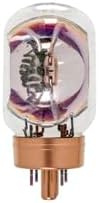
Image 1.1: The Technical Precision replacement light bulb. This bulb is designed to be compatible with the Bell & Howell Lumina MX33 projector, providing illumination for its operation.
2. Safety Information
Always observe the following safety precautions to prevent injury or damage:
- Power Disconnection: Always ensure the projector is completely powered off and unplugged from the electrical outlet before attempting any installation or maintenance.
- Cooling Period: Allow the old bulb to cool down completely before handling. Light bulbs can reach very high temperatures during operation and remain hot for some time after being turned off.
- Handle with Care: Avoid touching the glass part of the new bulb directly with bare hands. Oils from your skin can create hot spots, leading to premature bulb failure. Use a clean cloth or gloves.
- Proper Disposal: Dispose of old bulbs according to local regulations. Some bulbs may contain materials that require special disposal.
- Compatibility: Use only the specified replacement bulb for your Bell & Howell Lumina MX33 projector to ensure proper function and safety.
3. Installation Instructions
Follow these steps to replace the light bulb in your Bell & Howell Lumina MX33 projector:
- Power Off and Unplug: Turn off the projector and unplug it from the power source.
- Allow to Cool: Wait for at least 15-30 minutes for the old bulb to cool down completely.
- Locate Bulb Compartment: Refer to your Bell & Howell Lumina MX33 projector's original manual to locate and open the lamp compartment cover. This usually involves unscrewing a few screws.
- Remove Old Bulb: Carefully disconnect any wires or clips holding the old bulb in place. Gently pull the old bulb straight out from its socket. Avoid twisting or forcing it.
- Insert New Bulb: Holding the new Technical Precision bulb by its base or with a clean cloth/gloves, align the pins or connectors with the socket in the projector. Gently push the bulb firmly into place until it is seated correctly.
- Secure Bulb: Reconnect any wires or clips that were removed. Ensure the bulb is securely fastened.
- Close Compartment: Replace the lamp compartment cover and secure it with the screws.
- Power On: Plug the projector back into the power source and turn it on. The new bulb should illuminate.
4. Operating Considerations
Once installed, the replacement bulb operates identically to the original bulb in your Bell & Howell Lumina MX33 projector. No special operating procedures are required for the bulb itself.
- Initial Brightness: The bulb should reach full brightness almost immediately upon activation.
- Warm-up/Cool-down: Always allow the projector to complete its full warm-up and cool-down cycles as specified in the projector's manual to maximize bulb lifespan.
5. Maintenance
Minimal maintenance is required for the light bulb itself. However, regular inspection and cleaning of the projector's lamp compartment and ventilation system can extend bulb life and maintain optimal performance.
- Dust Removal: Periodically clean dust from the projector's air vents and lamp compartment using compressed air or a soft brush. Ensure the projector is unplugged and cool before cleaning.
- Bulb Inspection: During cleaning, visually inspect the bulb for any signs of damage or discoloration. If the bulb appears damaged, replace it immediately.
6. Troubleshooting
If the bulb does not function correctly after installation, consider the following common issues:
- Bulb Not Lighting:
- Ensure the projector is plugged in and powered on.
- Verify the bulb is securely seated in its socket.
- Check that the lamp compartment cover is properly closed and secured, as some projectors have safety interlocks.
- Confirm the projector's power source is functioning.
- Flickering or Dim Light:
- Ensure the bulb is fully seated.
- Check for any loose connections within the lamp compartment.
- If the issue persists, the bulb may be faulty or nearing the end of its lifespan.
If troubleshooting steps do not resolve the issue, consult the Bell & Howell Lumina MX33 projector's original manual or contact Technical Precision customer support.
7. Specifications
| Feature | Specification |
|---|---|
| Brand | Technical Precision |
| Model Number | LUMINA MX33 (Replacement) |
| Wattage | 80 Watts |
| Voltage | 230 Volts |
| Light Color | Warm White |
| Color Temperature | 3400 Kelvin |
| Material | Glass |
| Shape | Tubular (T) |
| Special Feature | Energy Efficient |
8. Warranty and Support
This Technical Precision replacement light bulb is covered by the manufacturer's standard warranty. For specific warranty details, claims, or technical assistance, please contact Technical Precision directly.
Technical Precision Customer Support:
- Visit the Technical Precision Store on Amazon for more information.
- Refer to the contact information provided with your purchase or on the official Technical Precision website.


