
1. Introduction
Thank you for purchasing the Laica KS5010 Electronic Kitchen Scale. This manual provides important information regarding the safe and efficient use of your new kitchen scale. Please read these instructions carefully before use and keep them for future reference.
2. Safety Information
- Do not immerse the scale in water or other liquids.
- Clean the scale with a damp cloth; do not use abrasive cleaners.
- Place the scale on a flat, stable surface for accurate measurements.
- Do not overload the scale beyond its maximum capacity of 10 kg.
- Keep out of reach of children.
- Remove batteries if the scale will not be used for an extended period.
3. Product Overview
The Laica KS5010 is an electronic kitchen scale featuring a tempered glass surface with a screen-printed wood design and touch sensor controls. It is designed for precise measurement of ingredients up to 10 kg.
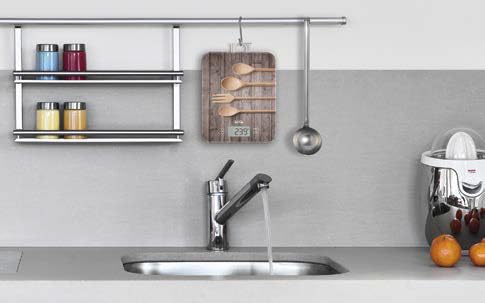
Figure 1: The Laica KS5010 Electronic Kitchen Scale displayed in a modern kitchen environment, showcasing its design and compact size next to a sink and other kitchen items.
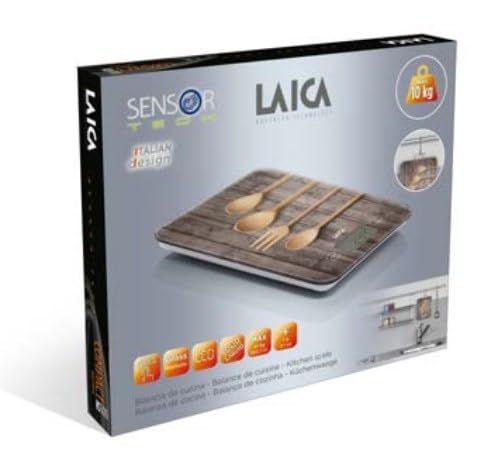
Figure 2: The retail packaging for the Laica KS5010 Electronic Kitchen Scale, highlighting its 'Sensor Tech' and 'Italian design' features, along with a 10 kg capacity icon.

Figure 3: A detailed view of the Laica KS5010 Electronic Kitchen Scale, illustrating its physical dimensions: approximately 24 cm in length, 20 cm in width, and 2.49 cm in height.
4. Setup
4.1 Battery Installation
- Locate the battery compartment on the underside of the scale.
- Open the battery compartment cover.
- Insert the required batteries (typically 1.5V AAA, refer to the compartment for exact type and polarity) ensuring correct polarity (+/-).
- Close the battery compartment cover securely.
4.2 Initial Placement
Place the scale on a hard, flat, and stable surface. Avoid placing it on soft or uneven surfaces, as this can affect measurement accuracy.
5. Operating Instructions
5.1 Turning On/Off
- To turn on: Press the [ON/OFF] button. The display will show '0' or '0.0'.
- To turn off: Press and hold the [ON/OFF] button for a few seconds, or the scale will automatically shut off after a period of inactivity.
5.2 Weighing Items
- Turn on the scale.
- Ensure the display shows '0' or '0.0'. If not, press the [TARE] button to reset.
- Place the item to be weighed directly onto the center of the scale's platform.
- Read the weight displayed on the screen.
5.3 Tare Function (Zeroing)
The tare function allows you to weigh multiple ingredients in the same container or to exclude the weight of a container.
- Place an empty container on the scale. The display will show its weight.
- Press the [TARE] button. The display will reset to '0' or '0.0'.
- Add the first ingredient to the container. The display will show the weight of the ingredient only.
- To add more ingredients, press [TARE] again after each ingredient to reset the display to zero before adding the next.
5.4 Unit Conversion
To change the unit of measurement (e.g., from grams to pounds/ounces), press the [UNIT] or [MODE] button. The available units will cycle through with each press.
6. Maintenance
6.1 Cleaning
- Wipe the scale surface with a soft, damp cloth.
- Do not use chemical or abrasive cleaning agents.
- Ensure the scale is completely dry before storage or next use.
6.2 Storage
Store the scale in a cool, dry place away from direct sunlight and extreme temperatures. If storing for a long period, remove the batteries to prevent leakage.
7. Troubleshooting
| Problem | Possible Cause | Solution |
|---|---|---|
| Scale does not turn on | Dead or incorrectly installed batteries | Replace batteries or check polarity. |
| Inaccurate readings | Uneven surface, overloaded, or scale not zeroed | Place on a flat surface, do not exceed 10 kg, press [TARE] before weighing. |
| Display shows 'Err' or 'O-Ld' | Overload | Remove item immediately. Do not exceed 10 kg capacity. |
| Display shows 'Lo' | Low battery | Replace batteries. |
8. Specifications
| Feature | Detail |
|---|---|
| Model | KS5010 |
| Maximum Capacity | 10 kg |
| Measurement Units | g, lb:oz (specific units may vary by region) |
| Display | LCD |
| Surface Material | Tempered Glass |
| Controls | Touch Sensor |
| Power Source | Batteries (not included, typically 1.5V AAA) |
| Product Dimensions | 18.5 x 22.5 x 2 cm (approx.) |
| Item Weight | 510 g (approx.) |
9. Warranty
Laica products are manufactured to high quality standards. For specific warranty terms and conditions, please refer to the warranty card included with your product or visit the official Laica website. Keep your proof of purchase for warranty claims.
10. Support
For further assistance, technical support, or information regarding spare parts, please contact Laica customer service. Contact details can typically be found on the official Laica website or on the product packaging.
Website: www.laica.com