
1. Safety Instructions
Read this manual carefully before operating the Hyundai HY-HYTW500 Tiller. Failure to follow instructions can result in serious injury or property damage. Keep this manual for future reference.
- Personal Protective Equipment (PPE): Always wear appropriate safety glasses, hearing protection, sturdy footwear, and gloves when operating the tiller.
- Work Area: Ensure the work area is clear of debris, rocks, and other obstacles. Keep bystanders, children, and pets at a safe distance (at least 15 meters).
- Fuel Handling: Gasoline is highly flammable. Refuel in a well-ventilated area with the engine off and cool. Do not smoke or use open flames near fuel.
- Engine Heat: The engine and muffler become very hot during operation and remain hot for some time after shutdown. Avoid contact to prevent burns.
- Slope Operation: Exercise extreme caution when operating on slopes. Till across the face of slopes, never up and down.
- Before Starting: Inspect the tiller for loose parts, damage, or fuel leaks. Ensure all guards are in place.
- Emergency Stop: Familiarize yourself with the location and operation of the engine stop switch.
2. Package Contents
Verify that all components are present and undamaged upon unpacking.
- Hyundai HY-HYTW500 Tiller Main Unit
- Transport Wheels (standard inclusion)
- Accessory Kit
- User Manual
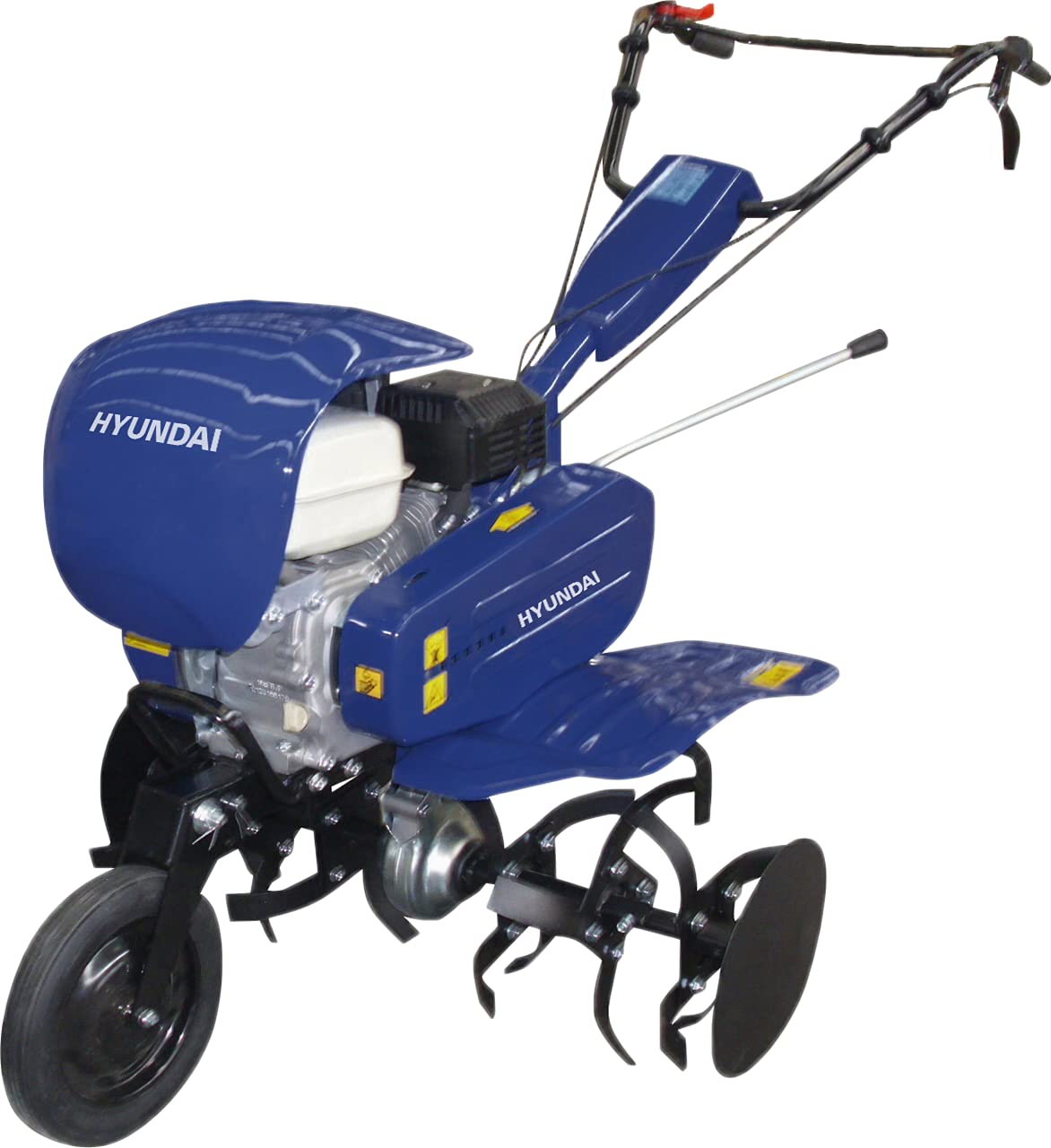
Image 1: Hyundai HY-HYTW500 Tiller main unit. This image shows the complete tiller assembly, including the engine, tines, and transport wheels.
3. Setup and Assembly
Follow these steps to prepare your tiller for first use.
- Attach Transport Wheels: The transport wheels are included as standard. Securely attach them to the designated points on the tiller frame. Ensure they are properly locked for transport or raised for tilling.
- Install Handles: Assemble the handle bars according to the diagrams in the accessory kit instructions. Tighten all fasteners securely.
- Engine Oil: Before starting, fill the engine with the recommended type and amount of engine oil. Refer to the engine manual for specific details. Do not overfill.
- Fuel Tank: Fill the fuel tank with fresh, unleaded gasoline. Ensure the fuel cap is securely tightened.
- Removable Gearbox: The tiller features a removable gearbox for easy disassembly of the screw transmission. Ensure it is correctly installed and secured before operation.
- Adjust Working Width: The working width can be adjusted to 35 cm, 60 cm, or 80 cm. Adjust the tines as required for your specific task.
4. Operating Instructions
Familiarize yourself with the controls before starting the engine.
- Starting the Engine:
- Ensure the fuel valve is open and the engine switch is in the "ON" position.
- Apply choke if the engine is cold.
- Pull the starter rope firmly until the engine starts.
- Once started, gradually push the choke lever to the "OFF" position.
- Engaging Tines: The tiller uses a clutch with a belt. Engage the clutch lever to start the tines rotating. Release the lever to stop.
- Speed Selection: The tiller has 2 forward speeds and 1 reverse speed. Select the appropriate speed using the gear selector lever.
- Forward Speeds: Use for tilling and cultivating.
- Reverse Speed: Use for maneuvering the tiller out of tight spots. Exercise caution when operating in reverse.
- Tilling Technique:
- Allow the tiller to pull itself forward. Do not force it.
- For deeper tilling, make multiple passes, gradually increasing depth.
- Overlap passes slightly to ensure complete coverage.
- Stopping the Engine: Move the engine switch to the "OFF" position. Close the fuel valve for storage.
5. Maintenance
Regular maintenance ensures optimal performance and extends the life of your tiller.
- Cleaning: After each use, clean soil and debris from the tines, engine, and chassis. This prevents corrosion and ensures proper cooling.
- Engine Oil: Check engine oil level before each use. Change oil after the first 5 hours of operation, then every 25-50 hours or annually, whichever comes first.
- Air Filter: Clean or replace the air filter regularly, especially when operating in dusty conditions.
- Spark Plug: Inspect and clean the spark plug periodically. Replace if worn or fouled.
- Tines: Inspect tines for wear or damage. Replace worn tines to maintain tilling efficiency.
- Removable Chain Transmission: The removable chain transmission allows for easy inspection and maintenance. Ensure it is properly lubricated and free from debris.
- Clutch with Belt: Inspect the drive belt for wear or damage. Adjust belt tension if necessary.
- Storage: For long-term storage, drain the fuel tank or use a fuel stabilizer. Clean the tiller thoroughly and store in a dry, protected area.
6. Troubleshooting
Refer to this section for common issues and their solutions.
| Problem | Possible Cause | Solution |
|---|---|---|
| Engine won't start | No fuel; Engine switch OFF; Choke incorrect; Fouled spark plug | Add fuel; Turn switch ON; Adjust choke; Clean/replace spark plug |
| Engine runs poorly | Dirty air filter; Stale fuel; Incorrect spark plug gap | Clean/replace air filter; Use fresh fuel; Adjust/replace spark plug |
| Tines not rotating | Clutch not engaged; Drive belt worn/broken; Debris jammed in tines | Engage clutch; Inspect/replace belt; Clear debris |
| Excessive vibration | Loose fasteners; Bent tines; Unbalanced components | Check and tighten fasteners; Inspect/replace tines; Contact service |
If you encounter issues not listed here or require further assistance, please contact Hyundai customer support.
7. Technical Specifications
| Feature | Specification |
|---|---|
| Model | HY-HYTW500 |
| Engine Type | HYUNDAI IC210 |
| Cylinder Displacement | 212cc |
| Engine Power | 7 HP |
| Power Source | Gasoline |
| Speeds | 2 Forward + 1 Reverse |
| Working Width | 35/60/80 cm (Adjustable) |
| Tine Diameter | 32 Ø (mm) |
| Transmission | Removable Chain Transmission |
| Clutch Type | Belt Clutch |
| Product Dimensions | 82 x 37 x 78 cm |
| Product Weight | 70 kg |
| UPC | 641022889039 |
8. Warranty and Support
For warranty information, please refer to the documentation provided with your purchase or contact your authorized Hyundai dealer. For technical support, spare parts, or service inquiries, please contact Hyundai customer service directly.
Please have your model number (HY-HYTW500) and purchase details ready when contacting support.