
Introduction
Thank you for choosing the Diamond Audio MICRO2V2 High-Power Monoblock Class D Digital Amplifier. This amplifier is designed to deliver robust audio performance in a compact form factor, ideal for various vehicle audio system upgrades. This manual provides essential information for proper installation, operation, and maintenance to ensure optimal performance and longevity of your device.
Safety Information
Please read all instructions carefully before installation and use. Failure to follow these guidelines may result in damage to the amplifier, vehicle, or personal injury. Keep this manual for future reference.
- Always disconnect the vehicle's battery negative terminal before beginning any electrical work.
- Ensure proper grounding to prevent electrical hazards.
- Use appropriate wire gauges for power and speaker connections as specified in the installation section.
- Avoid mounting the amplifier in locations exposed to direct sunlight, excessive heat, moisture, or dust.
- Do not operate the amplifier if it has been damaged or exposed to water.
- Professional installation is recommended for optimal performance and safety.
Package Contents
Verify that all items are present in the package:
- Diamond Audio MICRO2V2 Amplifier
- Wiring Harness Kit
- Remote Bass Knob
- Mounting Hardware
- User Manual (this document)
Product Overview
The Diamond Audio MICRO2V2 is a high-power monoblock Class D digital amplifier designed for superior sound quality and efficiency. Its compact size allows for flexible installation in various applications, including those with limited space.
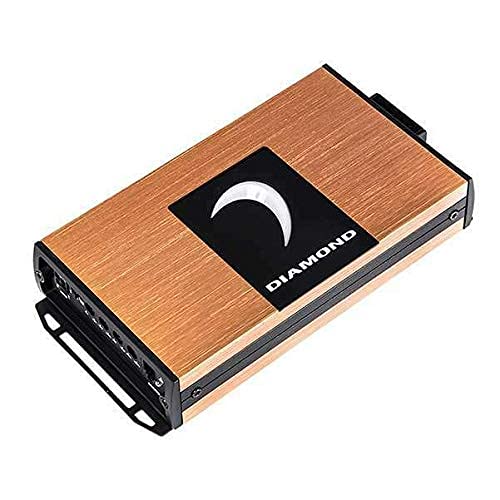
Image 1: Top-down view of the Diamond Audio MICRO2V2 amplifier, showcasing its brushed copper-colored chassis and the Diamond Audio logo.
Key Features:
- Durable Construction: High-density aluminum chassis ensures longevity.
- Powerful Output: Delivers up to 500W @ 1Ω.
- Advanced Cooling: Rollback/thermal protection for consistent performance.
- Flexible Installation: Compact design fits various setups.
- Noise-Free Operation: Balanced differential inputs prevent interference.
- Effortless Installation: Includes harness kits and a remote bass knob.
Setup and Installation
Proper installation is crucial for the performance and safety of your amplifier. If you are unsure about any steps, consult a professional installer.
Mounting Location:
Choose a dry, well-ventilated location that is protected from direct sunlight and excessive heat. The compact size of the MICRO2V2 allows for installation in tight spaces, such as under seats or in trunk compartments. Ensure adequate airflow around the amplifier for optimal cooling.
Wiring Connections:
- Power Connection: Connect the main power wire from the vehicle's battery (with an inline fuse) to the amplifier's +12V terminal. Ensure the fuse is located within 18 inches of the battery.
- Ground Connection: Connect a short, heavy-gauge wire from the amplifier's GND terminal to a clean, unpainted metal surface on the vehicle chassis.
- Remote Turn-On: Connect the remote turn-on wire from your head unit to the amplifier's REM terminal.
- Audio Input: Connect the RCA cables from your head unit's pre-amp outputs to the amplifier's input jacks. The balanced differential inputs help prevent noise interference.
- Speaker Output: Connect your subwoofer(s) to the amplifier's speaker output terminals. Pay close attention to polarity (+ to + and - to -).
- Remote Bass Knob: Connect the remote bass knob to the designated port on the amplifier for convenient bass level adjustment.
Operating Instructions
Once installed, follow these steps to operate your amplifier:
- Initial Power-Up: After all connections are secure, reconnect the vehicle's battery. Turn on your head unit. The amplifier should power on, indicated by an LED.
- Gain Adjustment: Start with the amplifier's gain control set to minimum. Play a familiar piece of music. Slowly increase the gain until you hear distortion, then back off slightly. This sets the maximum clean output.
- Crossover Settings: Adjust the low-pass filter (LPF) and subsonic filter (if available) according to your subwoofer and system requirements. Consult your subwoofer's specifications for recommended settings.
- Bass Boost: Use the bass boost sparingly, if at all, as excessive boost can cause distortion and damage to speakers.
- Remote Bass Knob: Use the remote bass knob for on-the-fly adjustments to the subwoofer level from the driver's seat.
Maintenance
The Diamond Audio MICRO2V2 amplifier requires minimal maintenance. Follow these guidelines to ensure its longevity:
- Cleaning: Periodically wipe the amplifier's exterior with a soft, dry cloth. Do not use harsh chemicals or abrasive cleaners.
- Ventilation: Ensure that the amplifier's cooling fins are free from obstructions to allow for proper heat dissipation.
- Connections: Occasionally check all wiring connections to ensure they are secure and free from corrosion.
Troubleshooting
If you experience issues with your amplifier, refer to the following common problems and solutions:
| Problem | Possible Cause | Solution |
|---|---|---|
| Amplifier does not turn on. | No power, ground, or remote signal. Blown fuse. | Check power, ground, and remote wire connections. Verify inline fuse is intact. |
| No sound output. | RCA cables disconnected, speaker wires loose, gain too low. | Check RCA and speaker connections. Increase gain slowly. |
| Distorted sound. | Gain set too high, improper crossover settings, damaged speakers. | Reduce gain. Adjust crossover settings. Inspect speakers. |
| Amplifier gets hot and shuts off. | Insufficient ventilation, low impedance load, prolonged high output. | Ensure proper airflow. Check speaker impedance. Reduce volume. The amplifier's rollback/thermal protection is active. |
Specifications
| Feature | Detail |
|---|---|
| Model Number | MICRO2V2 |
| Amplifier Type | Monoblock Class D Digital Amplifier |
| Maximum Power Output | Up to 500W @ 1Ω |
| Chassis Material | High-density aluminum |
| Cooling | Rollback/Thermal Protection |
| Inputs | Balanced Differential Inputs |
| Voltage | 10-17 Volts DC |
| Package Dimensions | 10.67 x 6.22 x 2.36 inches |
| Weight | 2.68 Pounds |
| Mounting Type | Surface Mount |
Warranty and Support
Diamond Audio products are engineered for reliability and performance. This amplifier is covered by a manufacturer's warranty against defects in materials and workmanship. For specific warranty terms and conditions, please refer to the warranty card included with your product or visit the official Diamond Audio website.
For technical support, troubleshooting assistance, or service inquiries, please contact Diamond Audio customer service or visit their official brand store:
Diamond Audio Official Store: Visit Store


