
Product Overview
The Rain Bird ESP-TM2 irrigation controller is engineered for basic residential irrigation solutions. It incorporates Rain Bird's commitment to efficient water use, providing straightforward water-saving functionalities. With support for 3 programs and 4 start times per program, users can customize watering schedules to meet specific landscape requirements. The ESP-TM2 features an intuitive programming interface and is built for durability. Additionally, it can be upgraded to a Wi-Fi enabled controller by integrating a LNK WiFi Module (sold separately), allowing for remote operation and monitoring without replacing the entire unit.

Figure 1: Front view of the Rain Bird ESP-TM2 Irrigation Controller, showing the display and control dial.
Setup and Installation
The ESP-TM2 controller is designed for quick installation and is suitable for both indoor and outdoor environments. It comes with a factory-installed 6-foot outdoor-rated power cord for convenience.
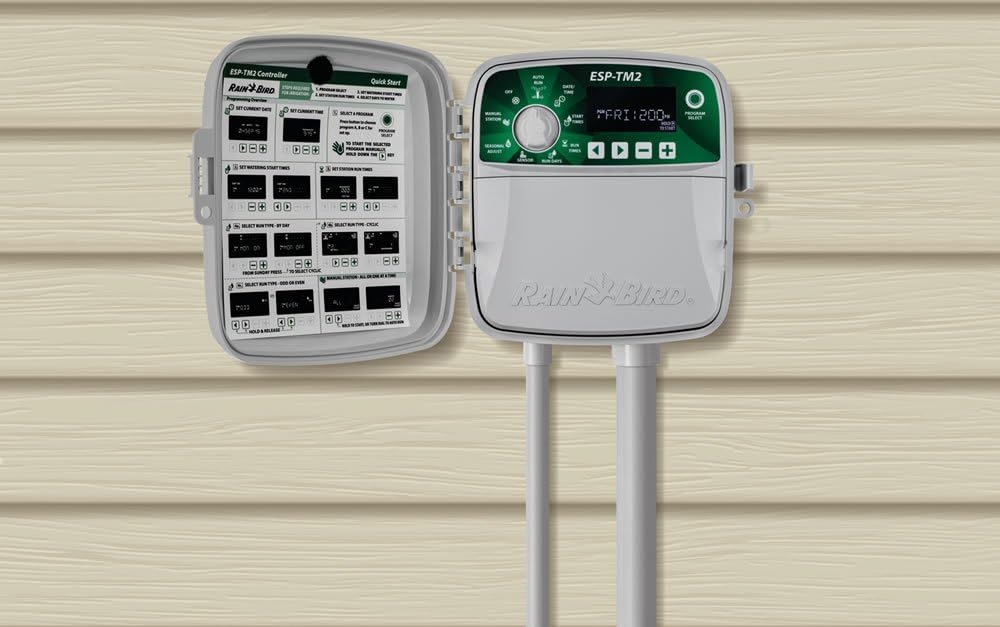
Figure 2: The ESP-TM2 controller mounted on a wall, demonstrating typical installation with irrigation piping.
Wiring
Connect the station wiring to the appropriate terminals within the controller. Ensure all connections are secure and follow local electrical codes. Refer to the quick start guide located inside the controller's cover for detailed wiring diagrams.

Figure 3: The ESP-TM2 controller with its protective cover closed, ready for operation.
Operating Instructions
The ESP-TM2 features an intuitive dial and button interface for easy programming and control.
Programming the Controller
Programming a watering schedule can be completed in just three steps using the large, backlit LCD display for improved visibility.
Setting Date and Time
Rotate the dial to the 'DATE/TIME' position. Use the arrow buttons to adjust the current day, month, and year. Press the '+' or '-' buttons to change values.
Setting Start Times
Move the dial to 'START TIMES'. You can set up to four independent start times per program (A, B, C). Use the arrow buttons to navigate between start times and the '+' or '-' buttons to set the desired time for each.
Setting Run Times
Turn the dial to 'RUN TIMES'. For each station within a program, specify the watering duration in hours and minutes. Use the arrow buttons to select the station and the '+' or '-' buttons to set the run time.
Setting Run Days
Select 'RUN DAYS' on the dial. You can choose specific days of the week for watering. Use the arrow buttons to navigate through the days and the '+' or '-' buttons to toggle watering ON or OFF for each day. The controller also supports odd/even or cyclic run days.
Manual Operation
To manually run all stations, turn the dial to 'MANUAL STATION' and select 'ALL'. You can then specify a duration for the manual run. This feature allows for immediate watering outside of the programmed schedule.
Seasonal Adjust
The 'SEASONAL ADJUST' setting allows you to easily increase or decrease watering duration for all programs by a percentage, adapting to changing weather conditions without reprogramming each station individually.
Wi-Fi Connectivity (Optional Module)
The ESP-TM2 can be upgraded with a Rain Bird LNK WiFi Module (sold separately). This module enables users to access, operate, and monitor their irrigation system remotely via a smartphone or tablet. Internet-based weather information can be utilized to automatically adjust the irrigation schedule, potentially saving up to 30% in water usage.
Maintenance
The Rain Bird ESP-TM2 controller is designed for minimal maintenance. Keep the unit clean and free from dust and debris. Ensure the cover is securely closed, especially for outdoor installations, to protect internal components from environmental elements. Periodically check wiring connections for tightness and signs of wear.
Troubleshooting
If the controller is not functioning as expected, verify power connections and programming settings. Ensure the dial is set to 'AUTO RUN' for automatic operation. For specific issues, consult the comprehensive user manual provided with your product or visit the Rain Bird support website for detailed troubleshooting guides and FAQs.
Specifications
| Feature | Detail |
|---|---|
| Manufacturer | Rain Bird |
| Model Number | 4332686446 |
| Package Dimensions | 9.88 x 8.43 x 3.9 inches |
| Item Weight | 3.5 pounds |
| Voltage | 110 Volts |
| Display Type | LCD |
| Color | Maroon |
| Batteries Required | No |
Warranty and Support
Warranty information for the Rain Bird ESP-TM2 Irrigation Controller is typically included with the product packaging. For detailed warranty terms, product registration, or technical support, please visit the official Rain Bird website or contact their customer service department. Online resources often include FAQs, troubleshooting guides, and contact information for direct assistance.