
Donner EC974
Donner Bluetooth Rechargeable Page Turner Pedal User Manual
Model: EC974 | Brand: Donner
Product Overview
The Donner Bluetooth Rechargeable Page Turner Pedal is designed to provide hands-free control for musicians and presenters. It allows seamless page turning, lyric scrolling, and media control across various devices and applications. With its robust design and long-lasting battery, it offers a reliable and convenient solution for digital sheet music and presentations.
- Wireless Bluetooth range of up to 10 meters (33 feet).
- Over 50 hours of continuous use on a single charge.
- Reliable and precise page turning functionality.
- Compatible with Apple iOS, Android, Mac, and PC devices.
- Supports popular music and teleprompter applications.

Image: The Donner Bluetooth Page Turner Pedal, showcasing its two large foot pedals and central control panel.
Setup
Package Contents
Please ensure all items are present in the package:
- 1 x Donner Bluetooth Page Turner Pedal
- 1 x USB Charging Cable
- 1 x User Guide
Charging the Device
The pedal comes with a built-in rechargeable battery. Before first use, or when the battery is low, connect the included USB charging cable to the pedal's charging port and to a standard USB power source (e.g., computer USB port, USB wall adapter). A full charge provides over 50 hours of usage.

Image: Illustration highlighting the long battery life of the Donner Page Turner Pedal, indicating over 50 hours of use.
Bluetooth Pairing Instructions
Follow these steps to pair your Donner Bluetooth Page Turner Pedal with your host device:
- First, activate Bluetooth on your host device (Windows PC, Mac, iPad, iPhone, Android Tablet, or smartphone).
- Turn on the Bluetooth Music Pedal using the power button located on the top panel of the control center.
- In your host device's Bluetooth settings, select the "detection" option. You should see "Bluetooth Music Pedal" appear in the list of available devices.
- Choose "Bluetooth Music Pedal" to initiate the Bluetooth connection.
- The synchronization and pairing process will cause the pedal's LED to flash in multiple colors. This process may take a few seconds, up to a minute.
- Once the pedal's LED stops flashing rapidly and your device indicates "Connected," the pedal is fully paired with your host device and ready for use.
Operating the Pedal
Control Modes
The Donner Page Turner Pedal features 5 distinct control modes, allowing for versatile functionality. You can switch between modes using the dedicated buttons on the central control panel.

Image: A table illustrating the 5 different control modes of the pedal, detailing the function of the left and right pedals in each mode.
| Mode | Pedal Left | Pedal Right |
|---|---|---|
| 1 (Up/Dn) | Page Up | Page Down |
| 2 | Left Arrow | Right Arrow |
| 3 | Up Arrow | Down Arrow |
| 4 | Left Mouse Click | Left Mouse Click |
| 5 | Space | Enter |
Application Compatibility
The pedal is compatible with a wide range of applications on various platforms. It works seamlessly with many apps for Apple iOS (iPhone, iPad, iPods), Android, Mac, and PC devices. Popular applications include:
- forscore
- onsong
- Planning Center Music Stand
- Next
- MusicReader4
- Teleprompt + 3
- unrealbook
- paperless Music
- piascore
- And many more.

Image: A visual representation of the pedal's versatility and compatibility with multiple platforms and reading applications, showing various app icons.
Maintenance
To ensure the longevity and optimal performance of your Donner Bluetooth Page Turner Pedal, please follow these maintenance guidelines:
- Cleaning: Wipe the pedal's surface with a soft, dry cloth. Avoid using abrasive cleaners or solvents, as they may damage the finish.
- Storage: Store the pedal in a cool, dry place away from direct sunlight and extreme temperatures.
- Battery Care: For best battery life, avoid fully discharging the battery frequently. Charge the pedal regularly, even if not in constant use.
- Handling: While durable, avoid dropping the pedal or subjecting it to strong impacts.
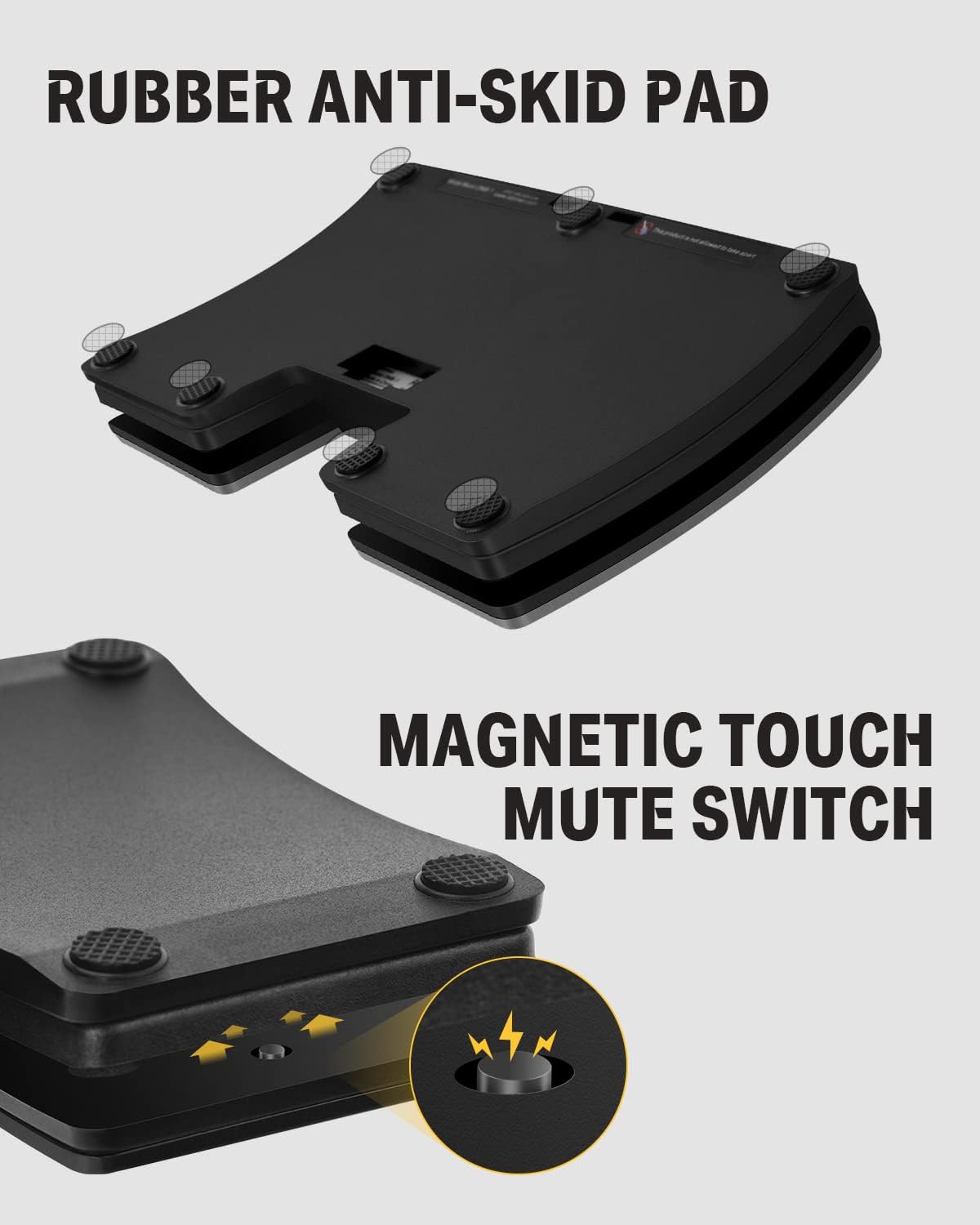
Image: Detailed view of the pedal's underside, highlighting the rubber anti-skid pads for stability and the magnetic touch mute switch.
Troubleshooting
If you encounter issues with your Donner Bluetooth Page Turner Pedal, please refer to the following common troubleshooting steps:
- Pedal Not Connecting/Pairing:
- Ensure the pedal is powered on and fully charged.
- Verify that Bluetooth is enabled on your host device.
- Make sure the pedal is within the 10-meter (33-foot) Bluetooth range of your device.
- Try turning off and on both the pedal and your host device's Bluetooth.
- If previously paired, try "forgetting" or "unpairing" the device from your host's Bluetooth settings and then re-attempt the pairing process from step 1 of the "Bluetooth Pairing Instructions".
- Ensure no other Bluetooth devices are interfering with the connection.
- Pedal Not Responding in App:
- Check if the pedal is successfully paired and connected to your device.
- Verify that the correct control mode is selected on the pedal for your application's requirements (e.g., Page Up/Down for sheet music apps).
- Ensure the application you are using supports external Bluetooth pedal input. Refer to the app's settings or documentation.
- Restart the application and try again.
- LED Indicator Issues:
- If the LED is not lighting up, ensure the pedal is charged and powered on.
- Flashing LEDs during pairing are normal. A solid LED (or specific color depending on model) usually indicates a successful connection.
If these steps do not resolve your issue, please contact Donner customer support for further assistance.
Specifications
Detailed technical specifications for the Donner Bluetooth Page Turner Pedal:
| Feature | Detail |
|---|---|
| Model Number | EC974 |
| Brand | Donner |
| Dimensions (L x W x H) | 18 x 14 x 2.2 cm (7.09 x 5.51 x 0.87 inches) |
| Weight | 430 g (0.95 lbs) |
| Material | ABS Plastic + Metal |
| Color | Black |
| Connectivity Type | Bluetooth, USB (for charging) |
| Wireless Range | Up to 10 meters (33 feet) |
| Battery Life | 50+ hours on a single charge |
| Power Source | DC Power (Rechargeable Battery) |
| Voltage | 3.7 Volts |
| Amperage | 2 A |
| Control Type | Tactile (Foot Pedals) |
| Origin | China |

Image: A diagram illustrating the physical dimensions of the Donner Page Turner Pedal in both inches and centimeters.
Warranty and Support
For information regarding product warranty, returns, or technical support, please refer to the official Donner website or contact their customer service directly. Details are typically provided in the included user guide or on the manufacturer's product page.
Online Resources: Visit the official Donner website for FAQs, updated drivers (if applicable), and additional support materials.
Customer Service: Contact information for customer support can usually be found on the Donner website or in your product's packaging.
Related documentsEC974


Ask a question about this manual
Ask about setup, troubleshooting, compatibility, parts, safety, or missing instructions. Manuals+ will review the question and use this page’s manual context to help answer it.