
Introduction
This manual provides essential instructions for the safe and effective installation, operation, and maintenance of your Harmar AL300 Fusion Universal Scooter Lift. Please read this manual thoroughly before attempting to install or operate the lift. Retain this manual for future reference.
The Harmar AL300 Fusion is designed to transport a wide range of mobility scooters and power chairs on the exterior of a vehicle, utilizing a hitch-mounted system. It features an automatic platform fold-up mechanism for convenience when not in use.
Safety Information
- Always ensure the lift is properly installed and secured to the vehicle's hitch receiver before use.
- Verify vehicle and mobility device compatibility with the lift prior to installation. Contact Harmar or your dealer for assistance.
- Do not exceed the maximum weight capacity of 350 lbs (158 kg) for the lift.
- Ensure the mobility device is securely fastened to the lift platform using all four Q'Straint retractors before driving.
- Keep hands and clothing clear of moving parts during operation.
- Exercise caution when operating the lift near other vehicles or pedestrians.
- Regularly inspect the lift for any signs of wear, damage, or loose components. Do not operate a damaged lift.
- Refer to your vehicle's owner's manual for information regarding towing capacity and hitch receiver limitations.
Product Overview
The Harmar AL300 Fusion is an automatic, hitch-mounted carrier designed for transporting mobility scooters and power chairs. Key features include:
- Universal Compatibility: Designed to carry virtually any scooter or power chair without requiring modifications to the mobility device.
- Weight Capacity: Supports mobility devices up to 350 lbs.
- Automatic Operation: Features an automatic platform that folds up when empty with a single switch.
- Securement System: Utilizes four easy-to-operate Q'Straint retractors for secure device transport.
- Platform Dimensions: The platform measures 27.5 inches by 39 inches, with an adjustable cradle extending up to 46 inches.
- Hitch Compatibility: Includes an AL123/HD Class III hitch adapter.
- Integrated Features: Equipped with a motor cover, key lock, toggle switch for operation, license plate holder, and light.
- Manual Override: Provides a manual override option for operation if needed.
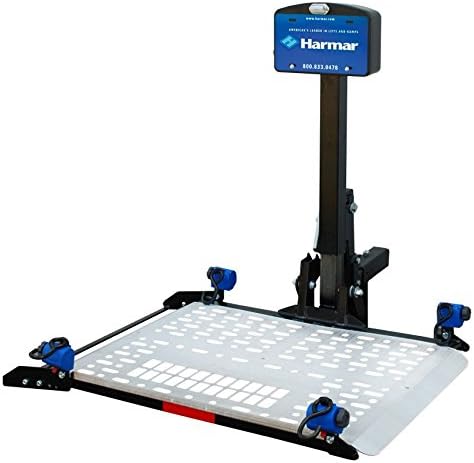
Image: The Harmar AL300 Fusion Universal Scooter Lift shown with its platform extended, ready to receive a mobility device. The lift features a central vertical mast, a blue control box with the Harmar logo, and four blue Q'Straint retractors positioned at the corners of the silver-colored platform.
Setup and Installation
- Compatibility Verification: Before installation, ensure your vehicle's hitch receiver is compatible with a Class III hitch adapter and can support the combined weight of the lift and your mobility device. It is highly recommended to verify compatibility with Harmar or your dealer.
- Hitch Adapter Installation: Insert the AL123/HD Class III hitch adapter into your vehicle's hitch receiver. Secure it according to the adapter's specific instructions, typically using a hitch pin and clip.
- Lift Assembly: Attach the main lift assembly to the hitch adapter. Follow the detailed instructions provided in the separate assembly guide for secure attachment.
- Wiring Harness Connection: Connect the lift's wiring harness to your vehicle's electrical system. This typically involves connecting to the vehicle's battery for power and potentially to the tail lights for integrated lighting. Professional installation of the wiring harness is recommended.
- Initial Test: After installation, perform an initial test of the lift's functions (raising, lowering, folding) without a mobility device to ensure proper operation.
Note: A swing-away arm accessory may be available separately to allow access to the vehicle's rear cargo area without removing the lift. Refer to the swing-away arm's specific instructions for installation.
Operating Instructions
Loading a Mobility Device:
- Ensure the vehicle is parked on a level surface and the parking brake is engaged.
- Use the toggle switch on the motor cover to lower the lift platform to the ground.
- Carefully drive or roll your mobility device onto the center of the lift platform.
- Position the mobility device so its weight is evenly distributed and the wheels align with the Q'Straint retractors.
- Attach all four Q'Straint retractors to the designated securement points on your mobility device. Ensure they are taut and locked.
- Use the toggle switch to raise the lift platform until it is fully elevated and locked into the transport position.
- Verify that the mobility device is stable and securely held by the retractors before driving.
Unloading a Mobility Device:
- Park the vehicle on a level surface and engage the parking brake.
- Use the toggle switch to lower the lift platform to the ground.
- Release all four Q'Straint retractors from the mobility device.
- Carefully drive or roll your mobility device off the platform.
Folding the Platform (When Empty):
- After unloading the mobility device, ensure the platform is clear of any obstructions.
- Flip the single switch (typically located near the motor cover) to initiate the automatic fold-up sequence. The platform will raise and secure itself in the vertical, stowed position.
- To lower the platform, flip the switch again.
Important: Always use the key lock on the motor cover to prevent unauthorized operation of the lift.
Maintenance
- Regular Inspection: Periodically inspect all moving parts, fasteners, and electrical connections for wear, corrosion, or damage.
- Cleaning: Keep the lift clean from dirt, road salt, and debris. Use a mild soap and water solution, then rinse thoroughly. Avoid high-pressure washing directly on electrical components.
- Lubrication: Lubricate pivot points and moving mechanisms as recommended by Harmar to ensure smooth operation. Refer to the manufacturer's specific lubrication guidelines.
- Battery Check: Ensure your vehicle's battery is in good condition, as the lift draws power from it.
- Q'Straint Retractors: Inspect retractors for proper function, wear, and damage. Replace if necessary.
Troubleshooting
| Problem | Possible Cause | Solution |
|---|---|---|
| Lift does not operate. | No power, blown fuse, key lock engaged, loose wiring. | Check vehicle battery, inspect fuses, ensure key is in "on" position, check wiring connections. |
| Lift operates slowly or weakly. | Low vehicle battery, motor issue, excessive load. | Charge or replace vehicle battery, ensure load is within capacity. Contact service if motor issue suspected. |
| Platform does not fold automatically. | Switch malfunction, obstruction, sensor issue. | Check for obstructions, ensure switch is fully engaged. Use manual override if necessary and contact service. |
| Unusual noises during operation. | Lack of lubrication, worn components, foreign object. | Lubricate moving parts, inspect for debris or worn components. Contact service if noise persists. |
For issues not listed or if solutions do not resolve the problem, contact Harmar customer support or an authorized service technician.
Specifications
- Model: AL300 Fusion
- Brand: Harmar
- Weight Capacity: 350 lbs (158 kg)
- Platform Size: 27.5" x 39" (adjustable cradle extends up to 46")
- Mounting Type: Hitch Mount
- Hitch Adapter Included: AL123/HD Class III
- Foldable: Yes (automatic)
- UPC: 819095020035
- First Available: March 16, 2017
Warranty and Support
For specific warranty information, please refer to the warranty card included with your product or visit the official Harmar website. Warranty terms and conditions may vary.
For technical support, parts, or to verify compatibility before ordering, please contact Harmar customer service or your authorized Harmar dealer. It is crucial to verify compatibility of the lift with your specific vehicle make, year, model, and mobility device before purchase or installation.
Legal Disclaimer: The manufacturer and seller are not responsible for issues arising from improper installation, operation, or non-compatibility if verification steps are not followed.


