1. Introduction
This manual provides essential information for the safe and efficient operation of your Samsung MS19M8000AS/AA Large Capacity Countertop Microwave Oven. This appliance is designed to simplify meal preparation with its generous 1.9 cu. ft. capacity, accommodating various dish sizes. It features Sensor Cook technology for automatic cooking time adjustments and a Ceramic Enamel Interior for durability and easy cleaning. Please read this manual thoroughly before using the appliance and keep it for future reference.
2. Safety Information
To reduce the risk of fire, electric shock, injury to persons, or exposure to excessive microwave energy when using your appliance, follow basic safety precautions, including the following:
- Read all instructions before using the appliance.
- Do not operate the oven if it is damaged.
- Do not heat liquids or other foods in sealed containers as they are liable to explode.
- Do not use corrosive chemicals or vapors in this appliance.
- Do not use this oven for commercial purposes.
- Always ensure proper ventilation around the microwave.
- Supervise children closely when the microwave is in use.
3. Product Overview
The Samsung MS19M8000AS/AA microwave oven is designed for convenient and efficient cooking. Key features include:
- Large Capacity: 1.9 cu. ft. interior to accommodate various dish sizes.
- Sensor Cook: Automatically adjusts cooking time for optimal results.
- Ceramic Enamel Interior: Durable, scratch-resistant, and easy to clean.
- Auto Defrost: Simplifies defrosting by weight or time.
- Cooking Presets: Convenient one-touch options for common foods.
Dimensions
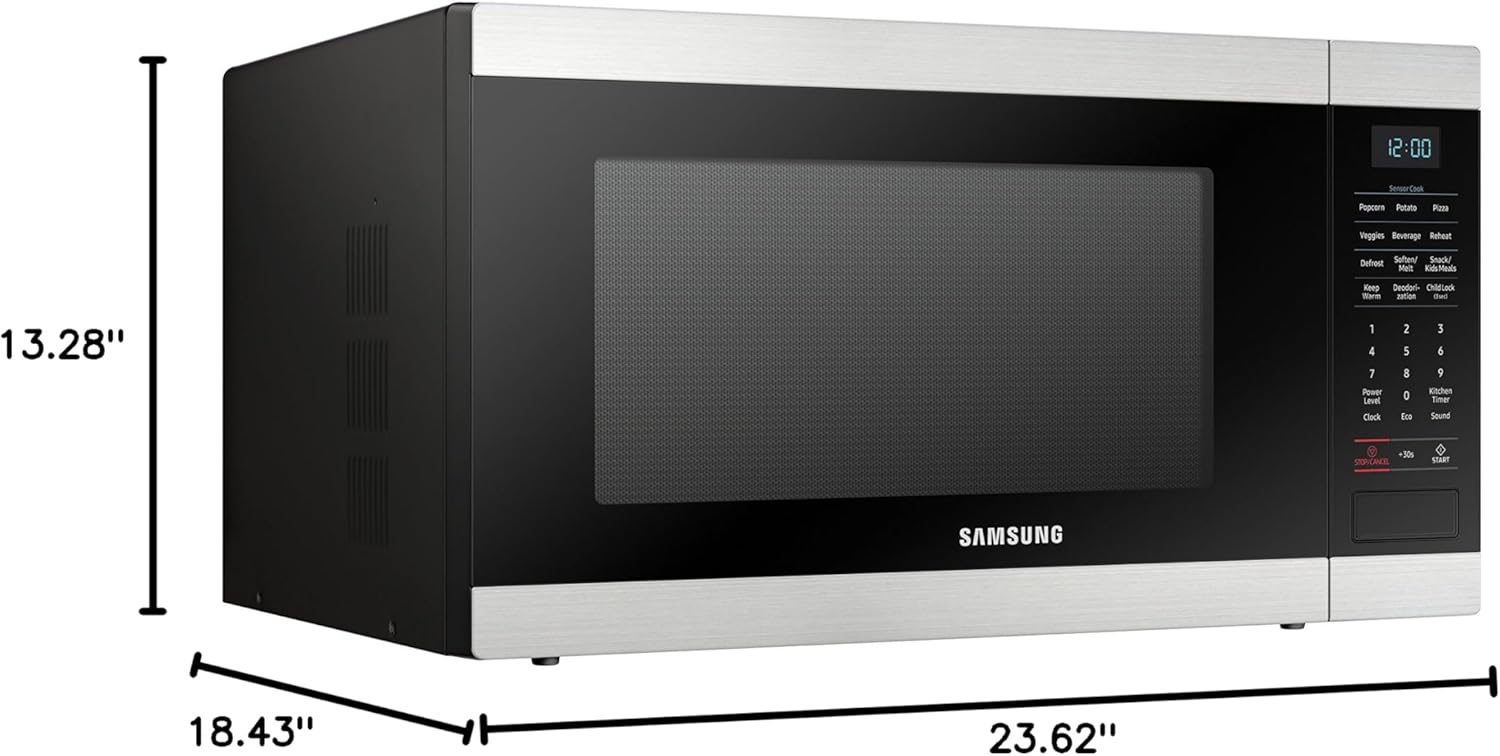
Image 1: Front view of the Samsung MS19M8000AS/AA Microwave Oven with labeled dimensions (18.43"D x 23.62"W x 13.28"H).
4. Setup
Follow these steps to set up your microwave oven:
- Unpack: Carefully remove the microwave oven and all packing materials from the carton.
- Placement: Place the microwave on a flat, stable surface that is strong enough to hold the oven and the food you place in it. Ensure there is adequate space for ventilation (at least 4 inches on top, sides, and back).
- Power Connection: Plug the power cord into a grounded electrical outlet. Do not use an extension cord.
- Initial Cleaning: Wipe the interior and exterior of the oven with a soft, damp cloth.
5. Operating Instructions
Your Samsung microwave offers various cooking functions for your convenience.
Basic Microwave Operation
- Time Cook: Press the 'Cook Time' button, enter the desired cooking time using the number pad, and then press 'Start'.
- Power Level: After setting the cook time, press 'Power Level' and select a power level from 1 to 10 (10 being 100% power). Press 'Start'.
- Express Cook: For quick cooking, simply press any number from 1 to 6 on the number pad for 1 to 6 minutes of cooking at 100% power.
- Add 30 Sec: Press the '+30 Sec' button to add 30 seconds of cooking time at 100% power.
Sensor Cook
The Sensor Cook feature automatically detects the humidity released from food and adjusts the cooking time for optimal results. To use:
- Place food in the microwave.
- Press the 'Sensor Cook' button (e.g., 'Potato', 'Popcorn', 'Pizza').
- Press 'Start'. The oven will automatically determine the cooking time.
Auto Defrost
Use Auto Defrost to quickly and efficiently defrost various foods.
- Press the 'Auto Defrost' button.
- Select the food type (e.g., Meat, Poultry, Fish) and enter the weight using the number pad.
- Press 'Start'. The oven will calculate the defrosting time.
Child Lock
The Child Lock feature prevents unintended operation of the microwave, enhancing safety, especially around children. To activate or deactivate:
- To Activate: Press and hold the 'Stop/Cancel' button for 3 seconds until 'LOC' appears on the display.
- To Deactivate: Press and hold the 'Stop/Cancel' button again for 3 seconds until 'LOC' disappears from the display.
6. Cleaning and Maintenance
Regular cleaning and maintenance will ensure the longevity and optimal performance of your microwave oven.
- Ceramic Enamel Interior: The ceramic enamel interior is designed for easy cleaning. Wipe spills immediately with a damp cloth. For stubborn stains, use a mild detergent and a soft sponge. Avoid abrasive cleaners or scouring pads.
- Exterior: Clean the exterior surface with a soft cloth and mild soap and water. Dry thoroughly.
- Turntable: The glass turntable can be removed and washed with warm soapy water or in the dishwasher.
- Door Seals: Keep the door seals clean to ensure proper closure and efficient operation.

Image 2: View of the easy-to-clean Ceramic Enamel Interior.
7. Troubleshooting
If you encounter issues with your microwave, refer to the following common problems and solutions:
| Problem | Possible Cause | Solution |
|---|---|---|
| Oven does not start | Door not closed properly; Power cord unplugged; Blown fuse/tripped circuit breaker | Ensure door is securely closed; Check power cord connection; Check household fuse/circuit breaker |
| Food not cooking evenly | Food not stirred/rotated; Improper power level/cook time | Stir or rotate food during cooking; Adjust power level and cook time as needed |
| Excessive noise during operation | Turntable not seated correctly; Foreign object in oven cavity | Ensure turntable is properly seated; Remove any foreign objects |
| Display shows error code | Internal malfunction | Unplug the oven for 30 seconds and plug back in. If error persists, contact service. |
8. Specifications
| Specification | Value |
|---|---|
| Brand Name | Samsung |
| Model Info | MS19M8000AS/AA |
| Item Weight | 43.03 Pounds |
| Product Dimensions | 18.43 x 23.62 x 13.28 inches |
| Installation Type | Countertop |
| Capacity | 1.9 Cubic Feet |
| Energy Use | 700 Watts |
| Voltage | 120 Volts |
| Wattage | 950 watts |
| Material Type | Stainless Steel |
| Inner Material Type | Ceramic Enamel |
| Special Features | Defrost, Sensor Cook |
| Included Components | Microwave |
9. Warranty and Support
For warranty information or technical support, please refer to the warranty card included with your product or visit the official Samsung website. You may also contact Samsung customer service for assistance.


