
1. Introduction
This manual provides essential information for the safe and effective use of your Disney PJ Masks PJ17024 Digital LED Watch. Please read this manual thoroughly before operating the device and retain it for future reference.
2. Product Overview
The Disney PJ Masks PJ17024 Digital LED Watch is a digital LED watch designed for children, featuring popular PJ Masks characters. It is a high-quality, officially licensed product that combines fun with functionality.
Key Features:
- Digital display with LED light.
- Features PJ Masks characters on the watch face.
- Designed for young users.
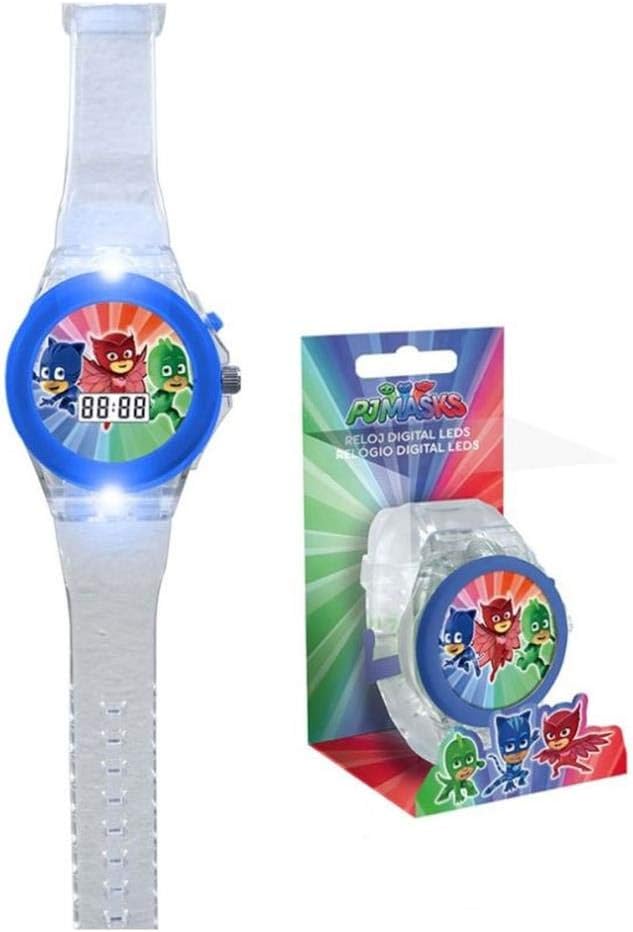
Figure 2.1: PJ Masks Digital LED Watch and its packaging. The watch features a clear strap and a blue bezel with PJ Masks characters. The digital display shows '88:88'.
3. Setup
3.1 Unboxing
Carefully remove the watch from its packaging. Ensure all components are present. The package should contain the PJ Masks Digital LED Watch.
3.2 Battery Installation/Activation
The watch comes with a pre-installed LR44 battery. If the display is not active, check for a plastic pull-tab near the crown (side button) and remove it to activate the battery. If the battery needs replacement, refer to the Maintenance section.
4. Operating Instructions
4.1 Setting the Time
- Press the button on the side of the watch to display the time.
- To enter setting mode, press and hold the button for approximately 3 seconds until the hour digits begin to flash.
- While the hour digits are flashing, press the button repeatedly to advance the hour.
- Once the correct hour is set, press and hold the button again for 3 seconds. The minute digits will begin to flash.
- Press the button repeatedly to advance the minutes.
- After setting the minutes, press and hold the button for 3 seconds to exit setting mode. The time will now be set.
4.2 Activating LED Light
Press the button once briefly to illuminate the LED light on the watch face. The light will typically stay on for a few seconds before automatically turning off to conserve battery life.
5. Maintenance
5.1 Cleaning
Wipe the watch with a soft, dry cloth. Do not use abrasive cleaners or solvents. Avoid submerging the watch in water.
5.2 Battery Replacement
The watch uses one LR44 battery. When the display becomes dim or unresponsive, it's time to replace the battery. This procedure should ideally be performed by an adult.
- Locate the battery compartment cover on the back of the watch.
- Using a small screwdriver, carefully open the battery compartment.
- Remove the old LR44 battery and insert a new one, ensuring correct polarity (+/-).
- Securely close the battery compartment cover.
Note: Dispose of used batteries responsibly according to local regulations.
6. Troubleshooting
| Problem | Possible Cause | Solution |
|---|---|---|
| Watch display is blank or dim. | Battery is dead or not properly installed. | Replace the LR44 battery or ensure the battery activation tab is removed. |
| Time cannot be set. | Incorrect button press sequence. | Refer to "4.1 Setting the Time" and follow the steps carefully. Ensure you hold the button for 3 seconds to enter/exit setting mode. |
| LED light does not activate. | Low battery or faulty LED. | Replace the battery. If the problem persists, contact customer support. |
7. Specifications
| Feature | Detail |
|---|---|
| Model Number | PJ17024 |
| Brand | Disney |
| Product Dimensions | 7.5 x 16 x 7.5 cm |
| Weight | 50 grams |
| Battery Type | 1 x LR44 (included) |
| Manufacturer | KIDS EUROSWAN |
8. Warranty Information
Specific warranty details for this product may vary by region and retailer. Please refer to your purchase receipt or contact the retailer where the product was purchased for information regarding warranty coverage and terms.
9. Customer Support
For further assistance or inquiries regarding your PJ Masks Digital LED Watch, please contact the retailer or the manufacturer, KIDS EUROSWAN. Contact information can typically be found on the product packaging or the retailer's website.