1. Product Overview
The Xanlite SE300SPR is an innovative LED lamp featuring an integrated Bluetooth speaker. This energy-efficient bulb provides a warm white light (2700 Kelvin) for a cozy ambiance while allowing you to stream audio wirelessly. Designed with an E27 base, it offers easy installation and a long operational lifespan.
- Energy Efficient: Consumes only 6.5W, equivalent to a 28W incandescent bulb.
- Warm White Light: Emits a comfortable 2700 Kelvin light.
- Easy Installation: Standard E27 fitting for quick setup.
- Integrated Bluetooth Speaker: Stream audio directly from your compatible devices.
- Durable: Boasts an exceptional lifespan of 25,000 hours.
- Recyclable: Designed with environmental considerations.

Figure 1: Xanlite SE300SPR LED Lamp. This image shows the white LED bulb with a standard E27 screw base and a visible speaker grille around the top section.
2. Setup and Installation
- Unpacking: Carefully remove the Xanlite SE300SPR LED lamp from its packaging. Inspect the bulb for any visible damage before proceeding.
- Power Off: Before installing the bulb, ensure the power supply to the lamp fixture is turned off at the main switch to prevent electrical shock.
- Installation: Screw the E27 base of the Xanlite SE300SPR lamp into a compatible E27 lamp holder. Turn clockwise until it is finger-tight. Do not overtighten.
- Power On: Restore power to the lamp fixture. The LED lamp should illuminate.
- Bluetooth Pairing:
- Ensure the lamp is powered on.
- On your smartphone or audio device, enable Bluetooth.
- Search for available Bluetooth devices. The lamp should appear as "SONOLUX" or a similar identifier.
- Select "SONOLUX" to pair. Once paired, you will hear a confirmation sound from the lamp's speaker.
- You can now play audio through the lamp's speaker.
3. Operating Instructions
3.1 Light Operation
- The LED lamp functions like a standard light bulb. Use the wall switch or lamp switch to turn the light on or off.
3.2 Bluetooth Speaker Operation
- Once paired (refer to Section 2.5), your device will automatically connect to the lamp's speaker when both are within range and Bluetooth is enabled on your device.
- Control audio playback (play, pause, skip tracks, volume) directly from your connected smartphone or audio device.
- The speaker's volume is independent of the light's operation. You can have the light on or off while using the speaker, as long as the lamp is powered.
4. Maintenance and Care
- Cleaning: Before cleaning, ensure the lamp is turned off and cool to the touch. Wipe the bulb with a soft, dry cloth. Do not use liquid cleaners or abrasive materials, as they may damage the lamp's surface or internal components.
- Replacement: Due to its long lifespan, frequent replacement is not expected. When replacement is necessary, ensure the power is off and allow the bulb to cool before unscrewing it from the fixture.
- Recycling: This lamp is recyclable. Please dispose of it according to local electronic waste recycling guidelines. Do not discard with general household waste.
- Storage: If storing the lamp, keep it in its original packaging or a protective container in a cool, dry place away from direct sunlight and extreme temperatures.
5. Troubleshooting
| Problem | Possible Cause | Solution |
|---|---|---|
| Lamp does not light up. | No power to the fixture. Bulb not screwed in properly. Bulb is faulty. | Check the power switch and circuit breaker. Ensure the bulb is securely screwed into the E27 socket. Test the bulb in another working fixture. If still not working, the bulb may be faulty. |
| Bluetooth speaker not connecting. | Bluetooth is off on your device. Lamp is not powered on. Device is too far from the lamp. Already connected to another device. | Enable Bluetooth on your device. Ensure the lamp is powered on. Move your device closer to the lamp. Disconnect from other Bluetooth devices and try pairing again. |
| Poor sound quality or no sound. | Volume too low on device. Interference. Device not properly paired. | Increase the volume on your connected device. Move away from other electronic devices that may cause interference. Re-pair your device with the lamp. |
| Lamp appears physically damaged (e.g., cracked). | Impact or manufacturing defect. | Do not use a damaged lamp. Safely remove it (with power off) and contact the retailer or manufacturer for replacement. |
6. Specifications
| Feature | Specification |
|---|---|
| Model Number | SE300SPR |
| Brand | Xanlite |
| Product Dimensions | 6.5 x 6.5 x 12.8 cm; 20 g |
| Light Type | LED |
| Wattage | 6.5 Watts |
| Equivalent Incandescent Wattage | 28 Watts |
| Lamp Base | E27 |
| Light Color | Warm White (2700 Kelvin) |
| Voltage | 230 Volts |
| Special Features | SONOLUX LED lamp, integrated Bluetooth speaker |
| Lifespan | 25,000 hours |
| Batteries Required | No |
| Included Components | Lamp |
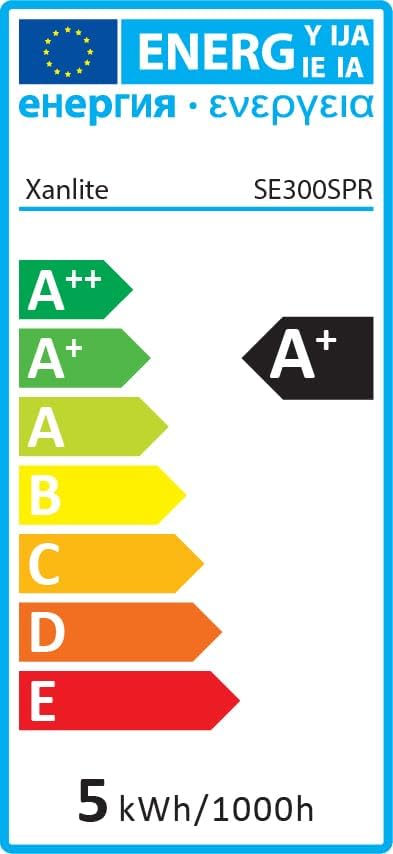

Figure 2: Energy Efficiency Labels for Xanlite SE300SPR. These labels indicate the product's energy rating, which is A+.
7. Warranty and Support
For warranty information, technical support, or service inquiries, please contact the retailer where you purchased the Xanlite SE300SPR LED lamp or refer to the official Xanlite website for customer service contact details.
Please retain your proof of purchase for any warranty claims.


