
1. Safety Information
Warning: Not suitable for children under 14 years of age. Adult supervision is recommended during operation.
- Always operate the drones in open, clear areas, away from people, animals, and obstacles.
- Do not operate near high-voltage lines, trees, or water.
- Ensure all propellers are securely attached before flight.
- Do not touch moving propellers.
- Turn off the drone and controller when not in use.
- Use only the specified charging cables and power sources.
- Avoid exposing the product to extreme temperatures or moisture.
2. Package Contents
Verify that all items listed below are present in your package:
- 2 x HyperDrone Racing Drones
- 2 x Remote Controllers
- 1 x Lap Counting Station
- USB Charging Cables (for drones)
- Spare Propellers
- Instruction Manual

Image: The complete Silverlit HyperDrone Racing Champion Kit packaging, displaying all included components.
3. Setup
3.1 Battery Installation and Charging
- Drones: Connect the drone to a USB power source using the provided USB charging cable. The charging indicator will show the charging status. A full charge typically takes 30-45 minutes and provides approximately 10-15 minutes of flight time.
- Remote Controllers: Open the battery compartment on the back of each controller. Insert 3 x AAA batteries (not included), ensuring correct polarity. Close the compartment.
- Lap Counting Station: Open the battery compartment. Insert 3 x AA batteries (not included), ensuring correct polarity. Close the compartment.
3.2 Drone and Controller Pairing
- Ensure both the drone and its corresponding controller are powered off.
- Place the drone on a flat, level surface.
- Power on the drone. The drone's indicator lights will flash.
- Power on the remote controller.
- Push the left joystick (throttle) fully up, then fully down. The drone's indicator lights will become solid, indicating successful pairing.
- Repeat this process for the second drone and controller.

Image: A Silverlit HyperDrone, ready for flight after setup.
3.3 Lap Counting Station Setup
- Place the lap counting station in the center of your racing area or at the designated start/finish line.
- Power on the station.
- Download the official Silverlit HyperDrone app on your smartphone (if desired for lap tracking and health points display).
- Connect your smartphone to the station via Wi-Fi as instructed in the app.
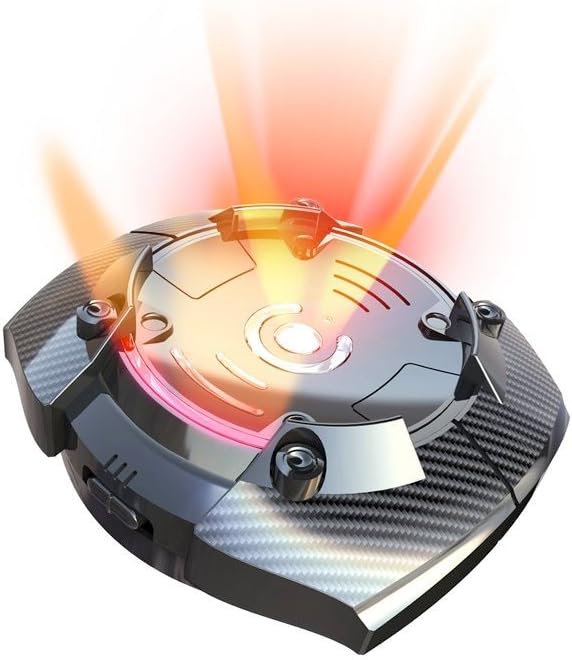
Image: The HyperDrone Lap Counting Station, central to racing and attack modes.
4. Operating Instructions
4.1 Basic Flight Controls
- Take-off: After pairing, press the one-key take-off button or slowly push the left joystick (throttle) upwards.
- Landing: Press the one-key landing button or slowly pull the left joystick (throttle) downwards until the drone lands.
- Altitude Hold: The drone features automatic stabilization to maintain a consistent altitude, allowing focus on direction.
- Directional Control: Use the right joystick to control forward, backward, left, and right movement.
- Rotation: Use the left joystick (left/right) to rotate the drone clockwise or counter-clockwise.
4.2 Piloting Modes
The HyperDrone offers two piloting modes:
- Easy Mode: Provides more stable and less sensitive controls, ideal for beginners.
- Expert Mode: Offers increased responsiveness and speed for experienced pilots. Switch between modes using the designated button on the controller.
4.3 Special Maneuvers
- 360° Looping: While in flight, press the looping button on the controller, then push the right joystick in any direction to perform a 360° flip.
4.4 Game Modes with Lap Counting Station
The kit supports two interactive game modes:
- Race Mode: Fly through the designated course, passing the lap counting station to record your laps. The station tracks lap times and can display information on a connected smartphone.
- Attack Mode: The objective is to be the first to 'destroy' the lap counting station by targeting and 'shooting' it with your drone. Drones can also 'shoot' at opponent drones to slow them down. The controller will vibrate and emit sound effects when your drone is hit.

Image: A user actively piloting a HyperDrone during a flight session.
5. Maintenance
- Cleaning: Use a soft, dry cloth to clean the drones, controllers, and station. Do not use water or chemical cleaners.
- Propeller Care: Regularly inspect propellers for damage. Replace any bent or broken propellers with spare parts. Ensure new propellers are installed with the correct rotation direction (indicated on the propeller and drone).
- Battery Storage: If storing the product for an extended period, remove batteries from controllers and the station. Ensure drone batteries are partially charged (not fully charged or fully depleted) before storage.
- Charging: Always use the original USB charging cables. Do not overcharge the drone batteries.
6. Troubleshooting
Refer to the table below for common issues and their solutions:
| Problem | Possible Cause | Solution |
|---|---|---|
| Drone does not respond to controller. | Not paired; low controller batteries; drone battery depleted. | Re-pair drone and controller; replace controller batteries; charge drone battery. |
| Drone is unstable or drifts during flight. | Not calibrated on a flat surface; damaged propellers; environmental interference. | Ensure drone is powered on a flat surface; check and replace damaged propellers; fly in a calm environment. |
| Short flight time. | Drone battery not fully charged; aging battery. | Ensure full charge before flight; consider battery replacement if performance significantly degrades over time. |
| Lap counting station not connecting to smartphone. | Wi-Fi interference; incorrect app settings; station batteries low. | Ensure no other devices are interfering; check app connection steps; replace station batteries. |
| Drone propellers stop spinning after a minor crash. | Propeller jammed; motor protection activated. | Clear any obstructions from propellers; power cycle the drone and controller. |
7. Specifications
| Feature | Detail |
|---|---|
| Brand | Silverlit |
| Model Name | Hyper Drone Racing Champion Kit |
| Model Number | 84775 |
| Age Range | 14 to 99 years |
| Color | Silver or Grey |
| Connectivity Technology | Wi-Fi (for station to smartphone) |
| Control Type | Remote Control |
| Skill Level | Intermediate |
| Material | Plastic |
| Video Recording Resolution | 1080p (if drone is equipped with camera, not explicitly stated for this model but listed in specs) |
| Video Capture Format | MP4 (if drone is equipped with camera) |
| Optical Sensor Technology | CMOS (if drone is equipped with camera) |
| Batteries Included | No (for controllers/station) |
| Rechargeable Batteries Included | No (for controllers/station, drones have integrated rechargeable batteries) |
| Remote Control Included | Yes (2 units) |
| Special Features | Two drones and controllers for racing and battling, integrated start button, hovering flight, base station with lap timing function. |
8. Warranty Information
The Silverlit HyperDrone Racing Champion Kit (Model 84775) comes with a 1-year manufacturer's warranty from the date of purchase. This warranty covers defects in materials and workmanship under normal use. It does not cover damage resulting from misuse, accidents, unauthorized modifications, or normal wear and tear.
Please retain your proof of purchase for warranty claims.
9. Customer Support
For technical assistance, troubleshooting not covered in this manual, or warranty inquiries, please contact Silverlit customer support. Refer to the official Silverlit website or your product packaging for the most current contact information.
You can visit the Silverlit brand store for more information and product updates: Silverlit Official Store
