
1. Introduction
Thank you for purchasing the FONESTAR WA-66R Wall Amplifier. This device is designed to provide a versatile audio solution for your space, featuring Bluetooth connectivity, FM radio, USB and MicroSD playback, and auxiliary inputs. Please read this manual carefully to ensure proper installation, operation, and maintenance of your amplifier.
2. Safety Information
- Power Supply: Ensure the amplifier is connected to a 100-240V AC power source. Incorrect voltage can damage the unit.
- Installation: Installation should be performed by qualified personnel to prevent electrical hazards. Ensure proper wiring and insulation.
- Ventilation: Do not block ventilation openings. Ensure adequate airflow around the unit to prevent overheating.
- Moisture: Keep the amplifier away from water, moisture, and high humidity environments.
- Cleaning: Disconnect power before cleaning. Use a dry, soft cloth. Do not use liquid cleaners or aerosols.
- Servicing: Do not attempt to service this product yourself. Refer all servicing to qualified service personnel.
3. Product Overview
3.1 Front Panel and Remote Control
The FONESTAR WA-66R features an integrated display and control buttons on its front panel, along with slots for MicroSD cards and USB drives. A remote control is also included for convenient operation.

Image 1: Front view of the FONESTAR WA-66R wall amplifier and its remote control. The amplifier features a digital display, control buttons, and slots for MicroSD and USB. The remote control includes power, mode, EQ, volume, and numeric keys.
3.2 Rear Panel Connections
The rear panel provides all necessary connection terminals for power, audio inputs, and speaker outputs.

Image 2: Rear view of the FONESTAR WA-66R wall amplifier, showing connection terminals for power (100-240V AC), FM antenna, two auxiliary audio inputs (AUX1, AUX2), and speaker outputs (8 Ohms).
4. Setup
4.1 Wiring Diagram
Follow the diagram below for correct wiring of power, antenna, and speakers.
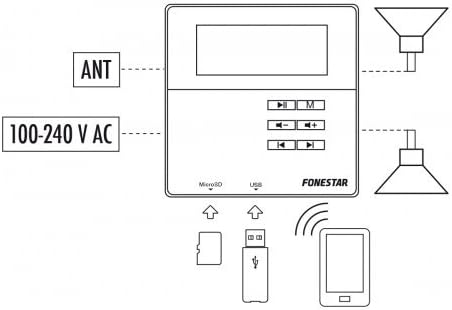
Image 3: Diagram illustrating the connection points for the FONESTAR WA-66R wall amplifier, including 100-240V AC power, FM antenna, and speaker outputs. It also shows the MicroSD and USB inputs, and wireless connection to a smartphone.
4.2 Installation Steps
- Power Connection: Connect the 100-240V AC power supply to the designated terminals on the rear panel. Ensure proper polarity (N for Neutral, L for Live).
- Speaker Connection: Connect your 8 Ohm speakers to the SPEAKER OUT terminals. Ensure correct positive (+) and negative (-) connections for each channel.
- FM Antenna: Connect the FM antenna to the ANT terminal for optimal radio reception.
- Auxiliary Inputs (Optional): If using external audio sources (e.g., TV, CD player), connect them to the AUX1 or AUX2 inputs using appropriate audio cables.
- Mounting: Securely mount the amplifier into the wall box according to standard electrical installation practices.
5. Operating Instructions
5.1 Power On/Off
Press the Power button on the remote control or the unit to turn the amplifier on or off.
5.2 Mode Selection
Press the M button on the remote control or the unit to cycle through available input modes: Bluetooth (BT), FM Radio, USB, MicroSD, AUX1, AUX2.
5.3 Volume Control
Use the Volume + and Volume - buttons on the remote control or the unit to adjust the audio level.
5.4 Bluetooth Pairing
- Select BT mode using the M button. The display will show 'BT' and indicate pairing mode.
- On your Bluetooth-enabled device (e.g., smartphone), search for available devices.
- Select 'FONESTAR WA-66R' from the list to pair. A confirmation tone or message will indicate successful pairing.
5.5 FM Radio Operation
- Select FM mode using the M button.
- Press the Play/Pause button to initiate an automatic station scan and save available stations.
- Use the Previous/Next Track buttons to navigate through saved stations.
5.6 USB/MicroSD Playback
- Insert a USB drive or MicroSD card into the respective slot on the front panel.
- The amplifier will automatically switch to USB or MicroSD mode and begin playback of compatible audio files. If not, select the mode manually using the M button.
- Use the Play/Pause and Previous/Next Track buttons to control playback.
5.7 Equalizer (EQ) Settings
Press the EQ button on the remote control to cycle through various equalizer presets (e.g., Pop, Rock, Jazz, Classic, Flat).
6. Maintenance
- Cleaning: Regularly wipe the amplifier's surface with a soft, dry cloth. Avoid abrasive cleaners or solvents.
- Storage: If storing the unit for an extended period, disconnect it from power and store it in a cool, dry place.
7. Troubleshooting
- No Power:
- Check if the power cable is securely connected.
- Verify the power outlet is functional.
- No Sound:
- Ensure the volume is not set to minimum or muted.
- Check speaker connections for proper polarity and secure fit.
- Verify the correct input mode is selected.
- For AUX inputs, ensure the external device is playing and its volume is adequate.
- Bluetooth Connection Issues:
- Ensure the amplifier is in BT mode and discoverable.
- Turn off and on Bluetooth on your device, then try pairing again.
- Move your device closer to the amplifier.
- Poor FM Reception:
- Ensure the FM antenna is properly connected and extended.
- Adjust the position of the antenna for better signal.
- Perform an auto-scan again to find stronger stations.
8. Specifications
- Brand: FONESTAR
- Model: WA-66R
- Power Output: 2 x 10W RMS
- Speaker Impedance: 8 Ohms
- Connectivity: Bluetooth 2.1, USB, MicroSD, FM Radio, 2 x Auxiliary Inputs (AUX1, AUX2)
- Power Supply: 100-240V AC
- Special Features: Integrated display, Remote Control, Integrated Microphone, USB Port
- Color: White
- Compatible Devices: Television (via AUX input)
9. Warranty and Support
Warranty and support information for the FONESTAR WA-66R is not available in the provided product data. Please refer to your purchase documentation or contact your retailer for details regarding warranty coverage and technical support.


