
1. Product Overview
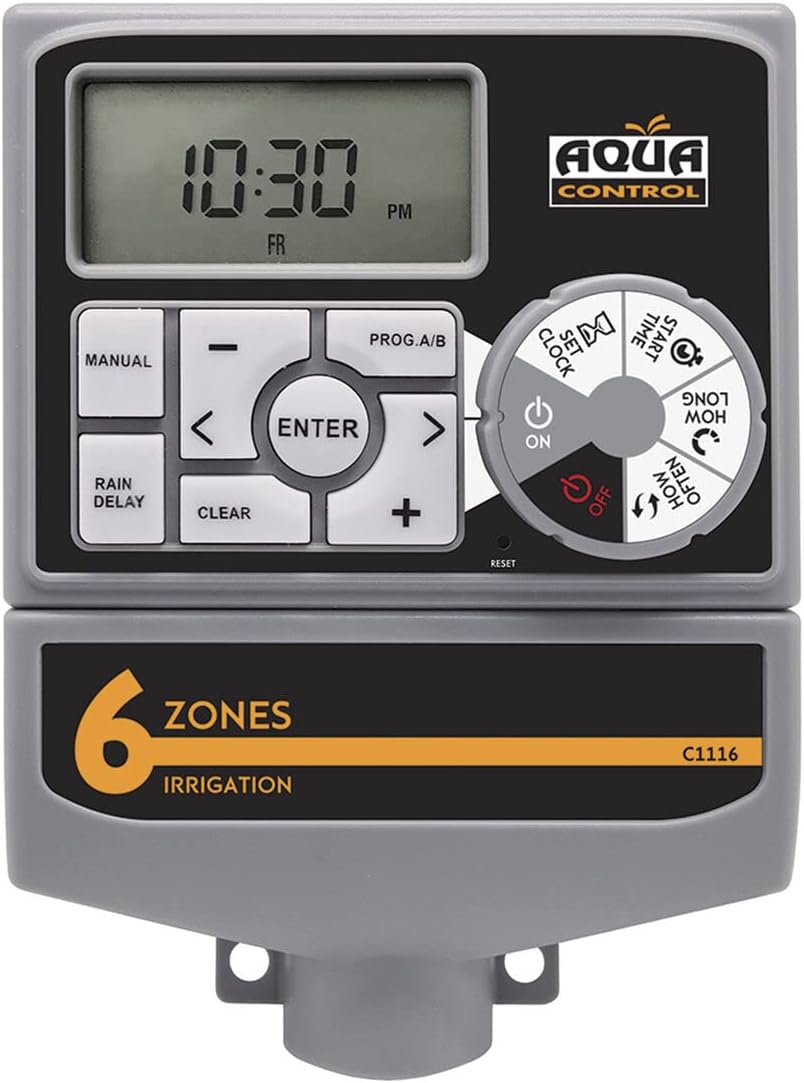
The Aqua Control C1116 is an automatic irrigation programmer designed to manage your garden watering system efficiently. It controls the opening and closing of solenoid valves, allowing for automated and precise irrigation across multiple zones. Featuring an intuitive dial and a large LCD screen, programming is straightforward, ensuring your plants receive optimal hydration.
2. Key Features
- Multi-Zone Control: Manages 1 to 6 independent irrigation zones by controlling solenoid valves.
- User-Friendly Interface: Easy programming via a rotary dial and a large, clear LCD screen.
- Flexible Watering Schedules: Supports manual or automatic irrigation, with watering times adjustable from 1 minute up to 4 hours.
- Power Supply: Operates with an included transformer and requires 2 AA alkaline batteries (not included) for backup.
- Pump/Master Valve Support: Equipped with a connector for a pump start or master valve.
- Rain Sensor Compatibility: Includes a connector for an external rain sensor to prevent unnecessary watering.
- Rain Delay Function: Allows delaying irrigation for up to 72 hours, useful during rainy periods or other factors.
3. Package Contents
Verify that all items are present in the package:
- Aqua Control C1116 Irrigation Programmer
- Power Transformer
- User Manual

4. Setup
4.1. Battery Installation
The programmer requires 2 AA alkaline batteries (not included) for memory backup and to maintain settings during power outages. Ensure correct polarity when inserting batteries.
- Locate the battery compartment on the back of the programmer.
- Open the battery compartment cover.
- Insert 2 new AA alkaline batteries, observing the correct (+) and (-) polarity markings.
- Close the battery compartment cover securely.

4.2. Mounting and Wiring
Mount the programmer in a location protected from direct sunlight and extreme weather conditions. Connect the transformer and solenoid valves as per the wiring diagram.
- Securely mount the programmer to a wall or suitable surface using appropriate fasteners.
- Connect the included transformer to the designated power input on the programmer.
- Connect your solenoid valves to the corresponding zone terminals (1-6) on the programmer. Ensure the common wire from all valves is connected to the 'C' terminal.
- If using a pump start relay or master valve, connect it to the 'M' terminal.
- If using a rain sensor, connect it to the designated rain sensor terminals.
5. Operating Instructions
The C1116 programmer features a large LCD screen and a rotary dial for easy navigation and programming. Refer to the diagram below for button and dial functions.

5.1. Setting Current Time and Date
- Turn the dial to SET CLOCK.
- Use the + and - buttons to adjust the current hour, then press ENTER.
- Repeat for minutes, day, and year.
- Turn the dial to ON to save and exit.
5.2. Programming Irrigation Zones
The programmer allows for up to 6 independent zones. Each zone can have its own start times, duration, and frequency.
- Turn the dial to START TIME. Use + and - to set the desired start time for the first watering cycle, then press ENTER. You can set multiple start times per day.
- Turn the dial to HOW LONG. Use + and - to set the watering duration (from 1 minute to 4 hours) for each zone, then press ENTER.
- Turn the dial to HOW OFTEN. Use + and - to set the watering frequency (e.g., every 12 hours, every 24 hours, specific days of the week), then press ENTER.
- Repeat steps for each zone (1-6) you wish to program.
- Turn the dial to ON to activate the programmed schedule.
5.3. Manual Operation
To manually water a zone outside of the programmed schedule:
- Press the MANUAL button.
- Use + and - to select the desired zone and watering duration.
- Press ENTER to start manual watering.
- To stop manual watering, press MANUAL again or wait for the duration to complete.
5.4. Rain Delay Function
The Rain Delay function allows you to temporarily suspend the watering schedule for a set period (0, 24, 48, or 72 hours) without losing your programmed settings.
- Press the RAIN DELAY button.
- Use + and - to select the desired delay duration (24, 48, or 72 hours).
- Press ENTER to activate the delay. The display will show the remaining delay time.
- To cancel the delay, press RAIN DELAY again and set the duration to 0, then press ENTER.
5.5. Turning Off Irrigation
To completely turn off all irrigation:
- Turn the dial to OFF. This will suspend all programmed watering cycles.
- To resume, turn the dial back to ON.
6. Maintenance
- Battery Replacement: Replace AA alkaline batteries annually or when the low battery indicator appears on the LCD screen.
- Cleaning: Clean the exterior of the programmer with a soft, damp cloth. Do not use abrasive cleaners or solvents.
- Winterization: In freezing climates, disconnect the programmer from the power supply and remove batteries. Store indoors in a dry, frost-free location.
7. Troubleshooting
| Problem | Possible Cause | Solution |
|---|---|---|
| Programmer not turning on/LCD blank | No power from transformer; dead batteries. | Check transformer connection and power outlet. Replace AA batteries. |
| Zones not watering | Programmer is OFF; incorrect programming; solenoid valve issue; rain sensor active. | Turn dial to ON. Verify program settings (start time, duration, frequency). Check solenoid valve wiring and function. Check rain sensor status. |
| Watering at wrong times | Incorrect current time/date; incorrect start times. | Adjust current time/date. Review and correct start times for each zone. |
| Watering continuously | Stuck solenoid valve; manual watering active. | Check and repair/replace faulty solenoid valve. Cancel manual watering. |
8. Specifications
| Feature | Specification |
|---|---|
| Model Number | C1116 |
| Dimensions | 20 x 10 x 30 cm |
| Weight | 698 g |
| Material | PVC |
| Voltage | 230 Volts (via transformer) |
| Battery Type | 2 x AA Alkaline (for backup, not included) |
| Number of Zones | 1 to 6 |
| Watering Duration | 1 minute to 4 hours |
| Rain Delay | 0, 24, 48, 72 hours |
| Color | Grey |
9. Warranty and Support
This Aqua Control C1116 programmer comes with a standard manufacturer's warranty. Please refer to the warranty card included in your package for specific terms and conditions. For technical support, troubleshooting assistance, or to inquire about replacement parts, please contact Aqua Control customer service through their official website or the contact information provided in the product packaging.
You can also consult additional instructions and documents by scanning the QR code provided in the product's third image or by visiting the Aqua Control store on Amazon.