1. Safety Information
Read all instructions carefully before operating the Amewi Extreme PRO 4WD Brushless 1:12 Jeep. Failure to follow these safety guidelines may result in injury or damage to the product or property.
- Age Recommendation: This product is recommended for users 14 years and older. Adult supervision is advised for younger users.
- Battery Safety: Use only the specified LiPo battery (7.4 V, 1500 mAh) and charger. Do not overcharge or short-circuit batteries. Always charge batteries on a non-flammable surface and never leave charging batteries unattended.
- Operating Environment: Operate the vehicle in open areas, away from people, pets, vehicles, and water. Avoid operating in wet conditions as the product is weather-resistant but not fully waterproof.
- Moving Parts: Keep fingers, hair, and loose clothing away from moving parts such as wheels, gears, and drive shafts to prevent injury.
- Radio Interference: Ensure no other radio control devices are operating on the same frequency (2.4 GHz) to prevent loss of control.
- Maintenance: Perform regular checks and maintenance as described in this manual to ensure safe operation.
2. What's in the Box
The Amewi Extreme PRO 4WD Brushless 1:12 Jeep package includes the following components:
- Desert Eagle-2 Dune Buggy RC Car (Amewi Extreme PRO 4WD Brushless 1:12 Jeep)
- 2.4 GHz Wireless Remote Control
- 220 V Charger
- Assembly Wrench
- Spare Pinion Gear
- 7.4 V, 1500 mAh LiPo Battery
- Illustrated Instructions (this manual)
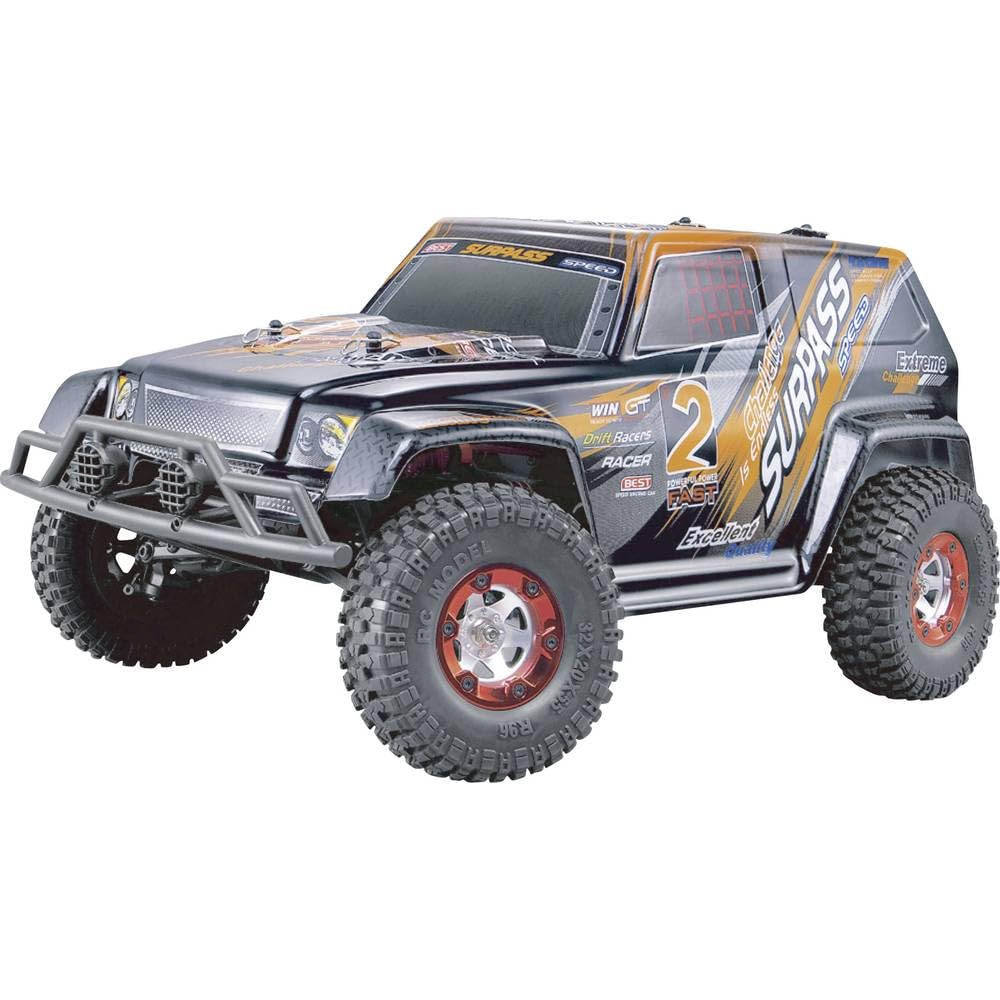
Figure 1: Contents of the Amewi Extreme PRO 4WD Brushless 1:12 Jeep package. Includes the RC car, remote control, battery, charger, and tools.
3. Setup
3.1 Charging the Battery
- Connect the 220 V charger to a power outlet.
- Connect the 7.4 V, 1500 mAh LiPo battery to the charger. Ensure correct polarity.
- Allow the battery to charge fully. The charger's indicator light will change (e.g., from red to green) when charging is complete. Refer to the charger's specific instructions for details.
- Important: Do not leave the battery unattended while charging. Disconnect the battery from the charger once fully charged.
3.2 Installing the Battery in the Vehicle
- Locate the battery compartment on the Amewi Extreme PRO Jeep. This is typically on the underside or accessible by removing the body shell.
- Carefully insert the charged LiPo battery into the compartment.
- Connect the battery connector to the vehicle's power connector. Ensure a secure connection.
- Close the battery compartment securely.
3.3 Installing Batteries in the Remote Control
The remote control requires 4x AA batteries (not included).
- Open the battery cover on the back of the remote control.
- Insert 4x AA batteries, observing the correct polarity (+/-).
- Close the battery cover.
4. Operating Instructions
4.1 Powering On
- Turn on the remote control first. The indicator light should illuminate.
- Turn on the power switch on the Amewi Extreme PRO Jeep. The vehicle's indicator light should illuminate.
- The remote control and vehicle will automatically pair. Wait for the indicator lights to stabilize, indicating a successful connection.
4.2 Basic Controls
- Steering Wheel (Remote Control): Turn left or right to control the vehicle's direction.
- Trigger (Remote Control): Pull the trigger to accelerate forward. Push the trigger forward to brake or reverse.
- Trim Adjustments: Use the steering trim dial on the remote control to adjust the steering if the vehicle does not drive straight when the steering wheel is centered.
Figure 2: Illustration of the 2.4 GHz remote control with steering wheel and trigger. Note the steering trim dial for fine adjustments.
4.3 Driving Tips
- Start slowly to get accustomed to the controls.
- Avoid sudden stops or turns at high speeds to prevent rollovers.
- Operate on flat, open surfaces initially before attempting more challenging terrain.
- Monitor battery life. Performance will decrease as the battery drains.
4.4 Powering Off
- Turn off the power switch on the Amewi Extreme PRO Jeep first.
- Turn off the remote control.
- Disconnect and remove the LiPo battery from the vehicle for storage.
5. Maintenance
Regular maintenance ensures the longevity and optimal performance of your Amewi Extreme PRO Jeep.
- Cleaning: After each use, especially in dusty or dirty conditions, clean the vehicle. Use a soft brush or compressed air to remove dirt and debris from the chassis, wheels, and suspension components. Avoid using water directly on electronic parts.
- Inspecting Moving Parts: Regularly check all moving parts (wheels, axles, gears, suspension links) for wear, damage, or obstructions. Ensure all screws are tight.
- Lubrication: Apply a small amount of RC-specific lubricant to moving metal parts, such as universal joints and gear teeth, as needed.
- Battery Storage: Store LiPo batteries in a cool, dry place, away from direct sunlight and extreme temperatures. Do not store fully charged or fully discharged for extended periods. Aim for a storage charge of approximately 3.8V per cell.
- Tire Care: Check tires for punctures or excessive wear. Ensure they are securely mounted.
6. Troubleshooting
| Problem | Possible Cause | Solution |
|---|---|---|
| Vehicle does not respond to remote control. |
|
|
| Vehicle drives crooked. |
|
|
| Vehicle loses power or stops suddenly. |
|
|
7. Specifications
| Feature | Detail |
|---|---|
| Model Number | 22244 |
| Brand | Amewi |
| Scale | 1:12 |
| Drive System | 4WD (Four-Wheel Drive) |
| Motor Type | Brushless, 4500 KV |
| Radio Frequency | 2.4 GHz |
| Battery (Vehicle) | 7.4 V, 1500 mAh LiPo |
| Dimensions (L x W x H) | 55 x 26 x 22 cm |
| Weight | 1.2 kg |
| Material | Plastic, Fiberglass chassis |
| Age Recommendation | 14 years and up |
| Special Feature | Weather-resistant, Slipper clutch, Rigid rear axle |
8. Warranty & Support
8.1 Warranty Information
Amewi products are manufactured to high-quality standards. This product comes with a standard manufacturer's warranty against defects in materials and workmanship. The warranty period typically begins from the date of purchase.
- Coverage: The warranty covers manufacturing defects. It does not cover damage caused by misuse, accidents, unauthorized modifications, improper maintenance, or normal wear and tear.
- Proof of Purchase: Retain your original purchase receipt as proof of purchase is required for all warranty claims.
- Returns: For returns or warranty claims, please refer to the retailer's return policy (e.g., Amazon.es offers a 30-day refund/replacement policy).
8.2 Customer Support
For technical assistance, spare parts, or further inquiries, please contact Amewi customer support or your authorized dealer.
- Manufacturer Website: Visit the official Amewi website for the latest support information and contact details.
- Dealer Support: Contact the seller (e.g., Bernis RC Toy Modellbau Shop) through the platform where the product was purchased for direct assistance.
- Model Number: When contacting support, please provide the model number (22244) and a detailed description of the issue.


