1. Introduction
This manual provides essential instructions for the safe and effective use of your Kodak PIXPRO AZ425 Astro Zoom Digital Camera. Please read this manual thoroughly before using your camera and retain it for future reference. This camera is designed for capturing high-quality photographs and videos with ease, featuring a powerful optical zoom and various user-friendly settings.
2. What's in the Box
Verify that all items listed below are included in your package:
- Kodak PIXPRO AZ425 Astro Zoom 20MP Digital Camera (Black)
- Rechargeable Li-ion Battery
- AC Adapter
- Micro USB Cable
- Neck Strap
- Lens Cap with Cord
- Quick Start Guide
- Kodak 32GB Class 10 UHS-I U1 SDHC Memory Card
- Koah Rechargeable Battery and Charger Kit for Casio NP-40 and Kodak LB-060
- Focus Camera Flexible 10-Inch Spider Tripod
3. Camera Components
Familiarize yourself with the various parts of your Kodak PIXPRO AZ425 camera.

Figure 3.1: Front view of the Kodak PIXPRO AZ425 Digital Camera, highlighting the lens and grip.

Figure 3.2: Kodak PIXPRO AZ425 Digital Camera with its pop-up flash in the activated position.

Figure 3.3: Rear view of the Kodak PIXPRO AZ425 Digital Camera, displaying the LCD screen and control buttons.
Key Components:
- Lens: 42x Optical Zoom lens with 24mm wide-angle capability.
- Flash: Built-in pop-up flash for low-light conditions.
- LCD Screen: 3-inch display for framing shots, reviewing images, and navigating menus.
- Mode Dial: Selects various shooting modes (Auto, Program, Scene, etc.).
- Shutter Button: Initiates focus and captures photos.
- Zoom Lever: Controls the optical zoom function.
- Control Buttons: Navigation, menu access, playback, and delete functions.
4. Setup
4.1. Charging the Battery

Figure 4.1: Koah Battery Charger Kit for the Kodak LB-060 battery.
- Insert the rechargeable Li-ion battery into the provided Koah charger. Ensure correct orientation.
- Connect the charger to a power outlet using the AC adapter or car adapter.
- The charging indicator light on the charger will illuminate. It will change color or turn off once charging is complete.
- Remove the battery from the charger once fully charged.
4.2. Inserting the Battery
- Open the battery compartment cover located at the bottom of the camera.
- Insert the charged battery according to the polarity indicators inside the compartment.
- Close the battery compartment cover securely until it clicks into place.
4.3. Inserting the SD Memory Card
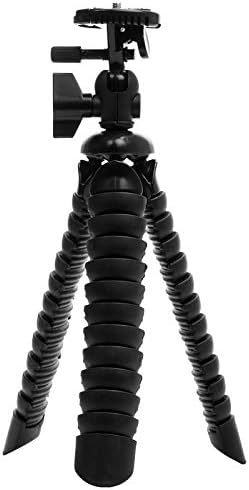
Figure 4.2: Kodak 32GB Class 10 SDHC Memory Card.
- Locate the SD card slot, usually near the battery compartment.
- Insert the 32GB SDHC memory card with the label facing the correct direction (refer to the diagram near the slot). Push it gently until it clicks into place.
- To remove, push the card in slightly until it springs out.
4.4. Attaching the Neck Strap
Thread the neck strap through the strap lugs on the camera body as illustrated in the quick start guide to prevent accidental drops.
4.5. Powering On/Off
Press the POWER button to turn the camera on or off. The lens will extend when powered on.
5. Operating the Camera
5.1. Basic Photography
- Select a Mode: Turn the mode dial to select your desired shooting mode (e.g., Auto for general use).
- Frame Your Shot: Use the 3-inch LCD screen to compose your image.
- Zoom: Use the zoom lever around the shutter button to adjust the 42x optical zoom. Push towards 'W' for wide-angle, 'T' for telephoto.
- Focus: Press the shutter button halfway down to allow the camera to focus. The focus frame will turn green when focus is achieved.
- Capture: Press the shutter button fully down to take the picture.
5.2. Video Recording
- Turn the mode dial to the video recording icon.
- Press the dedicated Record button (often marked with a red dot) to start recording.
- Press the Record button again to stop recording. Videos are recorded in 720p resolution.
5.3. Playback Mode
Press the Playback button (often marked with a triangle icon) to review your photos and videos. Use the directional buttons to navigate through your media.
6. Advanced Features
6.1. Panorama Capture
The AZ425 features a Panorama Capture mode for wide scenic shots. Select the Panorama mode from the mode dial or menu, then follow the on-screen instructions to sweep the camera across the scene. The camera will stitch multiple images together to create a single panoramic photo.
6.2. Optical Image Stabilization
The camera's optical image stabilization system helps reduce blur caused by camera shake, especially when using the zoom or shooting in lower light conditions. This feature operates automatically to ensure sharper images.
6.3. Wi-Fi Connectivity
The camera supports Wi-Fi connectivity for transferring images to a compatible smart device. Refer to the camera's on-screen menu for Wi-Fi setup and connection instructions.
7. Maintenance
7.1. Cleaning the Camera
- Lens: Use a soft, lint-free cloth specifically designed for camera lenses. Gently wipe in a circular motion. Avoid touching the lens with your fingers.
- LCD Screen: Wipe with a soft, dry cloth. For stubborn smudges, use a screen cleaner designed for electronics.
- Camera Body: Use a soft, dry cloth to wipe away dust and dirt. Do not use strong cleaning agents or solvents.
7.2. Storage
When not in use, store the camera in a cool, dry place away from direct sunlight and extreme temperatures. Remove the battery if the camera will not be used for an extended period. Use the lens cap to protect the lens from dust and scratches.
8. Troubleshooting
If you encounter issues with your camera, refer to the following common problems and solutions:
| Problem | Possible Cause / Solution |
|---|---|
| Camera does not power on. | Battery is not charged or incorrectly inserted. Ensure battery is fully charged and inserted correctly. |
| "Lens Obstruction" error. | Something is blocking the lens mechanism. Power off the camera, gently check for obstructions, and power on again. Do not force the lens. |
| Photos are blurry. | Camera shake, subject movement, or incorrect focus. Ensure stable grip, use a tripod (like the bundled spider tripod), or check focus settings. Optical Image Stabilization is active to help reduce blur. |
| SD card error. | SD card may be full, corrupted, or incorrectly inserted. Try reinserting the card, formatting it (this will erase all data), or using a different card. |
| Flash does not fire. | Flash mode may be set to 'Off' or 'Auto' in bright conditions. Adjust flash settings in the menu. |
If problems persist, contact customer support.
9. Specifications
Key technical specifications for the Kodak PIXPRO AZ425 Digital Camera:
- Model Name: PIXPRO AZ425 (AZ421-BK variant)
- Photo Sensor Resolution: 20 Megapixels
- Optical Zoom: 42x
- Wide Angle Lens: 24mm
- Image Stabilization: Optical
- LCD Screen Size: 3-inch
- Video Resolution: 720p
- Supported File Formats: JPEG (photos), MP4 (video)
- Battery Type: Lithium Ion
- Connectivity: Wi-Fi
- Memory Card Support: SD, SDHC (up to 32GB)
- Item Weight: Approximately 3 Pounds
10. Warranty and Support
For warranty information and customer support, please refer to the warranty card included in your product packaging or visit the official KODAK PIXPRO website. Keep your purchase receipt as proof of purchase for warranty claims.
Online Resources:
- KODAK Official Website: www.kodak.com
- KODAK PIXPRO Support: Refer to the support section on the KODAK PIXPRO website for FAQs, driver downloads, and service center information.


