
1. Introduction
Thank you for choosing the EZON T037 Digital Sports Watch. This manual provides detailed instructions on how to set up, operate, and maintain your watch and heart rate monitor chest strap. The EZON T037 is designed to assist you in monitoring your heart rate, tracking calories burned, and timing your workouts, helping you train more effectively.
2. Features
- Heart Rate Monitor: Tracks real-time heart rate using the included chest strap for intensity level monitoring.
- Training Zones: Allows setting customizable heart rate zones to guide your workout intensity.
- Calories Burned: Provides estimated calorie expenditure during exercise based on continuous heart rate tracking.
- Stopwatch: Features a 100-hour stopwatch with 1/100 second resolution for precise workout timing.
- Long Battery Life: Operates on standard coin cell batteries, eliminating the need for frequent recharging.
- Alarm Function: Includes an alarm for daily reminders or workout alerts.
3. Setup
3.1 Initial Watch Setup
- Power On: The watch typically comes pre-installed with a battery. If the display is off, press any button to activate it.
- Set Time and Date:
- Press and hold the MODE button until the time setting mode is activated (usually indicated by flashing digits).
- Use the START/STOP or RESET buttons to adjust the values (hours, minutes, year, month, day).
- Press MODE again to confirm each setting and move to the next.
- Press MODE one last time to exit the setting mode.
- Set Personal Data: For accurate calorie and heart rate zone calculations, input your personal data (age, weight, gender). Refer to the watch's display prompts and use the adjustment buttons.
3.2 Wearing the Watch
Wear the watch on your wrist, ensuring it is snug but comfortable. The display should be easily visible during your activities.
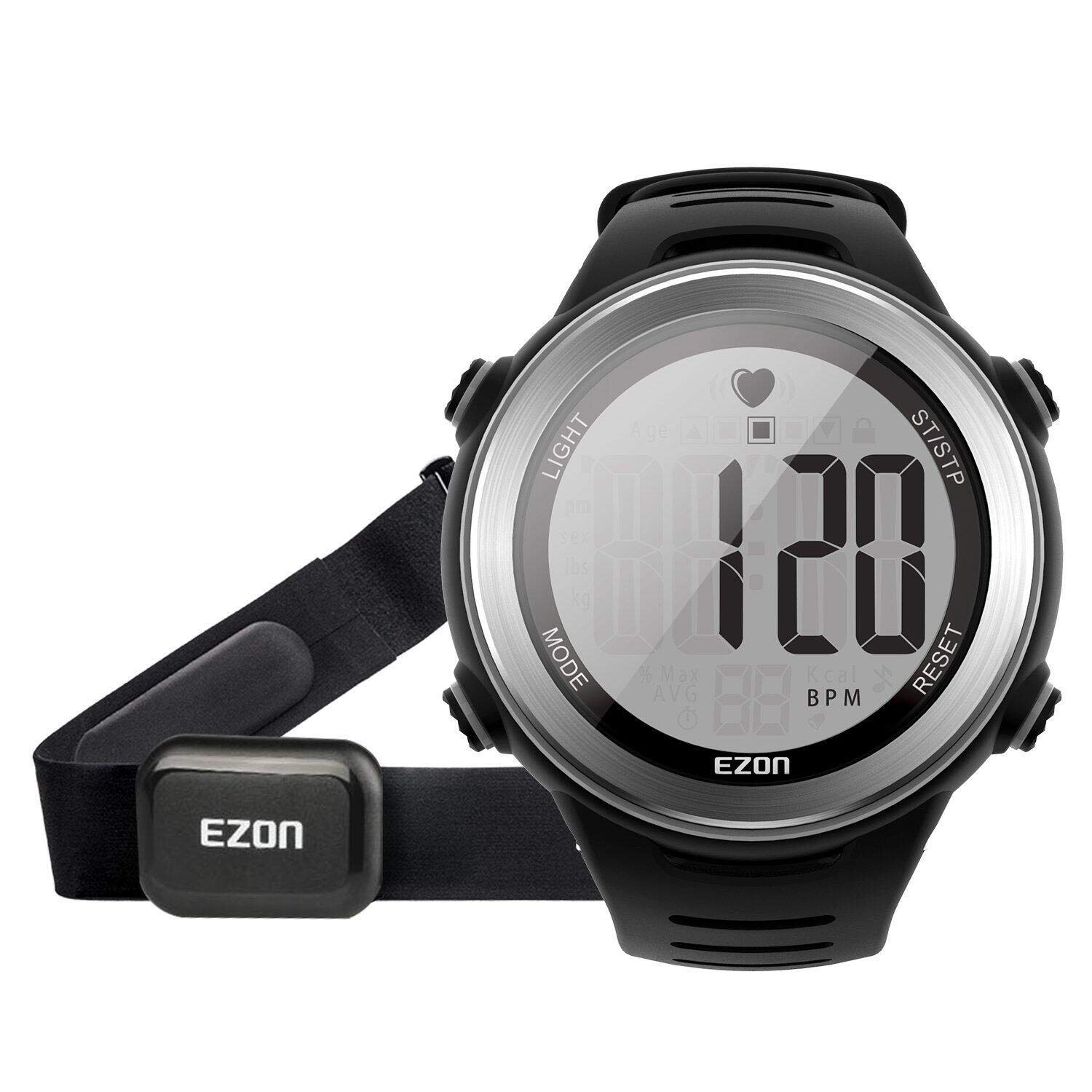
Figure 1: The EZON T037 Digital Sports Watch worn on a wrist. This image shows the watch face with its digital display and the strap securely fastened.
3.3 Wearing the Chest Strap
- Moisten Electrodes: Lightly moisten the electrode areas on the back of the chest strap with water or conductive gel. This ensures good contact with your skin.
- Position the Strap: Place the chest strap directly against your skin, just below your pectoral muscles. The EZON logo should be facing forward.
- Adjust Fit: Adjust the strap length to ensure a snug but comfortable fit. It should not be too loose, as this can affect heart rate detection.
- Pairing: The watch should automatically detect the chest strap when it's worn correctly and within range. Look for a heart rate icon or reading on the watch display.
4. Operating Instructions
4.1 Basic Navigation
The watch typically has several buttons for navigation:
- MODE Button: Cycles through different display modes (Time, Stopwatch, Heart Rate, Alarm).
- START/STOP Button: Starts and stops functions like the stopwatch or workout recording.
- RESET/SET Button: Resets values or enters setting modes when held.
- LIGHT Button: Activates the backlight for visibility in low light conditions.
4.2 Heart Rate Monitoring
- Ensure the chest strap is worn correctly and moistened.
- Press the MODE button until the heart rate display mode is shown.
- Your current heart rate (BPM) will be displayed. It may take up to a minute for the reading to stabilize.
4.3 Setting Training Zones
The watch allows you to set upper and lower heart rate limits for your training.
- In heart rate mode, press and hold the RESET/SET button to enter the zone setting.
- Use the START/STOP or RESET buttons to adjust the upper and lower heart rate limits.
- Press MODE to confirm each setting.
- An audible alert will sound if your heart rate goes above or below your set zones during a workout.
4.4 Using the Stopwatch
- Press the MODE button until the stopwatch display is shown (usually indicated by "00:00:00").
- Press START/STOP to begin timing.
- Press START/STOP again to pause the stopwatch.
- Press RESET to clear the stopwatch to zero.
4.5 Calorie Tracking
The watch estimates calories burned based on your personal data and heart rate during exercise.
- Ensure your personal data (age, weight, gender) is accurately entered in the watch settings.
- Wear the chest strap for continuous heart rate monitoring during your workout.
- The watch will display an estimated calorie count in the appropriate mode.
5. Maintenance
5.1 Watch Battery Replacement
The watch uses a standard coin cell battery (e.g., CR2032). When the display dims or functions become erratic, it's time to replace the battery.
- Using a small screwdriver, carefully remove the screws on the back cover of the watch.
- Gently pry open the back cover.
- Remove the old battery, noting its orientation (+/-).
- Insert a new battery with the correct orientation.
- Replace the back cover and secure the screws. Ensure the gasket is properly seated to maintain water resistance.
5.2 Chest Strap Battery Replacement
The chest strap also uses a coin cell battery (e.g., CR2032).
- Locate the battery compartment on the chest strap transmitter. It usually has a twist-off cover or small screws.
- Open the compartment and remove the old battery.
- Insert a new CR2032 battery with the positive (+) side facing up.
- Close the compartment securely, ensuring the seal is intact for water resistance.
5.3 Cleaning
- Watch: Wipe the watch with a soft, damp cloth. Avoid harsh chemicals or abrasive cleaners.
- Chest Strap: After each use, rinse the chest strap electrodes with clean water and hang to dry. Do not machine wash or tumble dry.
6. Troubleshooting
| Problem | Possible Cause | Solution |
|---|---|---|
| No heart rate reading or erratic readings. |
|
|
| Watch display is dim or blank. |
|
|
| Buttons are unresponsive. |
|
|
7. Specifications
- Model Number: T037
- Brand: EZON
- Display Size: 1.2 inches
- Dimensions: 24 x 1.33 x 4.8 cm (Watch)
- Weight: 108.86 g
- Battery Type (Watch): 1 x CR2 (included) - Note: The provided data states CR2, but CR2032 is common for similar devices. Please verify.
- Battery Type (Chest Strap): 1 x CR2032 (typically)
- Average Battery Life: 100 Hours (Watch operation)
- Water Resistance: (Information not explicitly provided. Advise caution regarding water exposure.)
8. Warranty and Support
For warranty information and customer support, please refer to the documentation included with your purchase or visit the official EZON website. Keep your proof of purchase for warranty claims.
If you encounter issues not covered in this manual, please contact EZON customer service for assistance.
