1. Introduction
This manual provides essential information for the safe and efficient operation, installation, and maintenance of your Samsung WF45M5500AP 4.5 Cu. Ft. Front Load Steam Washer. Please read this manual thoroughly before using the appliance and retain it for future reference.
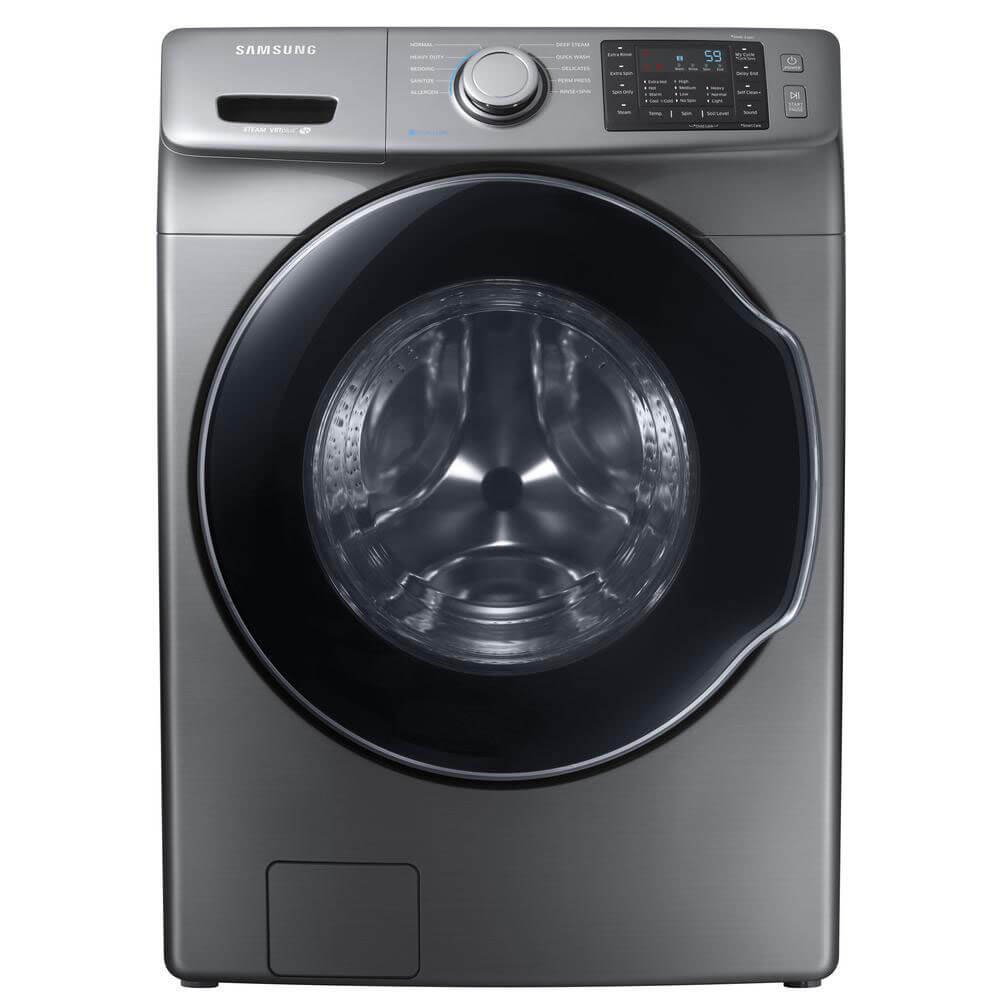
Figure 1: Front view of the Samsung WF45M5500AP Front Load Steam Washer. This image displays the overall design, including the large front-loading door, the control panel at the top, and the detergent dispenser drawer.
2. Safety Information
To reduce the risk of fire, electric shock, or injury when using your appliance, follow these basic precautions:
- Read all instructions before using the appliance.
- Do not wash or dry articles that have been previously cleaned in, washed in, soaked in, or spotted with gasoline, dry-cleaning solvents, or other flammable or explosive substances as they emit vapors that could ignite or explode.
- Do not allow children to play on or in the appliance. Close supervision of children is necessary when the appliance is used near children.
- Do not reach into the appliance if the tub or agitator is moving.
- Do not install or store this appliance where it will be exposed to the weather or freezing temperatures.
- Do not tamper with controls.
- Do not repair or replace any part of the appliance or attempt any servicing unless specifically recommended in the user-maintenance instructions or in published user-repair instructions that you understand and have the skills to carry out.
- Always disconnect the appliance from the power supply before attempting any service.
3. Setup and Installation
Proper installation is crucial for the performance and longevity of your washer. Ensure all steps are followed carefully.
3.1 Unpacking
Remove all packaging materials, including the shipping bolts located at the rear of the washer. Keep the shipping bolts for future transport if needed.
3.2 Leveling the Washer
Use a level to ensure the washer is perfectly level. Adjust the leveling feet at the bottom corners of the washer as necessary. A level washer prevents excessive vibration and noise during operation.
3.3 Water Supply Connection
Connect the hot and cold water inlet hoses to the corresponding hot and cold water valves on the wall and to the back of the washer. Ensure connections are tight to prevent leaks. Use new hoses to prevent water leakage.
3.4 Drain Hose Installation
Securely attach the drain hose to the drain outlet at the back of the washer. Place the other end of the drain hose into a standpipe or laundry tub. Ensure the drain hose is properly secured to prevent it from dislodging during the drain cycle.
3.5 Power Connection
Plug the washer's power cord into a grounded 120V, 60Hz, 15 Amp electrical outlet. Do not use an extension cord.
4. Operating Instructions
Familiarize yourself with the control panel and various wash cycles to optimize your laundry experience.

Figure 2: Close-up view of the Samsung WF45M5500AP control panel. This image highlights the cycle selector dial, digital display, and various option buttons for temperature, spin, soil level, and special features.
4.1 Control Panel Overview
The control panel consists of a cycle selector dial, a digital display, and various buttons for customizing wash settings.
- Cycle Selector Dial: Turn to select desired wash cycle.
- Digital Display: Shows remaining time, cycle status, and error codes.
- Temp: Adjusts wash water temperature (Extra Hot, Hot, Warm, Cold, Tap Cold).
- Spin: Adjusts spin speed (Extra High, High, Medium, Low, No Spin).
- Soil: Adjusts soil level (Heavy, Normal, Light).
- Options: Includes Extra Rinse, Extra Spin, Delay End, Self Clean, Sound.
- Power: Turns the washer on/off.
- Start/Pause: Starts or pauses the selected wash cycle.
4.2 Loading Laundry
Open the washer door and load items loosely into the drum. Do not overload the washer, as this can affect washing performance and cause excessive vibration. Close the door firmly.
4.3 Adding Detergent and Additives
Pull out the dispenser drawer. Add liquid or powder detergent to the main wash compartment. Add fabric softener to the softener compartment and bleach to the bleach compartment, if applicable. Do not overfill.
4.4 Selecting a Wash Cycle
Turn the Cycle Selector Dial to choose the appropriate cycle for your laundry type. Available cycles include:
- NORMAL: For everyday items like cottons, linens, and mixed loads.
- HEAVY DUTY: For sturdy fabrics, work clothes, and heavily soiled items.
- BEDDING: For bulky items like blankets, comforters, and sheets.
- SANITIZE: Uses high temperature to sanitize heavily soiled, colorfast items.
- ALLERGEN: Helps remove allergens from fabrics.
- DEEP STEAM: Provides a deep clean with steam for tough stains.
- QUICK WASH: For lightly soiled items that need a quick wash.
- DELICATES: For delicate items requiring gentle washing.
- PERMA PRESS: For permanent press and synthetic fabrics.
- RINSE+SPIN: For rinsing and spinning items without a full wash cycle.
4.5 Customizing Settings
After selecting a cycle, you can adjust the Temp, Spin, and Soil levels using the corresponding buttons. Press the Options button to select additional features like Extra Rinse or Delay End.
4.6 Starting the Cycle
Press the Start/Pause button to begin the wash cycle. The display will show the estimated remaining time.
5. Maintenance
Regular maintenance helps ensure optimal performance and extends the life of your washer.
5.1 Cleaning the Dispenser Drawer
Periodically remove and clean the detergent dispenser drawer to prevent residue buildup. Rinse with warm water and a soft brush, then reinsert.
5.2 Cleaning the Drum (Self Clean Cycle)
Use the Self Clean cycle regularly (approximately once a month) to remove detergent residue and bacteria from the washer drum. Do not add laundry or detergent during this cycle.
5.3 Cleaning the Exterior
Wipe the exterior surfaces of the washer with a soft, damp cloth. Avoid abrasive cleaners.
5.4 Cleaning the Drain Pump Filter
The drain pump filter should be cleaned periodically to prevent clogs and ensure proper drainage. Refer to the detailed instructions in the full product manual for accessing and cleaning this filter.
5.5 Winterizing
If the washer is to be stored in an area subject to freezing temperatures, follow the winterizing procedure in the full product manual to drain all water from the appliance and prevent damage.
6. Troubleshooting
Before contacting service, review the following common issues and their solutions.
| Problem | Possible Cause | Solution |
|---|---|---|
| Washer does not start | Power cord unplugged; door not closed properly; Start/Pause button not pressed. | Check power connection; ensure door is latched; press Start/Pause. |
| Excessive vibration/noise | Washer not level; shipping bolts not removed; overloaded or unbalanced load. | Level the washer; remove shipping bolts; redistribute laundry or reduce load size. |
| Water leaks | Loose hose connections; clogged drain hose; excessive detergent. | Tighten hose connections; clear drain hose; use appropriate amount of detergent. |
| Long cycle times / Off-balance issues | Unbalanced load; sensor malfunction; ballast weight issues (as per user reviews). | Redistribute load; if problem persists, contact authorized service. |
| Washer not draining | Drain hose kinked or clogged; drain pump filter clogged. | Check and clear drain hose; clean drain pump filter. |
7. Specifications
- Model: WF45M5500AP
- Capacity: 4.5 Cu. Ft.
- Access Location: Front Load
- Power Supply: 120V / 60Hz (Refer to product label for specific amperage)
- Dimensions (WxHxD): Refer to the full product manual or product label for exact measurements.
- Weight: Refer to the full product manual or product label.
8. Warranty and Support
Your Samsung WF45M5500AP washer is covered by a limited warranty. Please refer to the warranty card included with your purchase for specific terms and conditions, including coverage duration and limitations. Typically, major appliances come with a 1-year limited warranty on parts and labor.
For technical assistance, service requests, or to purchase replacement parts, please contact Samsung Customer Service:
- Website: www.samsung.com/us/support/
- Phone: Refer to the Samsung support website for the most current contact numbers.
When contacting support, please have your model number (WF45M5500AP) and serial number ready.