
Ariete 0156/05
Contents
Ariete Vintage 4-Slice Toaster 0156/05 Instruction Manual
Model: 0156/05 | Brand: Ariete
1. Introduction
Thank you for purchasing the Ariete Vintage 4-Slice Toaster. This appliance is designed for domestic use to toast bread slices. Please read this instruction manual carefully before use and keep it for future reference. Proper use and maintenance will ensure optimal performance and longevity of your toaster.
Important Safety Instructions
- Always ensure the voltage indicated on the rating label corresponds to your mains voltage.
- Do not immerse the appliance, cord, or plug in water or any other liquid.
- Do not operate the toaster with a damaged cord or plug.
- Keep the appliance out of reach of children.
- Do not leave the toaster unattended during operation.
- Avoid touching hot surfaces. Use handles or knobs.
- Do not insert oversized foods, metal foil packages, or utensils into the toaster slots as this may cause fire or electric shock.
- Unplug from the outlet when not in use and before cleaning.
- Ensure the crumb tray is regularly emptied and cleaned.
- Do not use the appliance for purposes other than its intended use.
2. Product Overview
The Ariete Vintage 4-Slice Toaster features a durable metal body and offers various functions for perfect toast. Below is an illustration of the toaster's main components and controls.

Image 2.1: Front view of the Ariete Vintage 4-Slice Toaster in blue.
Components and Controls

Image 2.2: Detailed view of the control panel, showing the Defrost (*), Reheat (SSS), and Cancel (0) buttons, along with the browning control dial.
- Toasting Slots: Four wide slots for bread slices.
- Carriage Lever: Lowers and raises the bread.
- Browning Control Dial: Adjusts the toasting level from 1 (lightest) to 6 (darkest).
- Cancel Button (0): Stops the toasting cycle immediately.
- Reheat Button (SSS): Reheats previously toasted bread without further browning.
- Defrost Button (*): Defrosts and toasts frozen bread.
- Crumb Tray: Collects crumbs for easy cleaning.
3. Initial Setup
Before using your toaster for the first time, please follow these steps:
- Unpack: Carefully remove the toaster and all packaging materials.
- Placement: Place the toaster on a stable, flat, heat-resistant surface, away from flammable materials and at least 10 cm from walls or cabinets.
- First Use (Burn-off):
- Plug the toaster into a grounded electrical outlet.
- Set the browning control to a medium setting (e.g., 3 or 4).
- Operate the toaster without bread for 2-3 cycles. This will burn off any manufacturing residues and eliminate initial odors. A slight smoke or odor is normal during this process.
- Ensure the area is well-ventilated during this initial operation.
4. Operating Instructions
Follow these steps to toast bread using your Ariete Vintage Toaster:

Image 4.1: Toaster in operation, showing four slices of bread being toasted.
- Insert Bread: Place up to four slices of bread into the toasting slots. Ensure the slices are not too thick or oversized.
- Select Browning Level: Turn the browning control dial to your desired setting (1 for light, 6 for dark).
- Start Toasting: Push the carriage lever down until it locks into place. The indicator light will illuminate, and the toasting cycle will begin.
- Automatic Pop-up: Once the selected browning level is reached, the toast will automatically pop up, and the toaster will switch off.
- Cancel Function: To stop the toasting cycle at any time, press the Cancel (0) button.
Special Functions
- Defrost Function:
To toast frozen bread, insert the bread, push the carriage lever down, and then press the Defrost (*) button. The indicator light for defrost will illuminate. The toaster will automatically adjust the toasting time to first defrost and then toast the bread.
- Reheat Function:
To reheat cold, previously toasted bread, insert the bread, push the carriage lever down, and then press the Reheat (SSS) button. The indicator light for reheat will illuminate. This function will warm the bread without further browning.
5. Cleaning and Maintenance
Regular cleaning ensures the safe and efficient operation of your toaster.
- Unplug and Cool: Always unplug the toaster from the power outlet and allow it to cool completely before cleaning.
- Crumb Tray:
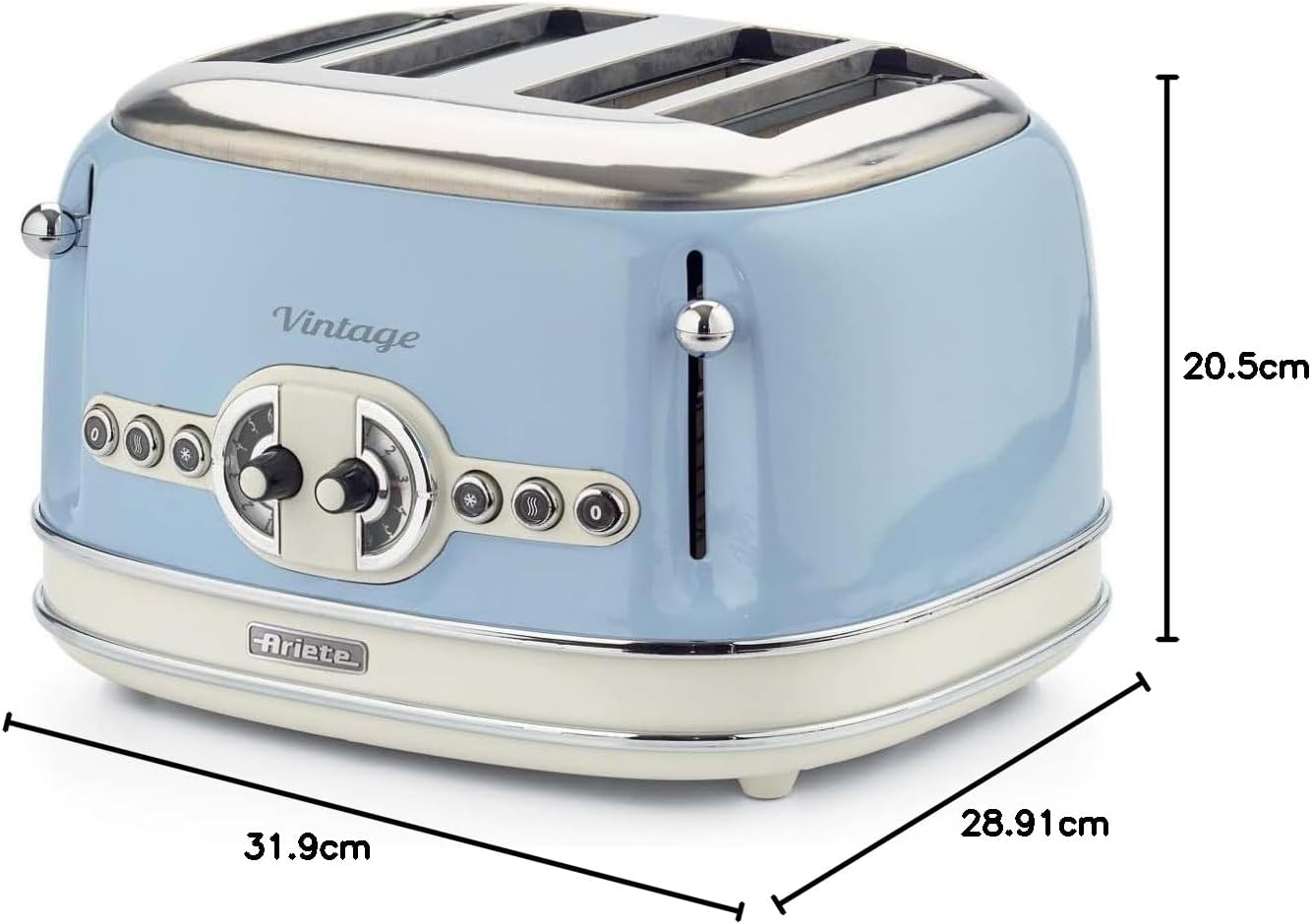
Image 5.1: Removing the crumb tray for cleaning.
- Pull out the removable crumb tray located at the bottom of the toaster.
- Discard accumulated crumbs.
- Wipe the tray with a damp cloth and dry thoroughly before reinserting.
- Never operate the toaster without the crumb tray in place.
- Exterior Cleaning:
- Wipe the exterior of the toaster with a soft, damp cloth.
- Do not use abrasive cleaners or metal scouring pads, as these can scratch the surface.
- Ensure no water enters the toasting slots.
- Interior Cleaning:
- To remove any bread pieces stuck inside the slots, turn the toaster upside down over a sink and gently shake it.
- Never use metal objects to remove bread from the slots, as this can damage the heating elements or cause electric shock.
6. Troubleshooting
If you encounter any issues with your toaster, please refer to the following common problems and solutions:
| Problem | Possible Cause | Solution |
|---|---|---|
| Toaster does not turn on. | Not plugged in; power outage; faulty outlet. | Check power cord connection; check circuit breaker; try a different outlet. |
| Bread does not toast evenly. | Uneven bread thickness; crumb buildup. | Ensure bread slices are uniform; clean crumb tray and interior. |
| Smoke coming from toaster. | Food stuck in slots; excessive crumbs; first use burn-off. | Immediately press Cancel button and unplug. Allow to cool, then clean crumbs. If first use, ensure ventilation. |
| Carriage lever does not stay down. | Toaster not plugged in; internal malfunction. | Ensure toaster is plugged in. If problem persists, contact customer support. |
If the problem persists after trying these solutions, please contact Ariete customer support.
7. Specifications
Technical details for the Ariete Vintage 4-Slice Toaster 0156/05:
- Model: 0156/05
- Brand: Ariete
- Power: 1630 Watts
- Capacity: 4 Slices
- Material: Metal Body
- Browning Levels: 6
- Functions: Toast, Defrost, Reheat, Cancel
- Dimensions (L x W x H): 31.9 cm x 28.9 cm x 20.5 cm
- Weight: 1 Kilogram
- Special Features: Removable Crumb Tray

Image 7.1: Product dimensions.
8. Warranty and Support
For warranty information, product registration, or technical support, please refer to the warranty card included with your purchase or visit the official Ariete website.
Ariete Official Website: www.ariete.net
Please have your model number (0156/05) and purchase date ready when contacting support.
Ask a question about this manual
Ask about setup, troubleshooting, compatibility, parts, safety, or missing instructions. Manuals+ will review the question and use this page’s manual context to help answer it.