
Introduction
The Prixton DV660 is a versatile 4K WiFi Aquatic Sports Camera designed to capture your adventures in high definition. Its compact and lightweight design, combined with a 2-inch display, makes it an ideal companion for various outdoor and underwater activities. This manual provides essential information for setting up, operating, maintaining, and troubleshooting your DV660 camera.
Key features include 4K video resolution, integrated Wi-Fi for instant media transfer, and a robust waterproof housing allowing submersion up to 30 meters. The camera supports external Micro SD cards up to 64GB for extensive storage.
Setup
Package Contents
- Prixton DV660 Action Camera
- Waterproof Housing
- Adhesive Mounts (for helmet and bicycle)
- USB Cable
- User Manual
Camera Overview
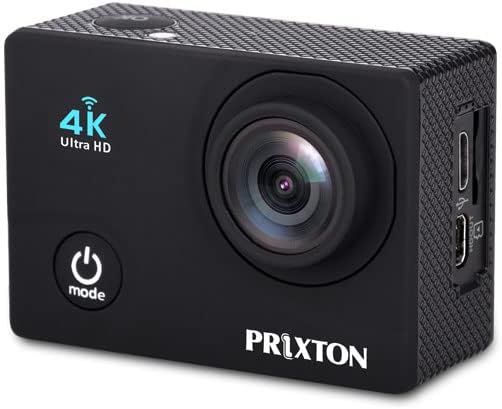
Figure 1: Front view of the DV660 camera. Features include the lens, power/mode button, and 4K Ultra HD indicator.

Figure 2: Back view of the DV660 camera. Shows the 2-inch display and navigation buttons.
Battery Installation and Charging
- Locate the battery compartment on the bottom of the camera.
- Open the compartment cover and insert the Lithium-ion battery, ensuring correct polarity.
- Close the battery compartment cover securely.
- To charge, connect the camera to a USB power source using the provided USB cable. The charging indicator will illuminate.
- Charging is complete when the indicator light turns off or changes color (refer to camera display for exact status).
Micro SD Card Installation
- Ensure the camera is powered off.
- Locate the Micro SD card slot on the side of the camera (refer to Figure 3).
- Insert a Micro SD card (up to 64GB, Class 10 or higher recommended) into the slot until it clicks into place.
- To remove, gently push the card inward until it springs out.
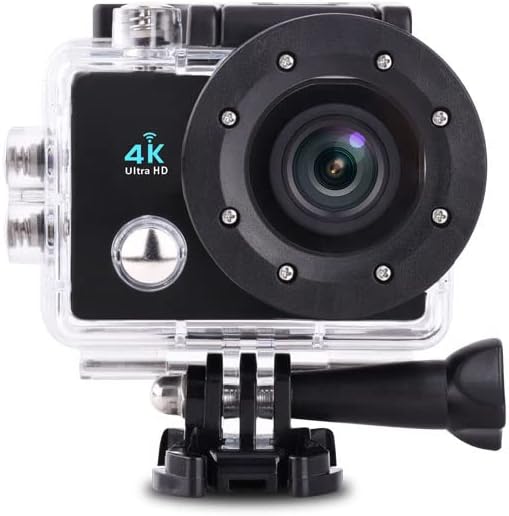
Figure 3: Side view of the DV660 camera, showing the Micro SD card slot and USB port.
Operating Instructions
Powering On/Off
- To Power On: Press and hold the Power/Mode button (refer to Figure 1) for a few seconds until the screen illuminates.
- To Power Off: Press and hold the Power/Mode button again for a few seconds until the screen turns off.
Basic Navigation and Mode Selection
- Press the Power/Mode button repeatedly to cycle through different modes: Video Recording, Photo Capture, Playback, and Settings.
- The selected mode will be displayed on the 2-inch screen.
- Use the Shutter/OK button (usually on top) to confirm selections or start/stop actions within a mode.
Video Recording
- Switch the camera to Video Recording mode.
- Press the Shutter/OK button to start recording. A red indicator light or on-screen icon will show that recording is in progress.
- Press the Shutter/OK button again to stop recording. The video file will be saved to the Micro SD card.
Photo Capture
- Switch the camera to Photo Capture mode.
- Frame your shot using the screen.
- Press the Shutter/OK button to take a photo. The image will be saved to the Micro SD card.
Wi-Fi Connectivity
- Navigate to the camera's settings menu and enable Wi-Fi.
- On your smartphone or tablet, search for available Wi-Fi networks and connect to the network broadcast by the DV660 camera.
- Open the dedicated camera application (if available, check manufacturer's website for download) on your device to view live footage, control the camera, and transfer files instantly.
Using the Waterproof Housing

Figure 4: The DV660 camera securely enclosed in its waterproof housing, ready for aquatic use.
- Before each use in water, ensure the camera is correctly seated within the waterproof housing and all latches are securely fastened.
- Perform a dry test of the housing without the camera inside to check for leaks.
- The housing provides water resistance up to 30 meters (98 feet). Do not exceed this depth.
- The housing is designed to allow access to all camera controls, enabling seamless switching between photo and video modes underwater.
Maintenance
Cleaning the Camera
- Use a soft, lint-free cloth to clean the camera body and screen.
- For the lens, use a specialized lens cleaning cloth and solution to avoid scratches.
- After using the waterproof housing in saltwater, rinse it thoroughly with fresh water and allow it to air dry.
Battery Care
- Avoid exposing the battery to extreme temperatures.
- Charge the battery fully before extended storage.
- If storing for long periods, remove the battery from the camera.
Storage
- Store the camera in a cool, dry place away from direct sunlight.
- Keep the camera and accessories in their original packaging or a protective case to prevent damage.
Troubleshooting
Common Issues and Solutions
| Problem | Possible Cause | Solution |
|---|---|---|
| Camera does not turn on. | Low battery; Battery incorrectly installed; Camera malfunction. | Charge the battery fully; Reinstall the battery correctly; Contact customer support if issue persists. |
| Cannot record video or take photos. | Micro SD card full; Micro SD card error; Incorrect mode. | Delete unnecessary files or replace Micro SD card; Format Micro SD card (this will erase all data); Ensure camera is in the correct mode. |
| Wi-Fi connection issues. | Wi-Fi not enabled; Interference; Incorrect password. | Enable Wi-Fi in camera settings; Move closer to the camera; Re-enter Wi-Fi password. |
| Short battery life. | Battery degradation; Extreme temperatures; Continuous recording/Wi-Fi use. | Replace battery if old; Operate in moderate temperatures; Minimize continuous Wi-Fi use and recording. |
Specifications
Technical Specifications
| Feature | Detail |
|---|---|
| Model Number | DV660 |
| Brand | Prixton |
| Dimensions (L x W x H) | 50 x 50 x 28 cm |
| Weight | 85 Grams |
| Battery Type | 1 Lithium-ion battery (required) |
| Photo Sensor Technology | CMOS |
| Video Recording Resolution | Up to 4K (listed as 1080p in some specifications) |
| Effective Capture Resolution | 5 Megapixels |
| Maximum Aperture | 2.8 Millimeters |
| Flash Memory Type | Micro SD (supports up to 64GB) |
| Video Capture Format | MOV |
| Audio Format | AAC |
| Screen Size | 2 Inches |
| Connectivity Technology | Wi-Fi (802.11b, 802.11g) |
| Color | Black |
| Water Resistance Level | Waterproof (up to 30 meters with housing) |
| Image Stabilization | Electronic (Note: May not be available in all modes) |
| Optical Zoom | 1x |
| Recommended Product Uses | Outdoor activities, sports, underwater filming |
| Shooting Modes | Night Portrait, Underwater |
| Compatible Devices | Devices with Wi-Fi and USB port |
Warranty and Support
Warranty Information
For detailed warranty information, please refer to the warranty card included with your product or visit the official Prixton website. Keep your proof of purchase for any warranty claims.
Customer Support
If you encounter any issues not covered in this manual or require further assistance, please contact Prixton customer support through their official website or the contact information provided with your product. Please have your model number (DV660) and purchase details ready when contacting support.


