
Introduction
Thank you for purchasing the Blackmore Pro Audio BRS-2009 Portable PA System. This versatile unit combines a powerful audio amplifier with music playback capabilities, making it ideal for various applications including musical performances, public speaking, and events. Featuring Bluetooth connectivity, USB/SD card inputs, and a built-in rechargeable battery, the BRS-2009 offers exceptional portability and convenience. Please read this manual thoroughly before operating the unit to ensure proper use and to maximize its lifespan.
Important Safety Instructions
- Do not expose this unit to rain or moisture to prevent fire or shock hazards.
- Do not open the cabinet. There are no user-serviceable parts inside. Refer all servicing to qualified service personnel.
- Protect the power cord from being walked on or pinched, particularly at plugs, convenience receptacles, and the point where they exit from the apparatus.
- Only use attachments/accessories specified by the manufacturer.
- Unplug this apparatus during lightning storms or when unused for long periods of time.
- Ensure proper ventilation. Do not block any ventilation openings.
Package Contents
Please check that all items are present in the package:
- Blackmore Pro Audio BRS-2009 Portable PA System
- Wired Microphone
- Power Adapter/Charging Cable
- User Manual (this document)
Product Features
- Built-in Rechargeable Battery for extended portability.
- Bluetooth Connectivity for wireless audio streaming from compatible devices.
- USB and SD Card Inputs for direct MP3 playback.
- Includes a Wired Microphone for immediate PA functionality.
- ¼” Musical Instrument Input for connecting guitars or other instruments.
- Integrated luggage-style carrying handle and caster wheels for easy transport.
- Powerful 1400 Watts of musical power with a 10-inch subwoofer.
Controls and Connections

Figure 1: Front view of the BRS-2009 PA system with the included wired microphone resting on top. This image shows the main speaker grille and the control panel located at the top of the unit.

Figure 2: Rear view of the BRS-2009, highlighting the retractable luggage-style handle and the integrated caster wheels at the base, designed for easy transport.
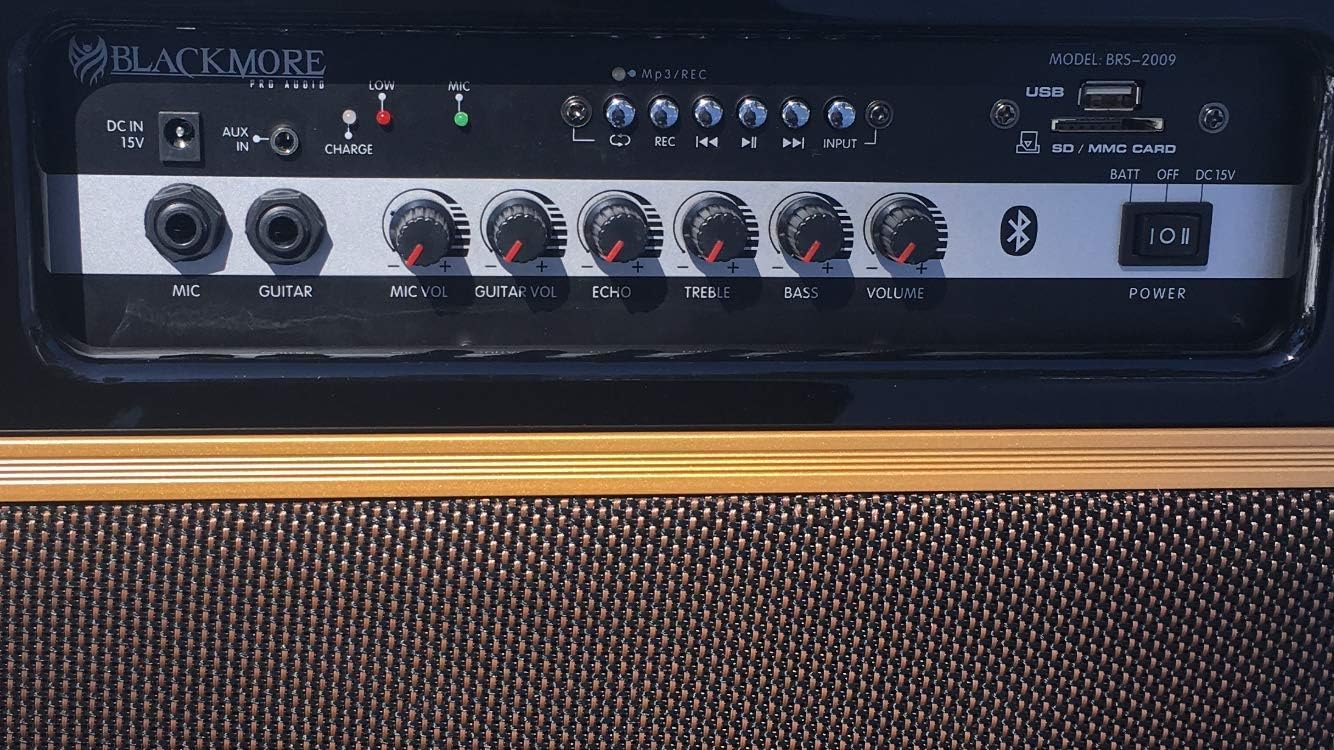
Figure 3: Detailed view of the BRS-2009 control panel. This image clearly shows all input jacks, control knobs, and indicators.
Control Panel Overview:
- DC IN 15V: Power input jack for connecting the included power adapter to charge the unit or operate it from AC power.
- AUX IN: 3.5mm auxiliary input for connecting external audio devices.
- CHARGE Indicator: LED light indicating charging status (e.g., red for charging, green for fully charged).
- MIC Indicator: LED light indicating microphone activity.
- MIC Input: ¼” jack for connecting the wired microphone.
- GUITAR Input: ¼” jack for connecting a guitar or other musical instrument.
- MIC VOL: Rotary knob to adjust the volume of the microphone input.
- GUITAR VOL: Rotary knob to adjust the volume of the guitar input.
- ECHO: Rotary knob to adjust the echo effect for microphone and guitar inputs.
- TREBLE: Rotary knob to adjust the high frequencies of the audio output.
- BASS: Rotary knob to adjust the low frequencies of the audio output.
- VOLUME: Master volume control for the overall audio output.
- MP3/REC Controls: Buttons for playback control (Play/Pause, Next, Previous, Record) and mode selection.
- INPUT Button: Toggles between different input modes (Bluetooth, USB, SD, AUX).
- USB Port: For connecting USB flash drives for MP3 playback.
- SD/MMC CARD Slot: For inserting SD or MMC memory cards for MP3 playback.
- POWER Switch: Toggles the unit ON/OFF.
Setup
- Unpacking: Carefully remove the PA system and all accessories from the packaging. Retain the packaging for future transport or storage.
- Initial Charge: Before first use, fully charge the internal battery. Connect the power adapter to the DC IN 15V port on the unit and plug it into a standard AC outlet. The CHARGE indicator will illuminate. Charging typically takes several hours. The indicator will change color when fully charged.
- Placement: Place the unit on a stable, flat surface. Ensure there is adequate ventilation around the unit.
Operating Instructions
Powering On/Off
- To turn the unit ON, slide the POWER switch to the 'ON' position.
- To turn the unit OFF, slide the POWER switch to the 'OFF' position.
Bluetooth Connectivity
- Turn on the BRS-2009.
- Press the INPUT button until the unit is in Bluetooth mode (indicated by a voice prompt or display icon).
- Enable Bluetooth on your mobile device (smartphone, tablet, etc.).
- Search for available Bluetooth devices and select "BRS-2009" from the list.
- Once paired, you can stream audio wirelessly from your device to the PA system.
USB/SD Card Playback
- Insert a USB flash drive into the USB port or an SD/MMC card into the SD/MMC CARD slot.
- The unit should automatically switch to USB/SD mode and begin playing compatible audio files (MP3 format recommended).
- Use the MP3/REC controls (Play/Pause, Next, Previous) to manage playback.
Microphone and Guitar Inputs
- Connect the wired microphone to the MIC input jack.
- Connect a guitar or other instrument to the GUITAR input jack.
- Adjust the MIC VOL and GUITAR VOL knobs to set the individual volume levels.
- Use the ECHO knob to add an echo effect to the microphone and guitar signals.
Audio Adjustment
- Use the TREBLE and BASS knobs to fine-tune the audio's high and low frequencies to your preference.
- Adjust the master VOLUME knob to control the overall output level of the PA system.
Charging the Battery
The BRS-2009 features a built-in rechargeable battery for portable use. When the battery level is low, the unit may indicate this via an LED or reduced performance. To charge:
- Connect the provided power adapter to the DC IN 15V port on the unit.
- Plug the power adapter into a standard AC power outlet.
- The CHARGE indicator LED will illuminate (e.g., red) to show that charging is in progress.
- Once fully charged, the CHARGE indicator LED will change color (e.g., green) or turn off.
- You can operate the unit while it is charging.
Maintenance
- Cleaning: Use a soft, dry cloth to clean the exterior of the unit. Do not use abrasive cleaners, waxes, or solvents.
- Storage: If storing the unit for an extended period, ensure the battery is fully charged, then turn off the unit. Store in a cool, dry place away from direct sunlight and extreme temperatures.
- Battery Care: To prolong battery life, avoid completely draining the battery frequently. Recharge the battery at least once every 3 months if not in regular use.
Troubleshooting
| Problem | Possible Cause | Solution |
|---|---|---|
| No power | Battery is drained; Power switch is OFF; Power adapter not connected properly. | Charge the battery; Turn the POWER switch ON; Ensure power adapter is securely connected and outlet is functional. |
| No sound from Bluetooth | Not paired; Volume too low; Incorrect input mode. | Ensure unit is in Bluetooth mode and paired; Increase VOLUME on unit and source device; Press INPUT button to select Bluetooth mode. |
| No sound from USB/SD | Incorrect input mode; Incompatible file format; USB/SD card not inserted correctly or corrupted. | Press INPUT button to select USB/SD mode; Ensure files are MP3 format; Reinsert USB/SD card; Try a different USB/SD card. |
| Microphone/Guitar not working | MIC/GUITAR VOL is too low; Cable not connected properly; Microphone/Guitar issue. | Increase MIC VOL/GUITAR VOL; Ensure cables are fully inserted; Test microphone/guitar with another device if possible. |
| Sound distortion | Volume too high; Input signal too strong. | Reduce master VOLUME; Reduce volume on source device or individual input (MIC VOL, GUITAR VOL). |
Specifications
| Feature | Detail |
|---|---|
| Model Number | BRS-2009 |
| Brand | Blackmore Pro Audio |
| Power Output | 1400 Watts (Peak) |
| Speaker Diameter | 10 inches (Subwoofer) |
| Connectivity | Bluetooth, USB, SD Card, AUX In, Microphone (1/4"), Guitar (1/4") |
| Power Source | Battery Powered (Rechargeable), AC Power (15V DC) |
| Product Dimensions (L x W x H) | 53.98 x 26.67 x 48.9 cm (21.25 x 10.5 x 19.25 inches) |
| Item Weight | 12.7 kg (28 lbs) |
| Color | Black |
| Included Accessories | Wired Microphone, Power Adapter |
Warranty and Support
For warranty information and technical support, please refer to the warranty card included with your product or visit the official Blackmore Pro Audio website. Keep your purchase receipt as proof of purchase for any warranty claims.
Manufacturer: Blackmore
UPC: 710645124510