
Introduction
Thank you for choosing the Atlanta Digital LCD Radio Alarm Clock, Model 1882-0. This compact and easy-to-use alarm clock features a clear LCD display, temperature indication, and a radio-controlled time function for automatic synchronization. This manual provides detailed instructions for setup, operation, and maintenance to ensure optimal performance.
Safety Information
- Battery Safety: Use only the specified battery type. Ensure correct polarity (+/-) when inserting batteries. Do not mix old and new batteries, or different types of batteries. Remove batteries if the device will not be used for an extended period. Dispose of used batteries responsibly according to local regulations.
- Placement: Place the clock on a stable, flat surface. Avoid direct sunlight, extreme temperatures, high humidity, or dusty environments.
- Cleaning: Do not use abrasive cleaners or solvents. Wipe with a soft, dry cloth.
- Water Exposure: This device is not waterproof. Avoid exposure to water or other liquids.
Package Contents
- Atlanta Digital LCD Radio Alarm Clock (Model 1882-0)
- Instruction Manual (this document)
- (Batteries are typically not included and must be purchased separately)
Product Overview
Familiarize yourself with the main components and controls of your alarm clock.

Figure 1: Front View. This image displays the front of the Atlanta Digital LCD Radio Alarm Clock. The large LCD screen shows the current time (10:40), radio control signal indicator, DST indicator, alarm time (6:00), and temperature (24.6°C). Below the screen are three buttons: "TIME", "ALARM", and "+ / -". A red snooze/light button is visible on the top edge.
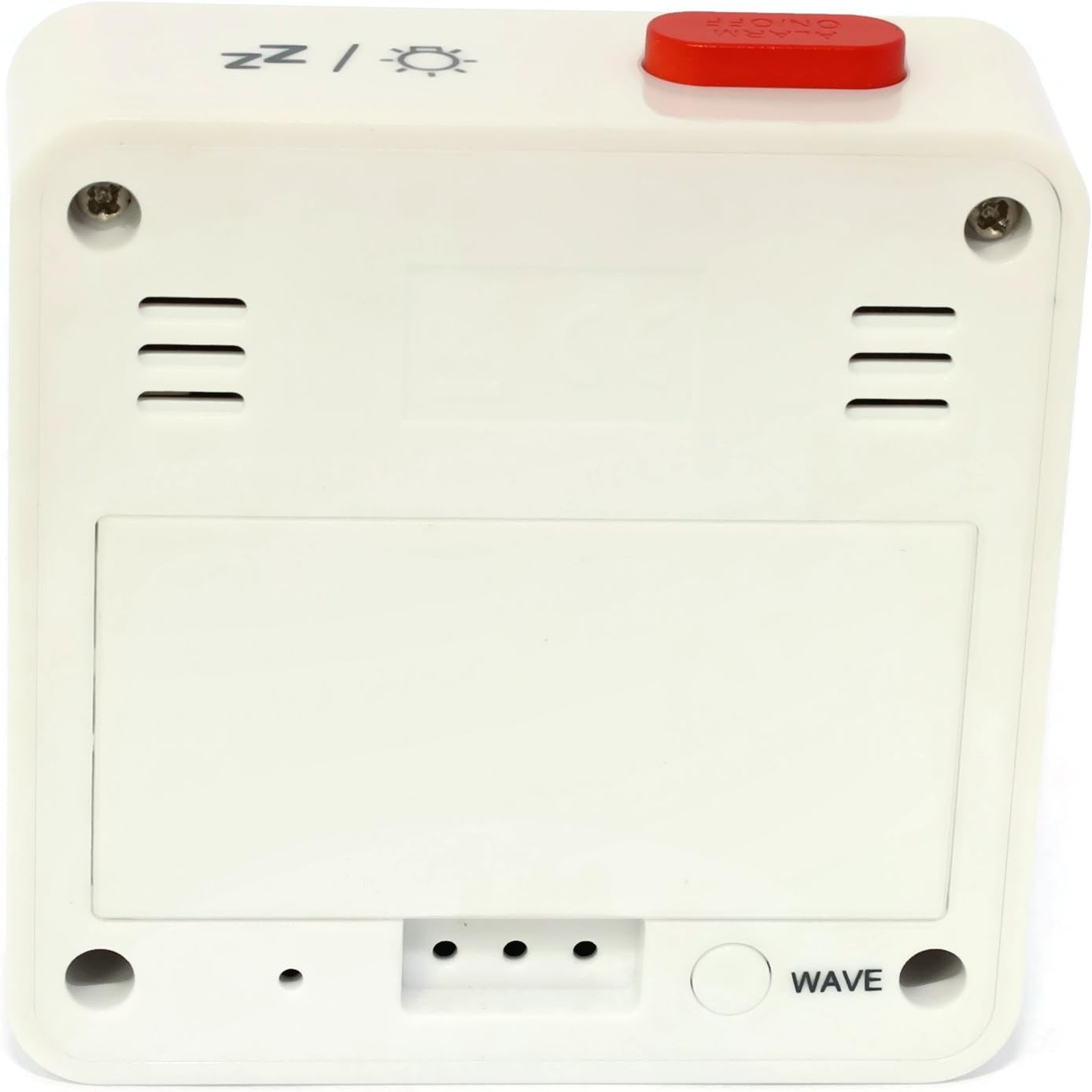
Figure 2: Back View. This image shows the back of the Atlanta Digital LCD Radio Alarm Clock. The large rectangular cover for the battery compartment is prominent. Below it, a circular "WAVE" button is visible, used for manual radio signal reception. Ventilation slots are present on both sides of the upper back panel.
Controls and Display Elements:
- LCD Display: Shows time, alarm time, temperature, and radio control status.
- TIME Button: Used to set the current time manually.
- ALARM Button: Used to set and activate/deactivate the alarm.
- + / - Buttons: Used to adjust values (time, alarm) and potentially toggle settings.
- SNOOZE / LIGHT Button (Top): Activates snooze function during an alarm; illuminates the display backlight.
- WAVE Button (Back): Initiates manual radio signal reception for time synchronization.
- Battery Compartment (Back): Holds the required batteries.
Setup
1. Battery Installation
- Open the battery compartment cover located on the back of the clock (refer to Figure 2).
- Insert the required batteries (e.g., 2x AAA, not included) according to the polarity markings (+ and -) inside the compartment.
- Close the battery compartment cover securely.
- The clock will power on and attempt to receive the radio-controlled time signal.
2. Initial Time Synchronization (Radio Control)
Upon battery insertion, the clock will automatically search for the radio time signal. This process may take several minutes. During this time, a signal icon (e.g., ((()))) will flash on the display.
- For best reception, place the clock near a window and away from electronic devices that may cause interference.
- Once the signal is successfully received, the time will be set automatically, and the signal icon will appear solid.
- If the signal is not received after a few minutes, press the WAVE button on the back of the clock to initiate a manual search.
3. Manual Time Setting (If Radio Control is Unavailable)
- Press and hold the TIME button for approximately 3 seconds until the hour digits begin to flash.
- Use the + or - buttons to adjust the hour.
- Press the TIME button again to confirm the hour and move to the minute setting.
- Use the + or - buttons to adjust the minutes.
- Press the TIME button once more to confirm and exit time setting mode.
Operating Instructions
1. Setting the Alarm
- Press and hold the ALARM button for approximately 3 seconds until the alarm hour digits begin to flash.
- Use the + or - buttons to adjust the desired alarm hour.
- Press the ALARM button again to confirm the hour and move to the alarm minute setting.
- Use the + or - buttons to adjust the desired alarm minutes.
- Press the ALARM button once more to confirm and exit alarm setting mode.
2. Activating/Deactivating the Alarm
- Briefly press the ALARM button to toggle the alarm on or off.
- When the alarm is active, an alarm icon (e.g., a bell symbol) will appear on the display.
- When the alarm sounds, press the SNOOZE / LIGHT button on top to activate the snooze function. The alarm will sound again after a few minutes.
- To turn off the alarm completely, press any other button (e.g., TIME, ALARM, +, -) or let it sound for its full duration.
3. Backlight Function
Press the SNOOZE / LIGHT button on the top of the clock to illuminate the display for a few seconds, allowing for easy viewing in low light conditions.
4. Temperature Display
The clock continuously displays the ambient temperature. The unit of temperature (Celsius or Fahrenheit) may be switchable by a dedicated button or a combination of existing buttons (refer to specific model variations if applicable, otherwise it defaults to Celsius as shown in the image).
Maintenance
Cleaning
- Wipe the clock's exterior with a soft, dry, lint-free cloth.
- Do not use liquid cleaners, aerosol sprays, or abrasive materials, as these can damage the finish or internal components.
Battery Replacement
- When the display becomes dim or the clock functions erratically, it is time to replace the batteries.
- Follow the battery installation steps outlined in the "Setup" section.
- Ensure proper disposal of old batteries.
Troubleshooting
| Problem | Possible Cause | Solution |
|---|---|---|
| Display is blank or dim. | Batteries are dead or inserted incorrectly. | Replace batteries, ensuring correct polarity. |
| Time is incorrect. | Poor radio signal reception or manual time not set. | Move the clock to a location with better reception (near a window). Press the WAVE button for manual synchronization. If still incorrect, set the time manually. |
| Alarm does not sound. | Alarm is not activated or set incorrectly. | Ensure the alarm icon is visible on the display. Recheck alarm time settings. |
| Snooze function not working. | Alarm was turned off instead of snoozed. | Ensure you press the SNOOZE / LIGHT button when the alarm sounds, not other buttons. |
Specifications
- Model: 1882-0
- Brand: Atlanta
- Color: White
- Material: Plastic
- Display Type: Digital LCD
- Dimensions (L x W x H): 6.5 x 2.1 x 6.5 cm (approximately 2.56 x 0.83 x 2.56 inches)
- Weight: 65 grams (approximately 2.29 ounces)
- Power Source: Battery powered (e.g., 2x AAA, not included)
- Special Features: Temperature Display, Alarm, Radio-Controlled Time, Backlight, Snooze
- Intended Use: Indoor
Warranty and Support
Specific warranty information for your Atlanta product may vary by region and retailer. Please refer to the documentation provided at the time of purchase or visit the official Atlanta website for detailed warranty terms and conditions.
For technical support or inquiries, please contact your retailer or the manufacturer's customer service department. Contact information can typically be found on the product packaging or the official brand website.
Note: Information regarding spare parts availability is not provided by the manufacturer.
