
1. Introduction
Thank you for choosing the Salter K4 M-060 Indoor Bike. This professional-grade fitness machine is designed to provide an effective and comfortable workout experience. This manual contains important information regarding the assembly, safe operation, maintenance, and technical specifications of your indoor bike. Please read this manual thoroughly before using the equipment and keep it for future reference.
2. Important Safety Instructions
- Consult your physician before starting any exercise program, especially if you have pre-existing health conditions.
- Always ensure the bike is placed on a stable, level surface. Use the adjustable stabilizers to compensate for uneven floors.
- Keep children and pets away from the equipment during use.
- Wear appropriate exercise clothing and footwear. Avoid loose clothing that could get caught in moving parts.
- The maximum user weight for this bike is 130 kg. Do not exceed this limit.
- Before each use, check all nuts and bolts to ensure they are securely tightened.
- Use the emergency stop function immediately if you feel unwell or experience any discomfort during your workout.
- Do not attempt to modify the equipment. Use only original Salter replacement parts if necessary.
3. Setup and Assembly
The Salter K4 M-060 Indoor Bike is designed for straightforward assembly. While specific step-by-step instructions are typically provided in a separate assembly guide, this section outlines key considerations for setting up your bike.
3.1 Unpacking and Placement
- Carefully remove all components from the packaging.
- Place the main frame in your desired workout area, ensuring sufficient space around the bike for safe operation and movement.
- The integrated wheels on the base facilitate moving the machine before final positioning.
3.2 Adjusting for Stability
The bike features adjustable stabilizers at the bottom. Rotate these stabilizers to ensure the machine is perfectly level and stable on any surface, preventing wobbling during intense workouts.
3.3 Seat and Handlebar Adjustments
Achieving an optimal riding position is crucial for comfort and effectiveness. The Salter K4 M-060 offers multiple adjustment points:
- Seat Adjustment: The high-comfort seat is adjustable both vertically and horizontally using an aluminum scissor mechanism with micro-adjustment and a position indicator. Loosen the adjustment knob, slide the seat to your desired position, and securely tighten the knob.
- Handlebar Adjustment: The multi-grip handlebars are adjustable horizontally and vertically. An aluminum bar with micro-adjustment and a position indicator allows for precise handlebar positioning. Loosen the adjustment knob, move the handlebars, and tighten securely.
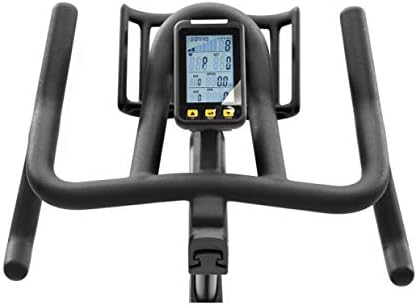
Image: The handlebars and digital monitor of the Salter K4 M-060 Indoor Bike. The monitor displays various workout metrics, and the handlebars offer multiple grip positions for comfort.
4. Operating Instructions
Once assembled and adjusted, your Salter K4 M-060 Indoor Bike is ready for use. Follow these instructions for a safe and effective workout.
4.1 Starting Your Workout
- Mount the bike carefully.
- Begin pedaling. The VC3 control monitor will automatically activate and start displaying your workout data.
4.2 Adjusting Resistance
The bike features adjustable resistance to vary your workout intensity. Locate the resistance knob, typically positioned on the frame below the handlebars.
- Increase Resistance: Turn the knob clockwise to increase the resistance, making pedaling more challenging.
- Decrease Resistance: Turn the knob counter-clockwise to decrease the resistance, making pedaling easier.
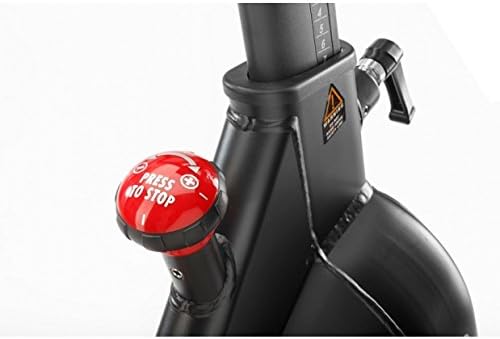
Image: Close-up of the red resistance knob on the Salter K4 M-060 Indoor Bike. This knob is used to adjust workout intensity and also functions as an emergency stop.
4.3 Emergency Stop
For immediate cessation of the flywheel's movement, press down firmly on the resistance knob. This will engage the emergency brake, bringing the flywheel to a rapid stop.
4.4 Using the VC3 Control Monitor
The VC3 control monitor provides real-time feedback on your workout. It is backlit and waterproof, featuring a wireless recording system (up to 5 kHz) for heart rate monitoring (pulse band not included). The monitor displays the following data:
- Time
- Speed
- Average Speed
- Distance
- RPM (Revolutions Per Minute)
- Average RPM
- Calories Burned
- Heart Rate (with compatible wireless pulse band)
- Brake Position Display (32 positions), including a light indicator that varies with working watt.
The monitor is battery-powered. If the display becomes dim or unresponsive, replace the batteries as per the instructions in the monitor's specific manual.
4.5 Hydration
The handlebars are equipped with a double bottle holder, allowing you to stay hydrated during your workout.
5. Maintenance
Regular maintenance ensures the longevity and safe operation of your Salter K4 M-060 Indoor Bike.
- Cleaning: Wipe down the bike with a damp cloth after each use to remove sweat and dust. Avoid abrasive cleaners or solvents.
- Inspection: Periodically check all visible nuts, bolts, and screws (made of stainless steel) for tightness. Tighten any loose fasteners.
- Rust Protection: The bike's housing is equipped with rust protection. However, avoid exposing the bike to excessive moisture or humidity to prevent corrosion.
- Belt Drive: The Hutchinson belt drive is designed for maintenance-free, silent operation. No lubrication is required for the belt.
- Stabilizers: Ensure the adjustable stabilizers are clean and functioning correctly to maintain stability.
- Rear Leg Protector: The rear leg features a double protector, designed to allow stretching exercises without damaging the structure. Keep this area clean.
6. Troubleshooting
This section addresses common issues you might encounter with your indoor bike.
- Bike is unstable/wobbles: Ensure the bike is on a level surface. Adjust the stabilizers on the base until the bike is firm and does not wobble.
- Monitor not displaying data: Check if the monitor batteries need replacement. Refer to the monitor's specific manual for battery replacement instructions. Ensure all connections to the monitor are secure.
- Unusual noises during operation: Stop exercising immediately. Check all visible bolts and screws for tightness. Ensure no foreign objects are caught in the flywheel or pedal mechanism. If the noise persists, contact customer support.
- Resistance not changing: Check the resistance knob for proper function. Ensure it turns smoothly and engages the resistance mechanism. If it feels stuck or unresponsive, do not force it.
7. Technical Specifications
| Feature | Specification |
|---|---|
| Model Number | M-060 |
| Brand | Salter |
| Maximum Dimensions (L x W x H) | 130 x 54 x 195 cm |
| Product Weight | 59 kg |
| Maximum User Weight | 130 kg |
| Flywheel Weight | 20 kg (equivalent) |
| Resistance Mechanism | Magnetic |
| Drive System | Hutchinson Belt Drive |
| Material | Aluminum, Alloy Steel, Stainless Steel |
| Power Source (Monitor) | Battery-Powered |
| Monitor Type | VC3 Control Monitor with Backlight |
| Heart Rate Monitoring | Wireless (up to 5 kHz, pulse band not included) |
| GTIN | 08422227060919 |
| First Available Date | January 15, 2020 |
8. Warranty Information
Specific warranty details for the Salter K4 M-060 Indoor Bike are typically provided with your purchase documentation or can be found on the official Salter website. Please retain your proof of purchase for any warranty claims. The warranty generally covers manufacturing defects under normal use conditions.
9. Customer Support
If you have any questions, require assistance with assembly, or encounter issues not covered in this manual, please contact Salter customer support. Refer to your product packaging or the official Salter website for the most up-to-date contact information.


