
1. Introduction
The iDealBed iEscape Adjustable Bed Base is designed to enhance your comfort and sleep experience. This manual provides essential instructions for the safe setup, operation, maintenance, and troubleshooting of your adjustable bed base. Please read this manual thoroughly before assembly and use, and retain it for future reference.
2. Safety Information
- Weight Capacity: The bed base has a maximum lift capacity of 850 lbs (per unit). Do not exceed this weight limit.
- Children and Pets: Keep children and pets away from the adjustable bed base, especially during operation, to prevent injury from moving parts.
- Power Cord: Ensure the power cord is not pinched or damaged. Do not operate the bed if the power cord is compromised.
- Clearance: Maintain clear space around the bed base to allow for proper articulation and prevent obstructions.
- Emergency Power-Down: In case of a power outage, use the emergency power-down feature to return the bed to a flat position. Refer to the operating section for instructions.
3. Package Contents
Verify that all components are present before beginning assembly:
- Adjustable Bed Base Frame
- Wireless Remote Control
- Adjustable-Height Legs (6"-10")
- Power Supply and Cord
- Foot Retainer Bar
- User Manual (this document)
4. Setup Instructions
- Unpack Components: Carefully remove all items from the packaging. Place the bed base frame upside down on a clean, flat surface to access the leg attachment points.
- Attach Legs: Screw the adjustable-height legs into the designated threaded receivers on the bed frame. Adjust the leg height to your preference (6, 7, 8, 9, or 10 inches) using the push-button lock mechanism. Ensure all legs are securely fastened and at the same height for stability.
- Install Foot Retainer Bar: Locate the slots at the foot of the bed base. Insert the foot retainer bar into these slots to prevent the mattress from sliding off when the bed is articulated.
- Position Bed Base: Carefully flip the bed base over and place it in your desired location. Ensure there is adequate clearance around the bed for movement, especially if utilizing the Wall Hugger Engineering feature.
- Connect Power: Plug the power cord into the power supply, then connect the power supply to the bed base. Finally, plug the power cord into a grounded electrical outlet.
- Place Mattress: Carefully place your mattress onto the bed base. The NanoHook Retention System, along with the foot retainer bar, will help keep the mattress in place.
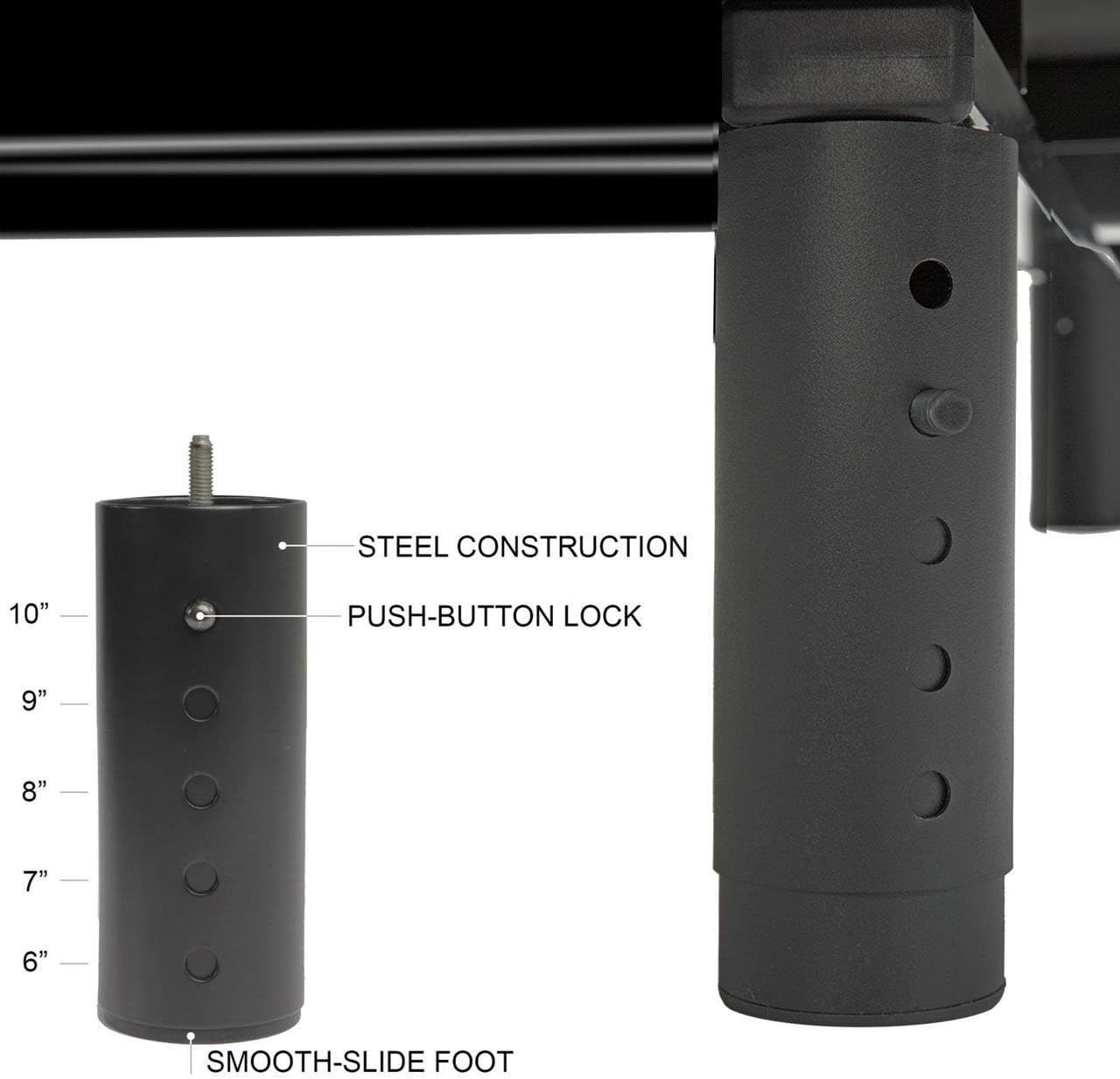
This close-up image highlights the adjustable steel legs of the iDealBed iEscape bed base. Markings indicate height options from 6 to 10 inches, with a push-button lock mechanism for secure adjustment.

A diagram illustrating the approximate dimensions of the iDealBed iEscape Queen size adjustable bed base: 80 inches long, 60 inches wide, and 15 inches high (with legs at maximum height).
5. Operating Instructions
Your iDealBed iEscape comes with a fully featured wireless remote control for easy operation of all functions.

This image displays the ergonomic wireless remote control for the iDealBed iEscape. It features buttons for head and foot adjustments, pre-set positions like Zero-Gravity and Anti-Snore, memory buttons, massage controls, and a flat button.
5.1 Remote Control Functions
- Head Articulation: Use the HEAD UP and HEAD DOWN buttons to adjust the head section up to 70 degrees.
- Foot Articulation: Use the FOOT UP and FOOT DOWN buttons to adjust the foot section up to 45 degrees.
- Zero-Gravity Preset (Z-GRAV): Press this button to automatically move the bed into the Zero-Gravity position, which elevates both the head and feet to promote circulation and reduce pressure.
- Anti-Snore Preset (SNORE): Press this button to gently raise the head section to help alleviate snoring.
- Flat Button: Press and hold this button to return the bed base to a completely flat position.
- Programmable Memory Buttons (MEM 1, MEM 2): Adjust the bed to your desired position, then press the SET button followed by MEM 1 or MEM 2 to save the position. To recall a saved position, simply press the corresponding memory button.
- Dual Massage: The bed features a dual massage system. Use the WAVE button to cycle through different massage modes (Wave, Pulse, Constant) and intensity levels (3 levels). Press the massage button again to turn off the massage function.
- Night Light: The remote includes a safety LED flash light. Press the light bulb icon button to activate or deactivate it.
- Lock Button: Use the LOCK button to prevent accidental adjustments. Press again to unlock.
5.2 Wall Hugger Engineering
The iDealBed iEscape features Wall Hugger Engineering. As you raise the head section, the bed base simultaneously glides backward, keeping you closer to your nightstand and wall. This design maintains convenient access to bedside items.
5.3 USB Charging Ports
The bed base is equipped with next-generation USB charging ports, including high-speed USB-C ports. There are 4 charge ports on each side of the bed, totaling 8 ports, for convenient device charging.

This image shows the iDealBed iEscape adjustable bed base with both the head and foot sections elevated, demonstrating its articulation capabilities. A bedside table with a lamp is visible next to the bed.
6. Maintenance
- Cleaning: Wipe the bed base frame with a damp cloth. Avoid using harsh chemicals or abrasive cleaners. For upholstered parts, use a fabric cleaner suitable for micro-suede.
- Inspections: Periodically check all connections, including power cords and leg attachments, to ensure they are secure.
- Moving Parts: The motors and moving parts are designed to be maintenance-free. Do not attempt to lubricate or disassemble them.
7. Troubleshooting
| Problem | Possible Cause | Solution |
|---|---|---|
| Bed does not operate. | No power, remote not paired, remote batteries low. | Check power cord connection to outlet and bed base. Ensure remote batteries are fresh. If remote is new or replaced, follow pairing instructions (refer to manufacturer's website if not in manual). |
| Bed moves slowly or with difficulty. | Overload, obstruction, low power. | Ensure weight does not exceed 850 lbs. Check for any obstructions under the bed. Verify power connection. |
| Massage function not working. | Massage motor issue, power issue. | Check power connection. Cycle through massage modes using the remote. If issue persists, contact customer support. |
| Remote control is unresponsive. | Low batteries, remote out of range, remote locked. | Replace remote batteries. Ensure you are within range of the bed base. Check if the remote's LOCK button is activated. |
If you experience issues not listed here or if troubleshooting steps do not resolve the problem, please contact customer support.
8. Specifications
- Model: iESCAPE-BLK-QN
- Size: Queen
- Product Dimensions: Approximately 80 x 60 x 15 inches (Length x Width x Height, with legs at max height)
- Item Weight: Approximately 140 pounds
- Lift Capacity: 850 lbs (per unit)
- Material: Alloy Steel frame, Micro-suede upholstery
- Head Articulation: Up to 70 degrees
- Foot Articulation: Up to 45 degrees
- Special Features: Wireless Remote, Wall Hugger Engineering, Dual Massage (Wave, Pulse, Constant with 3 intensity levels), Zero-Gravity Preset, Anti-Snore Preset, 2 Programmable Memory Buttons, One-Touch Flat Button, Safety LED Flash Light, Next-Generation USB Charging Ports (4 per side, 8 total, including USB-C), NanoHook Retention System, Adjustable-Height Legs (6"-10"), Emergency Power-Down.
- Manufacturer: Leggett & Platt
- GTIN/UPC: 094325247493
9. Warranty Information
The iDealBed iEscape Adjustable Bed Base comes with a 25-year limited warranty. Please refer to the warranty card included with your product or contact customer support for full details regarding coverage and terms.
10. Customer Support
For any questions, assistance, or warranty claims, please contact DealBeds customer support. You may also be eligible for 90-day easy returns. Refer to your purchase documentation for specific contact information or visit the official iDealBed website.