
Introduction
Welcome to the user manual for your FreedConn TCOM-SC Motorcycle Helmet Bluetooth Intercom System. This device is engineered to provide seamless communication and entertainment while riding, ensuring safety and convenience. It features Bluetooth connectivity for mobile phones, MP3 players, and GPS, an integrated FM radio, and advanced noise control technology for crystal-clear audio. Please read this manual thoroughly to understand the proper operation and maintenance of your intercom system.
Product Overview and Structure
The FreedConn TCOM-SC unit is designed for easy integration with most motorcycle helmets. Below is an overview of the main components and their functions.

- LCD Display Screen: Provides visual information on operating status, FM frequency, and battery level.
- Jog Wheel: Used for volume control, music track skipping, and FM channel switching.
- Multi-function Button (MFB): Controls various functions including power, intercom, phone calls, and music playback.
- Noise Canceling Microphone: Ensures clear voice transmission by reducing background noise.
- Stereo Ear Speakers: Deliver high-fidelity audio for communication, music, and GPS prompts.
- Charger and Headset Socket: Port for charging and connecting the headset.

Setup and Installation
Proper installation ensures optimal performance and comfort.
Component Installation
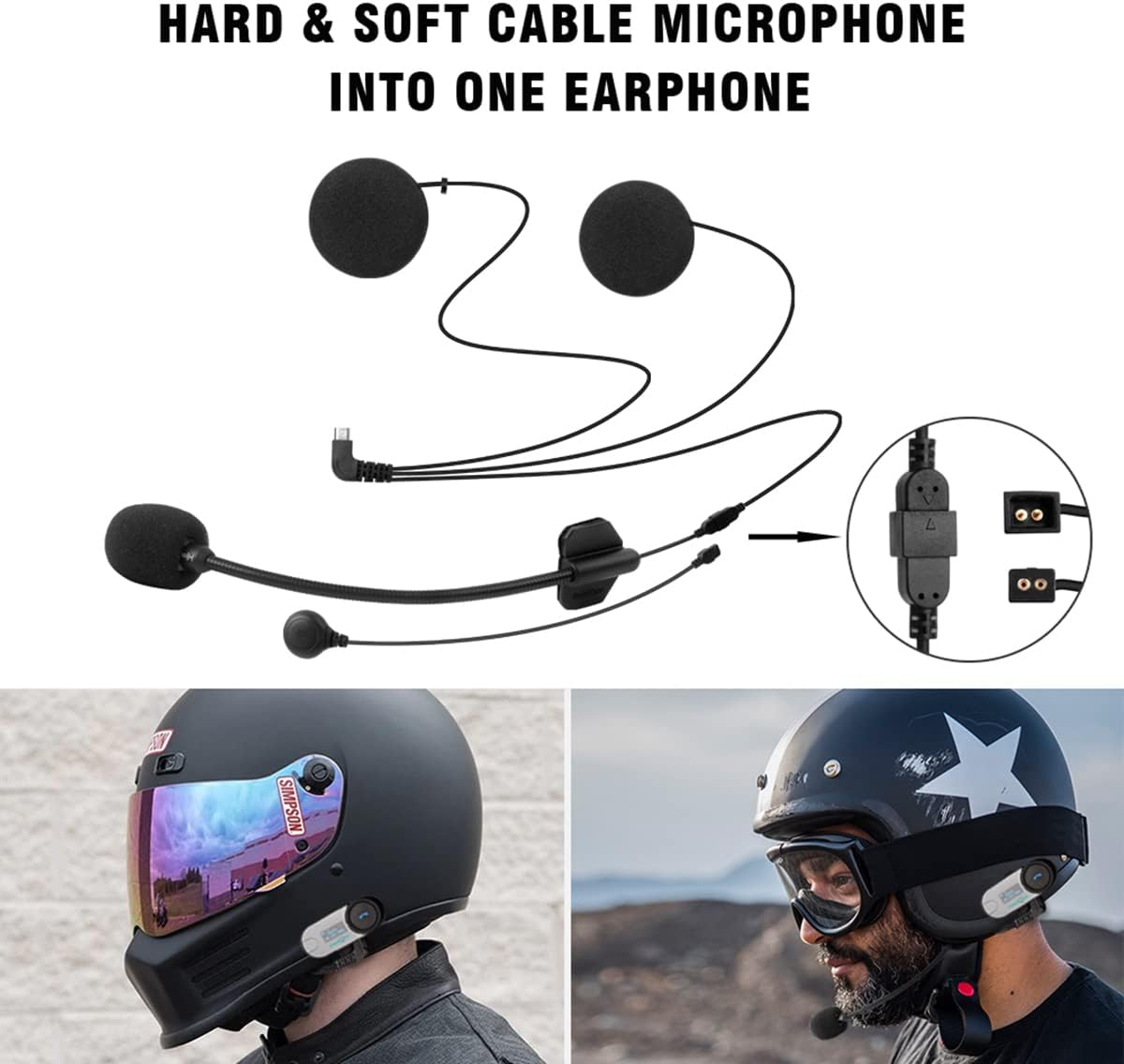
- Attach the Intercom Unit: Use the sticky clamp or headset clip to securely mount the intercom unit to the side of your helmet. Ensure it is firmly attached and does not obstruct your vision or movement.
- Install Speakers: Place the stereo ear speakers inside the helmet's ear pockets. Use the felted adhesive earphone pads to secure them in place and ensure they are positioned directly over your ears for the best audio quality.
- Connect Microphone: Choose between the hard mic cord (for modular and half helmets) or the soft mic cord (for full-face helmets). Connect the chosen microphone to the intercom unit and position it close to your mouth for clear voice pickup.
- Route Cables: Carefully route all cables inside the helmet lining to prevent tangling and ensure a neat installation.
Initial Charging
Before first use, fully charge the intercom unit. Connect the provided USB cable to the charging port on the unit and plug it into any standard USB power adapter (not included). Charging typically takes about 2.5 hours.
Operating Instructions
This section details how to use the various functions of your FreedConn TCOM-SC intercom system.
Power On/Off
- Power On: Press and hold the Power On/Off button for approximately 2 seconds until the LCD screen illuminates.
- Power Off: Press and hold the Power On/Off button for approximately 5 seconds until the LCD screen turns off.
Bluetooth Pairing (Phone/GPS/MP3)
The TCOM-SC can connect wirelessly to your Bluetooth-enabled devices.
- Ensure the TCOM-SC is powered off.
- Press and hold the Multi-function Button (MFB) for approximately 8 seconds until the red and blue indicator lights flash alternately, indicating pairing mode. You will hear a voice prompt "Pairing".
- On your phone, GPS, or MP3 player, enable Bluetooth and search for new devices. Select "FreedConn" from the list of available devices.
- Once connected, the indicator light will turn blue and flash slowly. You will hear a voice prompt "Connected".
Intercom Communication
The TCOM-SC supports intercom communication between two riders simultaneously, with up to three riders connected in total.

To pair two TCOM-SC units for intercom:
Video 1: How to pair between NEW version and OLD version of TCOM SC. This video demonstrates the step-by-step process for pairing two FreedConn TCOM-SC intercom units, including both newer Bluetooth 5.0 and older Bluetooth 3.0 versions, for intercom communication.
- Ensure both intercom units (Unit A and Unit B) are powered off.
- On Unit B, press and hold the "B" button (Multi-function Button) for 8 seconds until the red and blue lights flash alternately. You will hear a "Beep" sound on older versions.
- On Unit A, first hold down the power on/off button for 2 seconds to power it on. Then, immediately press and hold the Multi-function Button for 8 seconds until the red and blue lights flash alternately. You will hear "Pairing" on newer versions.
- Once both units are in pairing mode, they will automatically search for each other. When successfully paired, you will hear "Connected" on both units, and the lights will change to a slow blue flash.
- To initiate intercom conversation, click the power on/off button on Unit A. To end the conversation, click the power on/off button on Unit A again.
FM Radio
The built-in FM radio allows you to listen to broadcasts while riding.

- Turn On/Off FM Radio: Double-press the Multi-function Button (MFB) to activate or deactivate the FM radio.
- Change Station: Turn the Jog Wheel to scan for the next available FM station.
Phone Call Functions
Manage your phone calls hands-free while riding.
- Answer Call: Press the Multi-function Button (MFB) once when a call comes in.
- Reject Call: Press and hold the Multi-function Button (MFB) for 2 seconds to reject an incoming call.
- End Call: Press the Multi-function Button (MFB) once during a call to hang up.
- Redial Last Number: Hold the Multi-function Button (MFB) for 2 seconds in standby mode to redial the last dialed number.
- Voice Dialing: If your phone supports voice dialing, you can activate it by pressing the MFB twice.
Music Playback
Enjoy your favorite music wirelessly from your connected device.
- Play/Pause: Press the Multi-function Button (MFB) once to play or pause music.
- Next Track: Turn the Jog Wheel clockwise to skip to the next song.
- Previous Track: Turn the Jog Wheel counter-clockwise to go to the previous song.
Volume Control
Adjust the audio volume for all functions.
- Increase Volume: Turn the Jog Wheel clockwise.
- Decrease Volume: Turn the Jog Wheel counter-clockwise.

Maintenance
To ensure the longevity and optimal performance of your FreedConn TCOM-SC intercom system, follow these maintenance guidelines:
- Cleaning: Wipe the unit with a soft, damp cloth. Do not use harsh chemicals or abrasive cleaners.
- Water Resistance: The unit features a water-resistant design (IPX5), suitable for use in light rain. However, avoid submerging the device in water or exposing it to heavy downpours for extended periods.
- Storage: Store the device in a cool, dry place when not in use. Avoid extreme temperatures.
- Battery Care: For optimal battery life, charge the unit regularly and avoid fully discharging it for prolonged periods.
Troubleshooting
If you encounter issues with your FreedConn TCOM-SC, refer to the following common problems and solutions:
| Problem | Possible Cause / Solution |
|---|---|
| No sound from speakers or only one side has sound. | Ensure the speaker port is tightly plugged in. If the issue persists, the speakers may be faulty. Ensure speakers are placed directly over your ears for louder sound. |
| Cannot achieve 3-person intercom. | The TCOM-SC (and TCOM VB, BM2-S) Bluetooth Helmet intercom systems support 3 riders connecting but only 2 riders can intercom simultaneously. |
| Device not powering on. | Battery may be depleted. Charge the device for at least 2.5 hours. |
| Cannot pair with other Bluetooth devices. | Ensure the intercom is in pairing mode (red and blue lights flashing alternately). Make sure the other device's Bluetooth is enabled and discoverable. Try restarting both devices. |
| Intercom range is shorter than expected. | Obstacles (buildings, terrain) and electromagnetic interference can reduce range. Ensure clear line of sight between units for optimal performance. |
Specifications
Detailed technical specifications for the FreedConn TCOM-SC intercom system:
| Feature | Detail |
|---|---|
| Model Name | TCOM-SC-800M |
| Connectivity Technology | Wireless (Bluetooth) |
| Bluetooth Version | 3.0 |
| Frequency Response | 2.4 GHz |
| Bluetooth Range | Up to 10 meters (phone/MP3) |
| Intercom Range | Up to 800 meters (rider to rider, open space) |
| Battery Life (Phone) | Up to 10 hours |
| Battery Life (Intercom) | Up to 7 hours |
| Standby Time | Up to 300 hours |
| Charging Time | Approximately 2.5 hours |
| Item Weight | 45 Grams (excluding accessories) |
| Product Dimensions | 81mm (L) × 31mm (W) × 25mm (H) |
| Water Resistance Level | Water Resistant (IPX5) |
| Noise Control | Active Noise Cancellation (DSP echo cancellation and noise suppression) |
| Compatible Devices | Cellphones, MP3 Players, GPS Systems |
What's in the Box
Your FreedConn TCOM-SC package includes the following components:

- 2x Motorcycle Intercom System Units
- 2x Stereo Headphones (including changeable hard mic and soft mic)
- 2x Screw Driver
- 2x Sticky Clamp
- 2x Headsets Clip
- 2x USB Cable
- 1x User Manual
- 8x Felted Adhesive Earphone Pads
Warranty and Support
For detailed warranty information, please refer to the documentation provided with your product or visit the official FreedConn website. For further support or inquiries, you may contact FreedConn customer service or visit their official store page on Amazon.