
Introduction
The Gillette Fusion5 ProGlide Shield Power Razor is designed to provide a close and comfortable shave. This manual provides detailed instructions for the proper setup, operation, and maintenance of your razor to ensure optimal performance and longevity.

Image: The Gillette Fusion5 ProGlide Shield Power Razor, featuring the handle and a single blade cartridge.
Safety Information
Please read all safety warnings before using the product.
- OPEN PACKAGING CAREFULLY.
- Refer to the internal packaging for specific battery warnings.
- Keep out of reach of children.
- Do not touch the blades directly.
Setup
1. Battery Installation
The Gillette Fusion5 ProGlide Shield Power Razor requires one AA battery (included) to power the soothing micropulses. To install or replace the battery:
- Twist the bottom cap of the razor handle counter-clockwise to open the battery compartment.
- Insert one AA battery with the positive (+) end facing towards the razor head.
- Twist the bottom cap clockwise to securely close the battery compartment.
2. Attaching a Blade Refill
Your razor handle is compatible with all Gillette 5-blade refills (excluding GilletteLabs). To attach a new blade refill:
- Hold the razor handle with one hand.
- Align the new blade refill with the connector on the razor handle.
- Push the blade refill onto the handle until it clicks securely into place.

Image: A hand demonstrating how to attach a new blade refill to the Gillette Fusion5 ProGlide Shield Power Razor handle.
Operating Instructions
Follow these steps for an optimal shaving experience:
1. Hydrate Your Skin
Hydrating your skin before shaving helps to soften your hair, making it easier for the razor to glide and minimizing nicks, cuts, and irritation. Shave during or immediately after a warm shower, or apply warm water to your face for at least three minutes.
2. Cleanse Your Face
Use a facial scrub or wash to remove oil, dirt, and dead skin cells. This prepares your skin for a comfortable shave and helps prevent clogged pores.
3. Apply Shave Gel or Cream
Lather up a generous amount of shave gel or cream and apply it evenly over the areas you intend to shave. Allow it to soak in for about a minute. Shave gel improves razor glide and further softens hairs.
4. Shave with Light, Gentle Strokes
Use light, gentle strokes, allowing the razor to do the work. The FlexBall technology responds to your face's contours, and the battery-powered micropulses help reduce friction for a smooth glide. Shave both with and against the grain, depending on what feels most comfortable and provides the desired closeness.

Image: A man using the Gillette Fusion5 ProGlide Shield Power Razor, highlighting how the FlexBall technology adapts to facial contours for a close shave.

Image: The power handle of the Gillette Fusion5 ProGlide Shield Power Razor, indicating the micropulse feature.

Image: Detail of the Gillette Fusion5 ProGlide Shield blade, illustrating the 2x lubrication strips before and after the blades for enhanced comfort.
5. Utilize the Precision Trimmer
The razor features a precision trimmer on the back of the cartridge. Use this for hard-to-reach areas like under your nose, and for styling facial hair or defining sideburns.
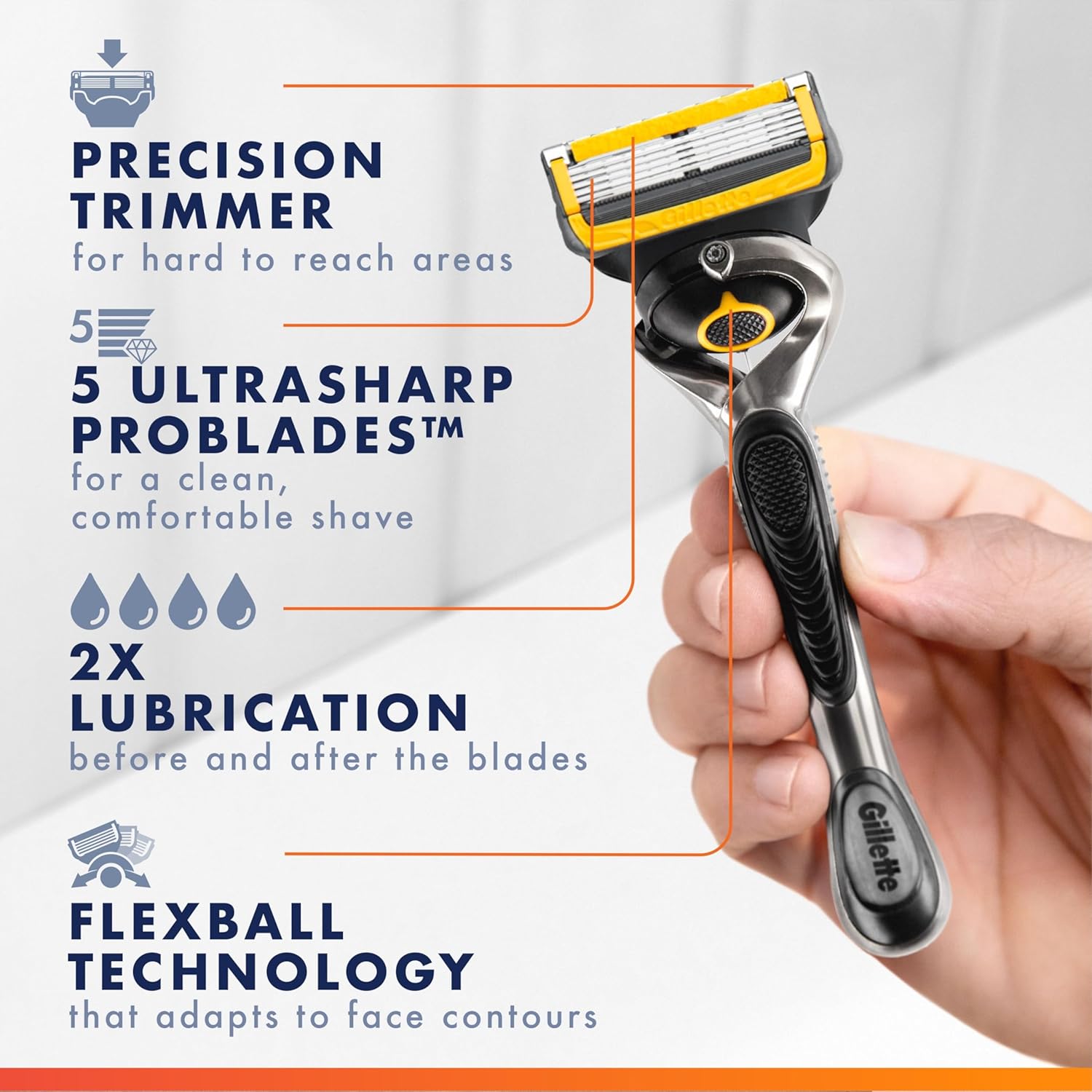
Image: The Gillette Fusion5 ProGlide Shield razor, pointing out the precision trimmer and the five ultra-sharp ProBlades.

Image: A man using the precision trimmer feature of the Gillette Fusion5 ProGlide Shield Power Razor for detailing under the nose.
6. Rinse Blades Often
Rinse your razor blades frequently under running water during your shave to prevent clogging and maintain optimal cutting performance.
7. Post-Shave Care
After shaving, rinse your face with cool water to close pores and pat it dry with a clean towel. Apply a hydrating aftershave or moisturizer to replenish moisture and soothe your skin.
Official Product Video: How to Shave Your Face
Video: An official Gillette video demonstrating the proper steps for shaving your face, including hydration, lathering, shaving technique, and post-shave care.
Maintenance
Blade Replacement
For optimal performance and to prevent irritation, replace your blade refill when the lubrication strips fade or when the blades feel dull. A single blade refill typically lasts up to one month of shaves (based on 3 shaves per week).
- Press the release button on the back of the razor handle to detach the used blade refill.
- Dispose of the used blade safely.
- Attach a new blade refill as described in the "Setup" section.
Cleaning the Razor
After each shave, rinse the entire razor head under running water to remove any remaining hair and shave gel. Do not tap the razor against the sink, as this can damage the precision-engineered blades.
Troubleshooting
| Problem | Possible Cause | Solution |
|---|---|---|
| Razor pulling or tugging hair | Dull blade, insufficient lubrication. | Replace the blade refill. Ensure adequate shave gel application. Hydrate skin thoroughly before shaving. |
| Skin irritation or razor burn | Dull blade, shaving without gel, over-shaving the same spot, shaving against the grain too aggressively. | Replace blade. Always use shave gel. Use light strokes and avoid repeated passes over the same area. Shave with the grain first, then against if desired. |
| Micropulses not working | Dead or improperly installed battery. | Check battery orientation. Replace with a fresh AA battery. |
Specifications
- Model Number: 10047400659121
- GTIN/UPC: 047400659124
- Product Dimensions: 3.81 x 1.37 x 7.95 inches
- Item Weight: 1.92 ounces
- Number of Blades: 5
- Special Features: FlexBall technology, Precision Trimmer, Battery-powered micropulses, 2x Lubrication
- Battery Requirement: 1 AA battery (included)
- Manufacturer: Procter & Gamble
- Compatible Refills: All Gillette 5-blade refills (excluding GilletteLabs)
Warranty and Support
For warranty information, product support, or to inquire about replacement parts, please contact Gillette customer service directly. Refer to the product packaging or the official Gillette website for the most current contact details.
Gillette Official Website: www.gillette.com

