
Introduction
This manual provides essential instructions for the safe and efficient operation, maintenance, and troubleshooting of your Weston 75-0201-W Vegi-Kiln 10-Tray Electric Food Dehydrator. Please read this manual thoroughly before first use and retain it for future reference.
Important Safety Instructions
When using electrical appliances, basic safety precautions should always be followed to reduce the risk of fire, electric shock, and/or injury to persons, including the following:
- Read all instructions before operating the dehydrator.
- Do not touch hot surfaces. Use handles or knobs.
- To protect against electrical shock, do not immerse cord, plugs, or the appliance in water or other liquid.
- Close supervision is necessary when any appliance is used by or near children.
- Unplug from outlet when not in use and before cleaning. Allow to cool before putting on or taking off parts.
- Do not operate any appliance with a damaged cord or plug, or after the appliance malfunctions or has been damaged in any manner. Contact customer support for examination, repair, or adjustment.
- The use of accessory attachments not recommended by the appliance manufacturer may cause injuries.
- Do not use outdoors.
- Do not let cord hang over edge of table or counter, or touch hot surfaces.
- Do not place on or near a hot gas or electric burner, or in a heated oven.
- Extreme caution must be used when moving an appliance containing hot oil or other hot liquids.
- Always attach plug to appliance first, then plug cord into the wall outlet. To disconnect, turn any control to "off", then remove plug from wall outlet.
- Do not use appliance for other than intended use.
- Ensure the appliance is placed on a stable, heat-resistant surface with adequate ventilation around it.
SAVE THESE INSTRUCTIONS.
Product Overview
The Weston 75-0201-W Vegi-Kiln is an electric food dehydrator designed to efficiently dry various foods, preserving nutrients and flavor. It features a rectangular design with 10 removable trays, allowing for ample capacity.
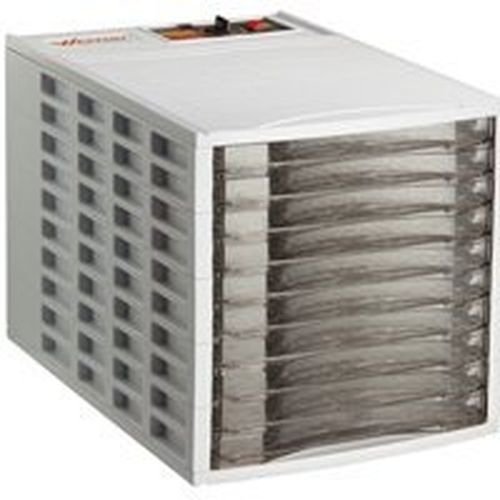
Image: The Weston 75-0201-W Vegi-Kiln 10-Tray Electric Food Dehydrator. This image displays the white, rectangular dehydrator unit with its 10 clear plastic trays visible through the front panel. The control panel is located on the top of the unit.
Components:
- Main Unit: Houses the heating element and fan.
- Drying Trays (10): Removable trays for holding food items.
- Lid/Cover: Sits on top to enclose the drying chamber.
- Control Panel: Located on the top of the unit, typically includes power switch and temperature control (if applicable).
Setup
- Unpack: Carefully remove all components from the packaging. Retain packaging for storage or future transport.
- Inspect: Check the dehydrator and all accessories for any signs of damage. Do not operate if damaged.
- Clean: Before first use, wash the drying trays and lid in warm, soapy water. Rinse thoroughly and dry completely. Wipe the main unit with a damp cloth.
- Placement: Place the dehydrator on a stable, level, and heat-resistant surface. Ensure there is adequate air circulation (at least 6 inches) around all sides of the unit to prevent overheating and ensure efficient operation. Do not place near water sources.
- Assemble Trays: Stack the clean, dry trays onto the main unit. Ensure they are properly seated.
Operating Instructions
- Prepare Food: Wash, peel, core, and slice food items according to recommended dehydration guidelines for the specific food type. Ensure slices are uniform in thickness for even drying.
- Load Trays: Arrange food in a single layer on the drying trays. Do not overlap food items. Leave a small space between pieces for air circulation.
- Stack Trays: Place the loaded trays onto the dehydrator base. Ensure the lid is securely placed on top.
- Plug In: Connect the power cord to a standard 120V AC electrical outlet.
- Set Temperature and Time:
- Turn the power switch to the "ON" position.
- If your model includes a temperature control dial, set it to the desired temperature based on the food being dehydrated. Common temperatures range from 105°F (40°C) for herbs to 160°F (71°C) for meats.
- Drying times vary significantly based on food type, thickness, moisture content, and ambient humidity. Refer to a reliable dehydration guide for specific food recommendations.
- Monitor Drying: Periodically check the food for dryness. Rotate trays if necessary to ensure even drying, especially if some trays are drying faster than others.
- Completion: Food is fully dehydrated when it is pliable but not sticky, or brittle and crisp, depending on the food type.
- Cool and Store: Once dry, turn off the dehydrator and unplug it. Allow the food to cool completely before storing in airtight containers.
General Dehydration Guidelines:
- Fruits: Typically 12-24 hours at 135°F (57°C).
- Vegetables: Typically 6-12 hours at 125°F (52°C).
- Meats (Jerky): Typically 4-10 hours at 155°F (68°C). Ensure meat is sliced thinly and pre-treated for safety.
- Herbs: Typically 2-6 hours at 95°F (35°C) - 105°F (40°C).
These are general guidelines. Always consult specific recipes or food dehydration charts for precise instructions.
Maintenance and Cleaning
Regular cleaning ensures optimal performance and extends the life of your dehydrator.
- Unplug: Always unplug the dehydrator from the power outlet and allow it to cool completely before cleaning.
- Clean Trays and Lid: Wash the drying trays and lid in warm, soapy water. Rinse thoroughly and dry completely. Note: The trays are not dishwasher safe.
- Clean Main Unit: Wipe the exterior and interior of the main unit with a damp cloth. For stubborn food residue, use a mild detergent on the cloth, then wipe with a clean, damp cloth. Ensure no water enters the electrical components.
- Do Not Immerse: Never immerse the main unit, power cord, or plug in water or any other liquid.
- Storage: Once clean and dry, store the dehydrator in a cool, dry place.
Troubleshooting
| Problem | Possible Cause | Solution |
|---|---|---|
| Dehydrator does not turn on. |
|
|
| Food is not drying evenly. |
|
|
| Dehydrator is too noisy. |
|
|
Specifications
| Model | 75-0201-W |
| Brand | Weston |
| Power | 600 Watts |
| Voltage | 120 Volts (AC) |
| Number of Trays | 10 |
| Material | Plastic (Food Safe) |
| Color | White |
| Shape | Rectangular |
| Dishwasher Safe Trays | No |
| UPC | 796084319458 |
Warranty and Customer Support
For warranty information, technical assistance, or to inquire about replacement parts, please refer to the warranty card included with your product or contact the manufacturer's customer support directly. Keep your purchase receipt as proof of purchase.
Please visit the official Weston website for the most up-to-date support information.


