
Ledlenser MT14 (500844)
Contents
Ledlenser MT14 Rechargeable LED Torch User Manual
Model: MT14 (500844) | Brand: Ledlenser
Introduction
The Ledlenser MT14 is a powerful and versatile rechargeable LED torch designed for various outdoor activities and general use. It features an impressive 1000 lumens output, a long lighting range of up to 320 meters, and an extended battery life of up to 192 hours on low power mode, making it ideal for multi-day adventures.
Equipped with the Ledlenser Advanced Focus System, the MT14 allows for seamless transition between a wide flood beam for close-up illumination and a sharply focused long-distance beam. Its Smart Light Technology provides four distinct light functions, offering customizable lighting options. The built-in USB recharging capability ensures convenient power replenishment, and a battery status indicator keeps you informed of the remaining power.
This manual provides detailed instructions on how to set up, operate, and maintain your Ledlenser MT14 torch to ensure optimal performance and longevity.
What's in the Box
Upon unboxing your Ledlenser MT14, please ensure all the following components are present:
- Ledlenser MT14 Rechargeable LED Torch
- 1x 26650er Li-Ion Rechargeable Battery (pre-installed or separate)
- USB Charging Cable
- Pouch
- Wrist Strap
- User Manual (this document)

Image: The Ledlenser MT14 torch shown with its retail packaging, highlighting its key features and accessories.
Setup and First Use
Charging the Battery
Before first use, it is recommended to fully charge the battery. The Ledlenser MT14 comes with a built-in USB charging port for convenience.
- Locate the USB charging port cover on the torch body.
- Carefully open the rubber cover to expose the USB port.
- Connect the provided USB cable to the torch and plug the other end into a suitable USB power source (e.g., computer, wall adapter, power bank).
- The battery status indicator on the on/off switch will show the charging progress. It typically glows red while charging and turns green when fully charged.
- Once charging is complete, disconnect the USB cable and securely close the rubber cover to maintain water resistance.
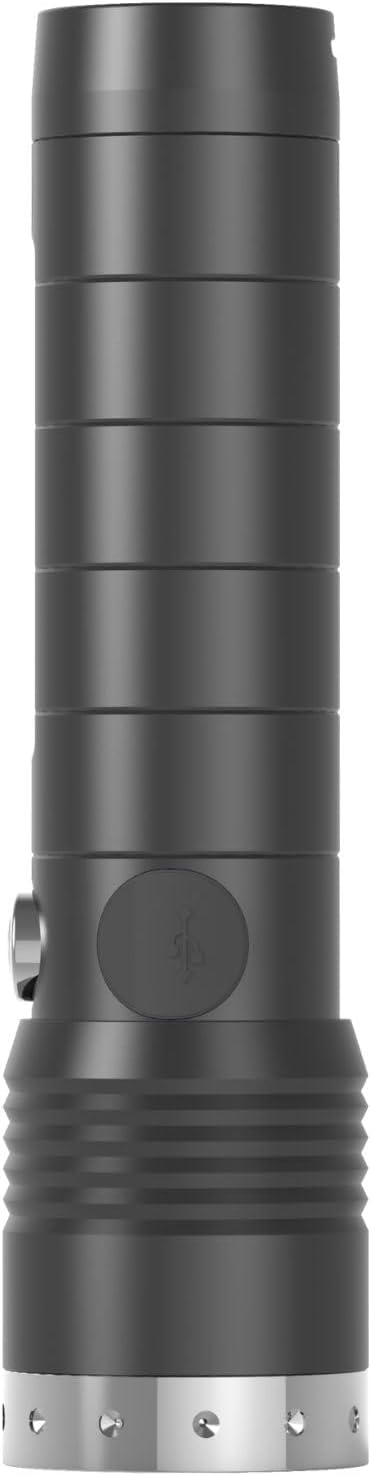
Image: Side view of the Ledlenser MT14 torch, illustrating the location of the USB charging port cover.
Attaching the Wrist Strap
For added security and ease of carrying, attach the included wrist strap to the designated loop at the tail end of the torch.

Image: Front view of the Ledlenser MT14 torch, demonstrating the attachment point for the wrist strap.
Initial Overview and Charging Demonstration
Video: This video provides a visual guide to unboxing the Ledlenser MT14, locating its components, and demonstrating the initial charging process and basic operation.
Operating Instructions
Power On/Off
The MT14 features a convenient front switch for easy one-handed operation.
- To turn the torch ON, press the front switch once.
- To turn the torch OFF, press and hold the front switch for approximately 2 seconds.
Light Modes and Smart Light Technology
The MT14 utilizes Smart Light Technology, offering four distinct light functions to suit various needs. Briefly press the front switch repeatedly to cycle through the modes:
- Power Mode: Full brightness (1000 lumens) for maximum illumination.
- Mid Power Mode: Reduced brightness for extended runtime and general use.
- Low Power Mode: Minimal brightness for very long runtime (up to 192 hours) and close-range tasks.
- Strobe/SOS (if applicable): A flashing light signal for emergency situations or signaling. (Note: Specific sequence for activating Strobe/SOS may vary, refer to quick start guide if included.)
The torch remembers the last used mode when turned off and on again.
Advanced Focus System (AFS)
The Advanced Focus System allows you to seamlessly adjust the beam from a wide floodlight to a sharply focused spot beam.
- To adjust the focus, slide the head of the torch forward or backward.
- Sliding the head forward creates a narrow, focused beam for long-distance illumination.
- Sliding the head backward creates a wide, diffused beam for close-range area lighting.

Image: A person demonstrating the powerful, focused beam of the Ledlenser MT14 torch in a dark environment.
Transport Lock
To prevent accidental activation during transport or storage, the MT14 features a transport lock function. Consult the quick start guide or product packaging for specific instructions on how to activate and deactivate this feature, as it typically involves a specific button press sequence.
Maintenance and Care
Proper maintenance will ensure the longevity and optimal performance of your Ledlenser MT14 torch.
- Cleaning: Wipe the torch body with a soft, damp cloth. Do not use abrasive cleaners or solvents.
- Water Resistance: The MT14 is IP54 water resistant, meaning it is protected against dust ingress and splashing water from any direction. Ensure the USB port cover is securely closed to maintain this rating. Do not submerge the torch in water.
- Battery Care: For long-term storage, charge the battery to approximately 50-70% and store the torch in a cool, dry place. Recharge every 3-6 months to prevent deep discharge.
- Lubrication: Periodically apply a small amount of silicone grease to the O-rings on the screw threads (if accessible) to maintain water resistance and smooth operation.
Troubleshooting
If you encounter issues with your Ledlenser MT14, refer to the following table for common problems and solutions.
| Problem | Possible Cause | Solution |
|---|---|---|
| Torch does not turn on. | Battery is depleted. Transport lock is active. Loose battery connection. | Charge the battery fully. Deactivate transport lock (refer to manual). Ensure battery is correctly inserted and cap is tightened. |
| Light is dim or flickers. | Low battery. Dirty contacts. | Recharge the battery. Clean battery contacts and torch contacts with a clean, dry cloth. |
| Torch does not charge. | USB cable faulty. Power source issue. Battery issue. | Try a different USB cable. Try a different USB power source. If problem persists, contact customer support. |
| Focus mechanism is stiff. | Dirt or debris. Lack of lubrication. | Clean the focusing mechanism. Apply a small amount of silicone grease to the moving parts (if accessible and recommended by manufacturer). |
If the issue persists after attempting these solutions, please contact Ledlenser customer support for further assistance.
Specifications
| Feature | Detail |
|---|---|
| Model | MT14 (500844) |
| Luminosity (Max) | 1000 Lumens |
| Lighting Range (Max) | 320 meters (1050 ft) |
| Battery Type | 1x 26650er Li-Ion (3.7V, 4900 mAh) |
| Max Runtime | Up to 192 hours (Low Power Mode) |
| Water Resistance | IP54 (Dust protected, splash-proof) |
| Length | 151 mm (5.9 in) |
| Weight (incl. battery) | 253 g (8.9 oz) |
| Material | Aluminum Polycarbonate |
| Special Features | Advanced Focus System, Smart Light Technology, Rapid Focus, Front Switch, Transport Lock, Temperature Control System, Battery Charge Level Indicator |
Warranty and Support
Ledlenser products are manufactured with high-quality materials and undergo rigorous quality control. For information regarding warranty coverage, terms, and conditions, please refer to the warranty card included with your product or visit the official Ledlenser website.
For technical support, spare parts, or any other inquiries, please contact Ledlenser customer service. Contact details can typically be found on the Ledlenser website or in your product's packaging.
You can visit the official Ledlenser store for more information: Ledlenser Store
Documents and downloads
Ask a question about this manual
Ask about setup, troubleshooting, compatibility, parts, safety, or missing instructions. Manuals+ will review the question and use this page’s manual context to help answer it.