
1. Introduction and Overview
Thank you for choosing the Denon AH-D7200 Reference Over Ear Headphones. These high-fidelity headphones are engineered to deliver an exceptional audio experience, combining advanced acoustic technology with premium materials for superior sound and comfort. Featuring unique FreeEdge drivers and natural walnut ear cups, the AH-D7200 is designed for discerning audiophiles seeking a pure and immersive listening experience.
2. Key Features
- Unique FreeEdge Driver Technology: At the core of the AH-D7200 is a 50 mm FreeEdge driver diaphragm, crafted from a nano-fibre material. This design ensures accurate, distortion-free pistonic motion and self-damping properties to eliminate unwanted resonances, resulting in pristine audio reproduction.
- Real Wood Ear Cups: The headphones feature beautiful 100% natural walnut ear cups. This material not only enhances the aesthetic appeal but also contributes to the acoustic performance by being self-damping and strong, effectively eliminating unwanted vibrations.
- Ultra-High-Quality Connection: Equipped with a detachable 7N-purity copper cable, meticulously made in Japan to Denon’s precise specifications. This cable ensures optimal signal transmission and features a durable machine-cut metal plug with an ornamental copper ring.
- Perfect Adjustment: The adjustable headband incorporates positive ball-bearing click-stops, allowing for precise and repeatable adjustments to accommodate various head sizes, ensuring a secure and comfortable fit.
- Luxurious Fit: The headband's ergonomically contoured diecast aluminum construction provides optimized comfort and a luxurious feel, designed for extended listening sessions.
- Superior Comfort: The ear-pads are enveloped in an extremely soft engineered leather, developed specifically for the AH-D7200, and filled with memory foam. This combination allows them to conform perfectly to the shape of your head, offering unparalleled comfort.
3. Setup
- Unpacking: Carefully remove the headphones and all accessories from the protective case.
- Connecting the Cable:
- Locate the detachable 7N-purity copper audio cable.
- Insert the smaller 3.5mm connectors into the corresponding jacks on the bottom of each ear cup. Ensure a firm connection.
- Plug the larger 3.5mm jack into your audio source device (e.g., smartphone, tablet, laptop, audio player).
- Adjusting the Headband: Gently slide the ear cups up or down along the headband until they rest comfortably over your ears. Use the positive ball-bearing click-stops for precise adjustment.
- Wearing the Headphones: Position the ear cups so that the soft engineered leather pads fully enclose your ears, creating a comfortable seal for optimal sound isolation and audio performance.

Figure 1: Denon AH-D7200 headphones with detachable cable and cleaning cloth.
4. Operating Instructions
- Basic Listening: Once connected to your audio source, begin playback on your device.
- Volume Control: Adjust the volume directly from your connected audio source device. The AH-D7200 headphones do not feature integrated volume controls.
- Optimal Sound: For the best audio experience, ensure your audio source is playing high-quality audio files. The 25 Ohm impedance allows for compatibility with a wide range of devices without requiring a dedicated headphone amplifier, though a high-quality amplifier can further enhance performance.

Figure 2: Denon AH-D7200 headphones connected to an audio source.
5. Maintenance
- Cleaning Ear-Pads: Gently wipe the engineered leather ear-pads with a soft, dry cloth. Avoid using harsh chemicals or abrasive materials.
- Cleaning Wood Cups: The natural walnut ear cups can be wiped with a soft, slightly damp cloth. Ensure no moisture enters the internal components.
- Cable Care: Handle the detachable cable with care. Avoid sharp bends or excessive pulling. Disconnect the cable by gripping the plug, not the cable itself.
- Storage: When not in use, store your headphones in the provided protective case to prevent dust accumulation and physical damage.
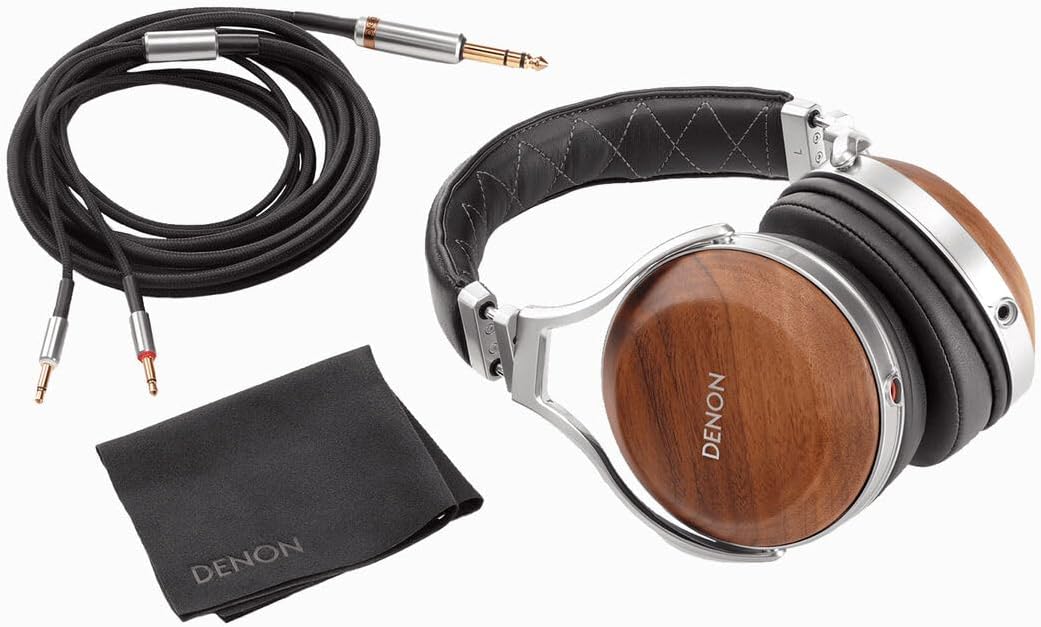
Figure 3: Close-up of the natural walnut ear cup, highlighting the wood grain.
6. Troubleshooting
- No Sound:
- Ensure the audio cable is securely connected to both the headphones and the audio source.
- Check the volume level on your audio source device.
- Test the headphones with a different audio source or cable to rule out device or cable issues.
- Poor Sound Quality:
- Verify that the audio cable connections are firm and free from damage.
- Ensure the ear-pads are properly sealed around your ears for optimal acoustic performance.
- Check the audio settings on your source device for any equalization or sound enhancements that might be affecting the sound.
7. Specifications
| Feature | Detail |
|---|---|
| Brand | Denon |
| Model Name | AH-D7200 (AHD7200EM) |
| Connectivity Technology | Wired |
| Headphones Jack | 3.5 mm Jack |
| Impedance | 25 Ohms |
| Audio Driver Type | Dynamic Driver (50mm FreeEdge) |
| Material | Wood (Natural Walnut) |
| Item Weight | 385 Grams (13.6 ounces) |
| Noise Control | None (Passive Noise Isolation from Over-Ear Design) |
| Cable Feature | Detachable (7N-purity copper) |
8. What's in the Box
- Denon AH-D7200 Reference Over Ear Headphones
- Detachable 7N-purity Copper Audio Cable (3.5mm to dual 3.5mm)
- Protective Case
9. Warranty and Support
Denon provides a 12-month warranty for the AH-D7200 headphones, covering manufacturing defects. For support, please refer to the official Denon website or contact their customer service. Ensure you retain your proof of purchase for warranty claims.


