
BRESSER AR-90s/500mm
BRESSER Messier AR-90s/500mm Refractor Telescope Optical Tube User Manual
Model: AR-90s/500mm | Brand: BRESSER
1. Introduction
This manual provides essential instructions for the assembly, operation, and maintenance of your BRESSER Messier AR-90s/500mm Refractor Telescope Optical Tube. Designed for both beginners and experienced observers, this telescope offers excellent views of celestial objects.
The AR-90s/500mm optical tube features a 90mm aperture and a 500mm focal length, making it suitable for detailed observations of the Moon, planets like Saturn and Jupiter, and impressive wide-field views of star clusters and the Milky Way.
2. Safety Information
WARNING: Never look directly at the sun through your telescope or its finderscope without a professionally manufactured solar filter. Permanent and irreversible eye damage, including blindness, can result.
- Do not leave the telescope unattended, especially when children are present.
- Handle optical components with care to avoid scratches or damage.
- Ensure the telescope is securely mounted to prevent accidental falls.
3. Package Contents
Verify that all components listed below are present in your package:
- BRESSER Messier AR-90s Refractor Optical Tube
- 26mm Super Plössl Eyepiece (31.7mm/1.25")
- Zenith Mirror (31.7mm/1.25")
- Pipe Clamp with Prism Rail (Universal Dovetail for EXOS/GP/EQ5/LXD75 mounts)
- 6x30 Finderscope
- Astronomy PC software Stellarium
- Rotatable Star Map
4. Component Identification
Familiarize yourself with the main parts of your telescope:
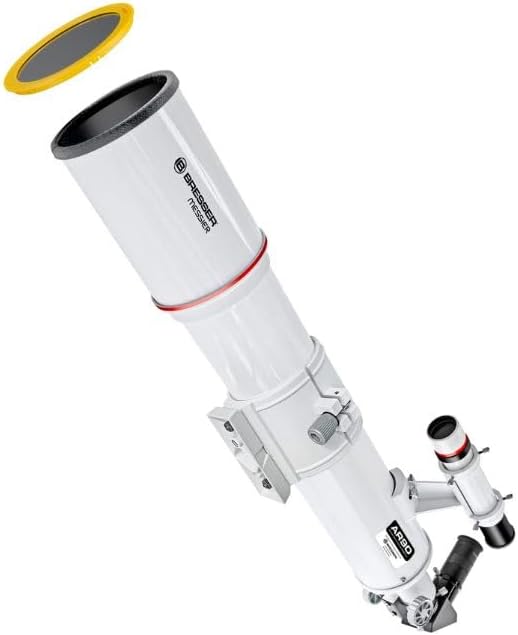
Figure 1: The BRESSER Messier AR-90s/500mm Refractor Telescope Optical Tube, showing the main tube, focuser, finder scope, and diagonal.

Figure 2: The 6x30 Finderscope, used for locating objects in the night sky before viewing through the main telescope.

Figure 3: The 26mm Super Plössl Eyepiece, providing a wide field of view for initial observations.

Figure 4: The Zenith Mirror (Diagonal), which redirects the light path at a 90-degree angle for comfortable viewing.
5. Setup
Follow these steps to assemble your telescope:
- Mounting the Optical Tube: Attach the telescope's pipe clamp with its universal dovetail prism rail to a compatible astronomical mount (e.g., EXOS/GP/EQ5/LXD75). Ensure it is securely fastened.
- Attaching the Finderscope: Slide the 6x30 finderscope into its bracket on the main telescope tube and tighten the retaining screws.
- Inserting the Diagonal: Insert the Zenith Mirror (diagonal) into the focuser drawtube. Secure it with the thumbscrew on the focuser.
- Inserting the Eyepiece: Insert the 26mm Super Plössl eyepiece into the diagonal. Secure it with the thumbscrew on the diagonal.
6. Operating Instructions
Once assembled, you can begin observing:
- Aligning the Finderscope: Before observing, align the finderscope with the main telescope. Point the main telescope at a distant, stationary object (e.g., a distant tree or street light) during daylight hours. Center the object in the main telescope's eyepiece. Then, adjust the finderscope's alignment screws until the same object is centered in the finderscope's crosshairs.
- Locating Objects: Use the aligned finderscope to locate your desired celestial object. Once the object is centered in the finderscope, it should be visible in the main telescope's eyepiece.
- Focusing: Use the focuser knobs to achieve a sharp image. Turn the knobs slowly until the object appears clear and crisp.
- Changing Magnification: To change magnification, remove the current eyepiece and insert another with a different focal length. A shorter focal length eyepiece provides higher magnification.
- Observing Celestial Objects: Enjoy views of the Moon's craters, Jupiter's moons and cloud bands, Saturn's rings, and various star clusters and nebulae. The 500mm focal length is particularly good for wide-field observations.
7. Maintenance
Proper care will ensure the longevity and performance of your telescope:
- Cleaning Optics: Use a soft, lint-free cloth specifically designed for optical surfaces. For stubborn dust, use a photographic lens brush or compressed air. For smudges, use a specialized optical cleaning solution applied to a cloth, not directly to the lens.
- Storage: Store the telescope in a dry, dust-free environment. Keep dust caps on the objective lens and focuser when not in use.
- Handling: Always handle the telescope and its components with clean hands to avoid transferring oils or dirt to optical surfaces.
- Dew Protection: The integrated dew protection cover helps reduce moisture formation on the objective lens.
8. Troubleshooting
If you encounter issues, refer to the following common problems and solutions:
- Image is blurry: Adjust the focuser knobs slowly until the image is sharp. Ensure the eyepiece is fully inserted and secured. Check for condensation on the lens.
- Cannot find objects: Ensure the finderscope is properly aligned with the main telescope (refer to Section 6.1). Start with the lowest magnification eyepiece (largest focal length) for a wider field of view.
- No image visible: Check that all lens caps are removed from both the main telescope and the finderscope. Ensure the diagonal and eyepiece are correctly inserted.
9. Specifications
| Feature | Specification |
|---|---|
| Brand | BRESSER |
| Model Name | AR-90s |
| Part Number | 4890500 |
| Telescope Type | Achromatic Refractor |
| Objective Lens Diameter | 90 Millimetres |
| Max Focal Length | 500 Millimetres |
| Finderscope | 6x30mm |
| Focus Type | Manual Focus |
| Item Weight | 1.9 Kilograms |
| Product Dimensions (L x W x H) | 52 x 15 x 15 cm |
10. Warranty and Support
This BRESSER Messier AR-90s/500mm Refractor Telescope Optical Tube is covered by a 2 Year Manufacturer's Warranty.
For technical support, warranty claims, or further assistance, please contact BRESSER customer service through their official website or the retailer where the product was purchased. Please have your model number (AR-90s/500mm) and part number (4890500) available when contacting support.
Related documentsAR-90s/500mm


Ask a question about this manual
Ask about setup, troubleshooting, compatibility, parts, safety, or missing instructions. Manuals+ will review the question and use this page’s manual context to help answer it.