
1. Introduction
This instruction manual provides important information for the safe and proper use of your RASTAR McLaren P1 GTR Remote Control Car. Please read this manual thoroughly before operating the product and retain it for future reference.
The RASTAR McLaren P1 GTR is a 1:14 scale full-function radio control car designed for enthusiasts aged 6 and above. It replicates the iconic McLaren P1 GTR with attention to detail, offering an engaging remote control driving experience.

Figure 1: RASTAR McLaren P1 GTR Remote Control Car and packaging. This image shows the yellow and green McLaren P1 GTR model car alongside its retail box and the included steering wheel-shaped remote control.
2. Package Contents
Carefully unpack all items and ensure the following components are present:
- 1 x RASTAR McLaren P1 GTR Remote Control Car (1:14 Scale)
- 1 x Remote Control Handset (Steering Wheel Type)
- 1 x Operating Instructions Manual (this document)
Note: Batteries are not included and must be purchased separately.
3. Setup
Follow these steps to prepare your RASTAR McLaren P1 GTR for operation:
3.1 Battery Installation
The RASTAR McLaren P1 GTR requires a total of 7 AA batteries for full functionality: 5 AA batteries for the car and 2 AA batteries for the remote control handset.
3.1.1 Car Battery Installation
- Locate the battery compartment on the underside of the McLaren P1 GTR car.
- Using a screwdriver, carefully open the battery compartment cover.
- Insert 5 new AA batteries into the compartment, ensuring correct polarity (+/-) as indicated inside the compartment.
- Replace the battery compartment cover and secure it with the screw.
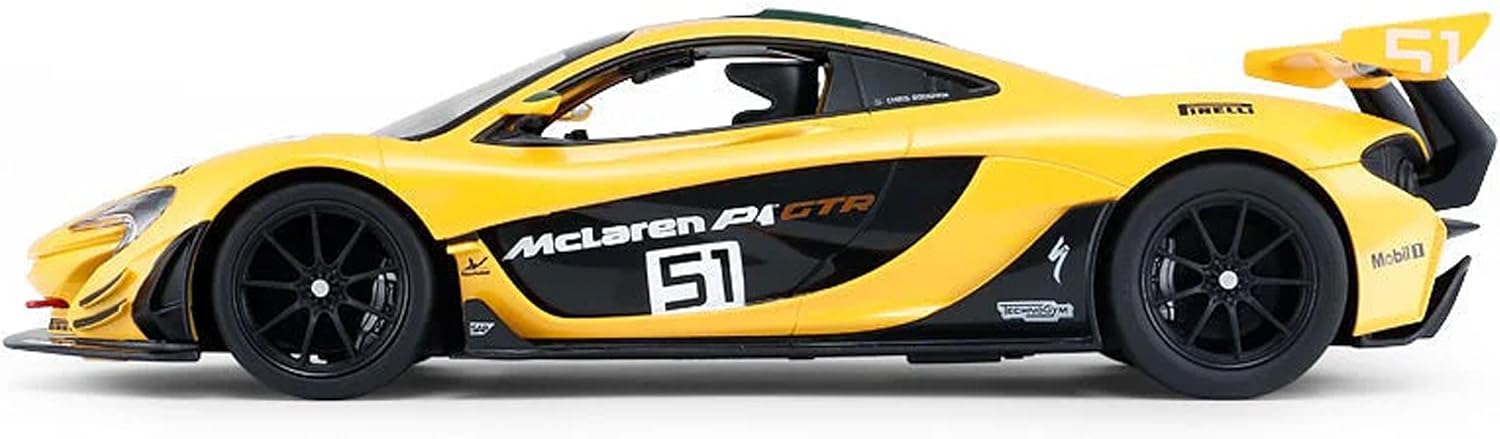
Figure 2: Side view of the RASTAR McLaren P1 GTR. The battery compartment is located on the underside of the vehicle, typically near the rear axle.
3.1.2 Remote Control Battery Installation
- Locate the battery compartment on the back of the remote control handset.
- Open the battery compartment cover.
- Insert 2 new AA batteries into the compartment, observing correct polarity (+/-).
- Replace the battery compartment cover.
3.2 Pairing the Car and Remote Control
The car and remote control are typically pre-paired. If they do not connect automatically, follow these steps:
- Ensure both the car and the remote control have fresh batteries installed.
- Turn on the power switch on the car (usually located on the underside).
- Turn on the power switch on the remote control.
- The indicator light on the remote control should illuminate, and the car should respond to commands, indicating successful pairing.
- If pairing fails, turn both devices off, wait a few seconds, and repeat the process.
4. Operation
Once setup is complete, you can begin operating your RASTAR McLaren P1 GTR.
4.1 Basic Controls
The remote control handset is designed to mimic a steering wheel for intuitive control:
- Steering Wheel: Turn the steering wheel left or right to control the car's direction.
- Forward/Reverse Trigger: Pull the trigger to move the car forward. Push the trigger away from you to move the car in reverse.

Figure 3: Top view of the RASTAR McLaren P1 GTR. This perspective highlights the car's sleek design and the green racing stripe down the center.
4.2 Driving Tips
- Operate the car on smooth, flat surfaces for optimal performance.
- Avoid driving on carpet or rough terrain, as this can reduce speed and battery life.
- Keep the car within the effective range of the remote control (typically up to 30 meters) to maintain connection.
- Do not operate multiple RASTAR RC cars with the same frequency simultaneously, as this may cause interference.
5. Maintenance
Proper maintenance will extend the life and performance of your RASTAR McLaren P1 GTR.
5.1 Cleaning
- Wipe the car and remote control with a soft, dry cloth after each use.
- Do not use water or chemical cleaners, as these can damage electronic components.
- Remove any debris (dust, hair, etc.) from the wheels and axles to ensure smooth operation.
5.2 Storage
- Always remove all batteries from both the car and the remote control when not in use for extended periods. This prevents battery leakage and corrosion.
- Store the product in a cool, dry place, away from direct sunlight and extreme temperatures.
6. Troubleshooting
If you encounter issues with your RASTAR McLaren P1 GTR, refer to the table below for common problems and solutions.
| Problem | Possible Cause | Solution |
|---|---|---|
| Car does not move or respond. |
|
|
| Car moves slowly or erratically. |
|
|
| Steering is not precise. |
|
|
If the problem persists after trying these solutions, please contact RASTAR customer support.
7. Specifications
| Feature | Detail |
|---|---|
| Model Name | McLaren P1 GTR |
| Model Number | 6930751310445 |
| Scale | 1:14 |
| Product Dimensions | 11.61 x 3.94 x 5.75 inches (29.5 x 10 x 14.6 cm) |
| Item Weight | 2.42 pounds (1.1 kg) |
| Car Battery Requirement | 5 x AA batteries (not included) |
| Remote Control Battery Requirement | 2 x AA batteries (not included) |
| Recommended Age | 6 years and up |
| Manufacturer | RASTAR |
8. Warranty & Support
8.1 Warranty Information
RASTAR products are manufactured to high quality standards. For specific warranty terms and conditions, please refer to the documentation included with your purchase or visit the official RASTAR website. Typically, warranty covers manufacturing defects under normal use.
Note: Damage resulting from misuse, accidents, unauthorized modifications, or failure to follow instructions is not covered by warranty.
8.2 Customer Support
For technical assistance, troubleshooting not covered in this manual, or warranty inquiries, please contact RASTAR customer support:
- RASTAR Official Website: www.rastar.com (Please check the website for contact details such as email or phone number.)
- When contacting support, please have your product model number (6930751310445) and purchase date ready.