
1. Introduction
Thank you for choosing the ECONTROLLY AA59-00508A replacement remote control. This remote is designed to function as a direct replacement for the original Samsung AA59-00508A remote, offering seamless compatibility with a range of Samsung LCD LED HDTV models. No programming is required; simply insert batteries, and the remote is ready for use.
Compatible Samsung TV Models:
- UE32D5520, UE32D5500RW, UE32D5500
- UE37D5520, UE37D5500
- UE40D5520, UE40D5500
- UE46D5500, UE46D5520
- UE55D5520
2. Setup: Battery Installation
The remote control requires two (2) AAA batteries for operation. Ensure correct polarity when inserting the batteries.
- Locate the battery compartment cover on the back of the remote control.
- Slide the cover downwards or press the latch and lift to open the compartment.
- Insert two new AAA batteries, matching the (+) and (-) terminals as indicated inside the compartment.
- Replace the battery compartment cover by sliding it back into place until it clicks securely.

Image: Rear view of the remote control with the battery cover removed, illustrating the correct placement of AAA batteries.
Once batteries are installed, the remote is ready for immediate use with your compatible Samsung TV. No additional pairing or programming steps are necessary.
3. Operating Instructions
Point the remote control directly at the TV's infrared sensor. Ensure there are no obstructions between the remote and the TV.
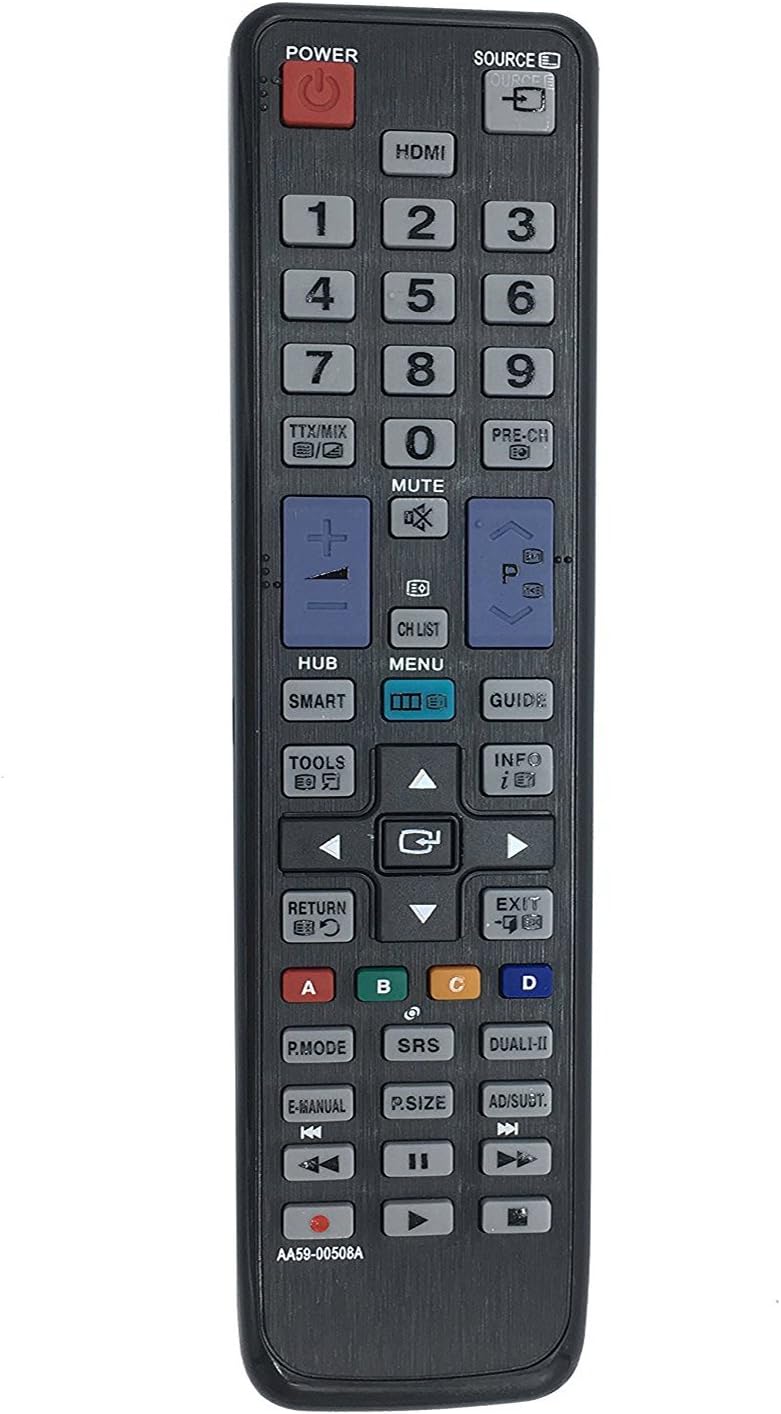
Image: Front view of the ECONTROLLY AA59-00508A remote control, displaying the layout of all functional buttons.
3.1. Basic Functions
- POWER (Red Button): Turns the TV on or off.
- SOURCE: Cycles through available input sources (HDMI, AV, Component, etc.).
- Number Pad (0-9): Directly selects TV channels or enters numerical values.
- VOL (+/-): Adjusts the volume level.
- CH (Up/Down): Changes TV channels sequentially.
- MUTE: Mutes or unmutes the TV audio.
3.2. Navigation and Menu Functions
- MENU: Opens the TV's main menu.
- HUB / SMART: Accesses the Smart Hub or Smart TV features.
- GUIDE: Displays the electronic program guide (EPG).
- INFO: Shows information about the current program or input.
- TOOLS: Provides quick access to common TV functions and settings.
- Directional Pad (Up, Down, Left, Right) & ENTER (Center Button): Navigates through menus and confirms selections.
- RETURN: Returns to the previous screen or menu.
- EXIT: Exits the current menu or application.
3.3. Special Functions
- TTX/MIX: Teletext functions.
- PRE-CH: Returns to the previously viewed channel.
- Color Buttons (A, B, C, D): Used for specific functions within certain TV menus or applications, as indicated on-screen.
- P.MODE (Picture Mode): Cycles through picture modes (e.g., Standard, Dynamic, Movie).
- SRS (Sound Retrieval System): Activates or deactivates SRS sound enhancement.
- DUAL-II: For dual audio or multi-language broadcasts.
- E-MANUAL: Accesses the TV's electronic manual.
- P.SIZE (Picture Size): Adjusts the aspect ratio or picture size.
- AD/SUBT. (Audio Description/Subtitles): Toggles audio description or subtitle options.
- Playback Controls (Rewind, Play/Pause, Fast Forward, Stop, Record): Controls media playback on connected devices or TV's media player.
4. Maintenance
- Cleaning: Wipe the remote control with a soft, dry cloth. Do not use liquid cleaners or abrasive materials.
- Battery Replacement: Replace batteries when the remote's response becomes sluggish or stops working. Always replace both batteries at the same time with new ones.
- Storage: If the remote will not be used for an extended period, remove the batteries to prevent leakage and potential damage.
- Avoid Exposure: Keep the remote away from direct sunlight, heat sources, and moisture.
5. Troubleshooting
| Problem | Possible Cause | Solution |
|---|---|---|
| Remote control is not working. |
|
|
| Buttons are unresponsive or delayed. |
|
|
6. Specifications
- Model: AA59-00508A
- Brand: ECONTROLLY
- Compatible Devices: Samsung LCD LED HDTVs (Specific models listed in Introduction)
- Connectivity Technology: Infrared (IR)
- Power Source: 2 x AAA Batteries (not included)
- Product Dimensions: 7 x 2 x 0.65 inches (approximately)
- Item Weight: 1 ounce (approximately, without batteries)
- Special Feature: Ergonomic design
7. Warranty and Support
This ECONTROLLY replacement remote control is designed for reliable performance. For any issues or support inquiries, please refer to the seller's return policy or contact the manufacturer directly through their official channels. Please retain your proof of purchase for any warranty claims.
For further assistance, you may visit the ECONTROLLY brand page on Amazon: ECONTROLLY Store
