MOOER UK Gold 900 Micro Preamp (M002) Instruction Manual
Model: M002
Introduction
The MOOER UK Gold 900 Micro Preamp (M002) is a compact digital recreation of the preamp section of a classic British tube amplifier. It is designed to capture the sound, dynamics, and response of the original amplifier. This micro preamp features dual channels, integrated speaker cabinet simulation, and dual operating modes to provide versatile tonal options for guitarists.
Key Features
- High-quality dual-channel preamp.
- Independent 3-band EQ (Treble, Mid, Bass) for each channel.
- Independent Gain and Volume controls for each channel.
- Switchable speaker cabinet simulation.
- Two footswitch operating modes: On/Off or Channel A/B switching.
- Compact and durable metal housing.
Controls and Connections

Image: Front view of the MOOER UK Gold 900 Micro Preamp, showing the control knobs and footswitch.
- TRE (Treble) Knob: Adjusts the high-frequency response.
- MID (Middle) Knob: Adjusts the mid-range frequency response.
- BASS Knob: Adjusts the low-frequency response.
- GAIN Knob: Controls the amount of overdrive/distortion.
- VOL (Volume) Knob: Adjusts the overall output level.
- CH/CAB Button:
- Press to switch between Channel A and Channel B.
- Press and hold to toggle the speaker cabinet simulation on or off.
- Footswitch: Activates or bypasses the preamp, or switches between channels depending on the selected mode.
- Input Jack: Connect your guitar or other instrument.
- Output Jack: Connect to an amplifier, mixer, or audio interface.
- DC 9V Power Input: Connect a 9V DC power adapter (center negative, 300mA minimum).

Image: Rear view of the MOOER UK Gold 900 Micro Preamp, showing the 9V DC power input.
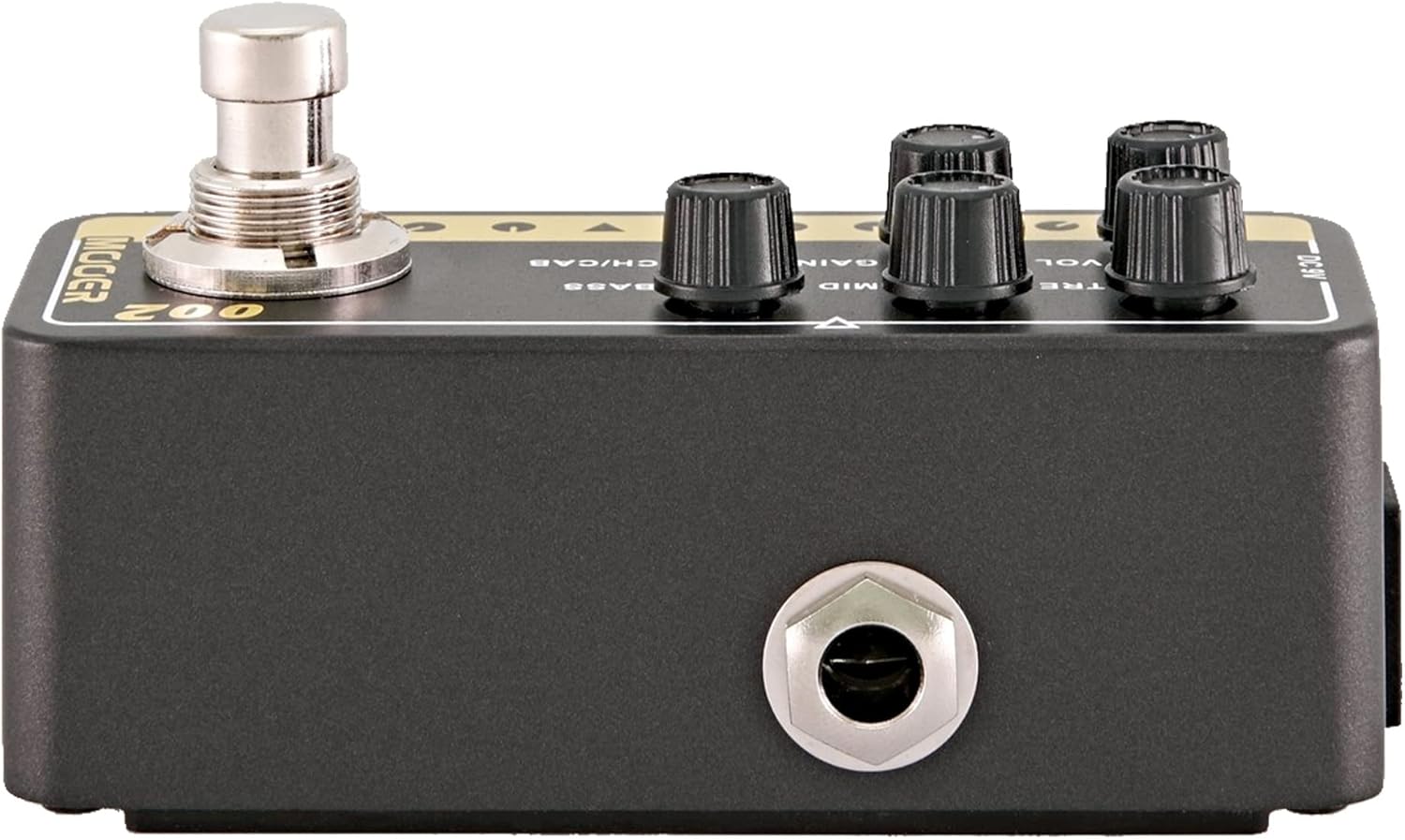
Image: Side view of the MOOER UK Gold 900 Micro Preamp, illustrating the input and output jacks.
Setup
- Power Connection: Connect a 9V DC power adapter (center negative, 300mA minimum) to the DC 9V input jack on the rear of the unit. Ensure the power supply meets these specifications to prevent damage.
- Instrument Connection: Connect your guitar or other instrument to the INPUT jack on the right side of the preamp using a standard 1/4-inch instrument cable.
- Output Connection: Connect the OUTPUT jack on the left side of the preamp to your amplifier's input, effects loop return, or an audio interface/mixer.
- Initial Settings: Before powering on, set all control knobs (TRE, MID, BASS, GAIN, VOL) to their minimum positions to avoid sudden loud sounds.
- Power On: Once all connections are secure, apply power to the unit. The LED indicator will illuminate.
Operating Instructions
Channel Selection
The UK Gold 900 features two channels, A and B, each with independent EQ, Gain, and Volume settings.
- To switch channels: Briefly press the CH/CAB button. The LED color will change to indicate the active channel (e.g., green for Channel A, red for Channel B).
Speaker Cabinet Simulation
The preamp includes an integrated speaker cabinet simulation, which is useful for direct recording or connecting to a PA system.
- To toggle cabinet simulation: Press and hold the CH/CAB button for approximately 2 seconds. The LED will flash to indicate the change.
Footswitch Modes
The footswitch can operate in two different modes:
- On/Off Mode: In this mode, the footswitch acts as a bypass, turning the preamp effect on or off.
- Channel A/B Mode: In this mode, the footswitch switches between Channel A and Channel B.
Refer to the product's full manual or manufacturer's website for instructions on how to switch between these footswitch modes, as this functionality is typically configured via a hidden switch or specific power-up sequence.
Tone Adjustment
Adjust the following controls to shape your sound:
- GAIN: Increase for more overdrive and distortion. Decrease for cleaner tones.
- VOL: Adjust the overall output volume.
- TRE, MID, BASS: Use these three knobs to fine-tune the equalization for your desired tone.
Maintenance
- Cleaning: Use a soft, dry cloth to clean the unit. Do not use liquid cleaners or solvents.
- Storage: Store the preamp in a dry environment, away from extreme temperatures and direct sunlight.
- Power Supply: Always use the specified 9V DC (center negative) power supply. Incorrect power can damage the unit.
- Connections: Ensure all cables are securely connected but do not overtighten. Disconnect cables when the unit is not in use for extended periods.
Troubleshooting
- No Sound:
- Check all cable connections (input, output, power).
- Ensure the power supply is correctly connected and functioning.
- Verify that the volume knobs on the preamp and your amplifier are not set to zero.
- Test with different cables and instruments to rule out faulty equipment.
- Undesired Noise/Buzz:
- Ensure you are using a regulated 9V DC (center negative) power supply. Unregulated or incorrect power supplies can introduce noise.
- Check for ground loops by trying different power outlets or isolating the power supply.
- Reduce gain settings if the noise is excessive distortion.
- Ensure all cables are shielded and in good condition.
- Footswitch Not Responding:
- Ensure the unit is powered on.
- If the footswitch mode is set to Channel A/B, it will not bypass the effect.
Specifications
| Model Name | UK Gold 900 |
| Item Model Number | M002 |
| Material | Metal |
| Dimensions | 4.1 x 1.9 x 2.3 inches |
| Item Weight | 6.4 ounces |
| Power Source | Corded Electric |
| Voltage | 9 Volts DC (Center Negative) |
| Current Draw | 300mA (minimum) |
| Hardware Interface | USB (Note: USB functionality typically for firmware updates or advanced control, refer to manufacturer for details) |
| Signal Format | Digital |
Warranty and Support
For warranty information and technical support, please refer to the official MOOER website or contact your authorized MOOER dealer. Keep your purchase receipt as proof of purchase for warranty claims.
MOOER Official Website: www.mooeraudio.com


