
Introduction
Welcome to the LD Systems MON81AG2 8" Active Stage Monitor user manual. This guide provides essential information for the safe and efficient operation of your new stage monitor. Please read this manual thoroughly before use to ensure proper setup, operation, and maintenance. Retain this manual for future reference.
Safety Instructions
Always observe the following safety precautions to prevent electric shock, fire, or damage to the device.
General Safety
- Power Supply: Ensure the power supply voltage matches the requirements specified on the device. Connect the unit only to grounded power outlets.
- Ventilation: Do not block ventilation openings. Maintain adequate airflow around the unit to prevent overheating.
- Moisture: Keep the device away from water, rain, and high humidity. Do not place objects filled with liquids on the unit.
- Heat Sources: Avoid placing the unit near heat sources such as radiators, heat registers, stoves, or other heat-producing apparatus.
- Cleaning: Disconnect the power before cleaning. Clean only with a dry, soft cloth. Do not use liquid cleaners or solvents.
- Servicing: Refer all servicing to qualified service personnel. Do not attempt to service this product yourself, as opening or removing covers may expose you to dangerous voltage or other hazards.
- Placement: Place the monitor on a stable surface to prevent it from falling.
Package Contents
Verify that all items are present in the package:
- LD Systems MON81AG2 8" Active Stage Monitor
- Power Cable
- User Manual (this document)
Product Overview
The LD Systems MON81AG2 is a compact active stage monitor designed for versatile use in various live sound applications. It features an 8-inch coaxial speaker with an integrated 1-inch HF driver, delivering a broad frequency response and a maximum sound pressure level of 116dB. The coaxial configuration ensures a very homogeneous sound in the entire dispersion area and reduces susceptibility to feedback. The monitor is driven by a Class AB power amplifier with a peak output of 320W, incorporating short-circuit protection and a limiter for dependable operation.
Front View

Image Description: This image shows the front and top view of the LD Systems MON81AG2 active stage monitor. The monitor is angled, with a black metal grille covering the speaker. The LD Systems logo is prominently displayed on the grille. The enclosure is dark gray with a textured finish, designed for durability and stage use.
Rear Panel Connections and Controls

Image Description: This image displays the rear panel of the LD Systems MON81AG2 monitor. Visible controls include a POWER switch for turning the unit on/off, a LIMIT LED indicator, and a SUB LEVEL knob for adjusting the output volume. Connectivity options include a standard AC power input, a DIRECT OUT jack for linking to other devices, and an INPUT jack for audio sources. The model name "STINGER MON8AG2" and "ENGINEERED IN GERMANY" are printed on the panel.
Side View

Image Description: This image shows a side view of the LD Systems MON81AG2 monitor. The side features two recessed handles, designed for easy and secure transport of the unit. The enclosure maintains its dark gray, textured finish.
Dimensions
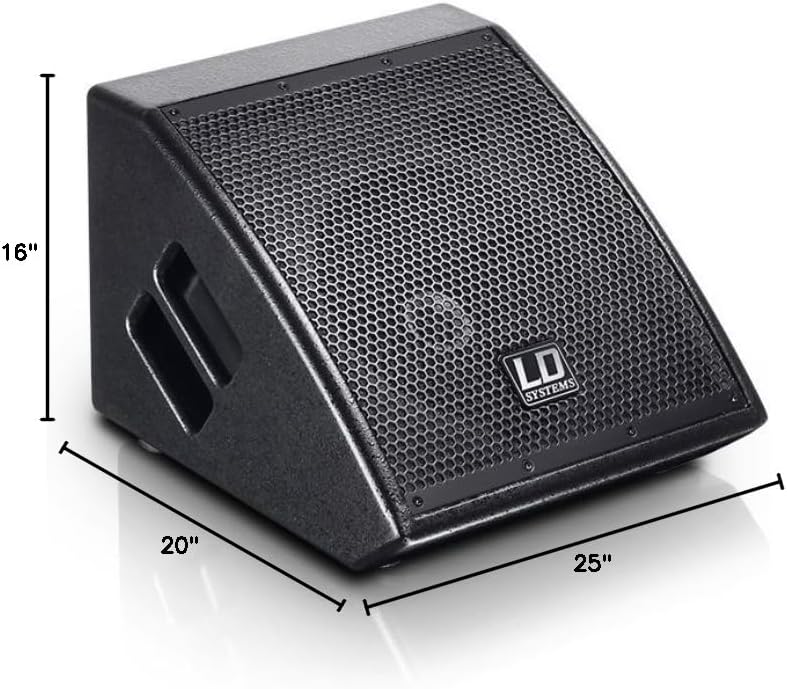
Image Description: This image illustrates the physical dimensions of the LD Systems MON81AG2 monitor. The measurements are indicated as approximately 25 inches (depth), 16 inches (width), and 20 inches (height), providing a clear understanding of its size for placement and transport.
Setup
Follow these steps to set up your MON81AG2 active stage monitor.
Placement
- Place the monitor on a stable, flat surface, such as a stage floor or a tabletop. The monitor is designed for tabletop mounting.
- Ensure adequate space around the unit for proper ventilation to prevent overheating.
- Position the monitor to achieve optimal sound coverage for the performer or audience, considering its 75° x 75° dispersion angle.
Connections
- Power Connection: Connect the supplied power cable to the power input on the rear panel of the monitor, then plug the other end into a suitable grounded AC power outlet.
- Audio Input: Connect your audio source (e.g., mixer, instrument, microphone preamplifier) to the INPUT jack on the rear panel using an appropriate audio cable.
- Audio Output (Direct Out): If you need to send the audio signal to another monitor or audio device, connect a cable from the DIRECT OUT jack on the rear panel to the input of the next device.
Operating Instructions
This section details how to operate your LD Systems MON81AG2 monitor.
Powering On/Off
- Ensure all audio connections are secure and the SUB LEVEL knob is set to its minimum position before powering on.
- Flip the POWER switch on the rear panel to the "ON" position. The power indicator (if present) should illuminate.
- To power off, first reduce the SUB LEVEL to minimum, then flip the POWER switch to the "OFF" position.
Adjusting Volume
Use the SUB LEVEL knob on the rear panel to adjust the overall output volume of the monitor. Start with a low setting and gradually increase to the desired listening level. Avoid setting the volume excessively high to prevent distortion and potential hearing damage.
Limiter Indicator
The LIMIT LED on the rear panel indicates when the internal limiter is active. This limiter protects the speaker from excessive signal levels. If this LED illuminates frequently or stays lit, it means the signal is too strong. Reduce the input signal level from your source or decrease the SUB LEVEL on the monitor to prevent distortion and protect the speaker components.
Maintenance
Proper maintenance ensures the longevity and optimal performance of your monitor.
- Cleaning: Disconnect the power before cleaning. Use a dry, soft, lint-free cloth to wipe the exterior of the monitor. Do not use abrasive cleaners, waxes, or solvents, as these can damage the finish.
- Storage: When not in use for extended periods, store the monitor in a dry, dust-free environment, ideally in its original packaging or a protective case.
- Inspection: Periodically check all cables and connections for any signs of wear, damage, or loose contacts. Replace damaged cables immediately.
- Ventilation: Ensure that the ventilation openings are always clear of dust and debris.
Troubleshooting
If you encounter issues with your MON81AG2 monitor, refer to the table below for common problems and solutions.
| Problem | Possible Cause | Solution |
|---|---|---|
| No sound output | No power to the unit; incorrect audio connections; low volume setting; faulty audio source or cable. | Check power cable and outlet. Ensure POWER switch is ON. Verify audio input cable is securely connected to the INPUT jack. Increase SUB LEVEL gradually. Test with a different audio source and cable. |
| Distorted sound | Input signal too high; SUB LEVEL too high; faulty audio cable; LIMIT LED constantly lit. | Reduce the input signal level from your audio source. Decrease the SUB LEVEL on the monitor. If the LIMIT LED is constantly lit, reduce signal further. Replace audio cables if damaged. |
| Monitor not powering on | No power to the electrical outlet; faulty power cable; internal fault. | Check the power outlet with another device to confirm it is functional. Ensure the power cable is fully inserted at both ends. Try a different power cable. If the problem persists, contact qualified service personnel. |
| Humming or buzzing noise | Ground loop; interference from other electronic devices; faulty cable. | Ensure all equipment is connected to the same electrical circuit. Try isolating the monitor from other electronics. Use balanced audio cables if possible. Check and replace any faulty cables. |
Specifications
Detailed technical specifications for the LD Systems MON81AG2 active stage monitor:
- Model: MON81AG2
- Item Model Number: LDS MON81AG2
- Speaker Type: 8" Coaxial with 1" HF Driver
- Amplifier Type: Class AB
- Output Power: 320W Peak
- Maximum SPL: 116dB
- Dispersion Angle: 75° x 75°
- Product Dimensions (D x W x H): 25" x 16" x 20" (approximately 63.5 cm x 40.6 cm x 50.8 cm)
- Mounting Type: Tabletop Mount
- ASIN: B06XB5S2LY
- Date First Available: March 14, 2020
Warranty and Support
For warranty information, technical support, and service inquiries, please refer to the official LD Systems website or contact your local authorized distributor. Keep your proof of purchase (receipt or invoice) as it will be required for any warranty claims.
Manufacturer: LD Systems
Official Website: www.ld-systems.com (Please visit the official website for the most current support information and contact details.)
