1. Introduction
This manual provides comprehensive instructions for the installation, operation, and maintenance of the Honeywell T991A1004/U Modulating Temperature Controller. Please read this manual thoroughly before attempting to install or operate the device. Retain this manual for future reference.
2. Safety Information
WARNING: Improper installation or operation can result in personal injury, property damage, or damage to the controller. Always follow local electrical codes and safety regulations.
- Ensure power is disconnected before installation or servicing.
- Installation and servicing must be performed by qualified personnel only.
- Do not operate the controller beyond its specified ratings.
- Protect the controller from moisture and extreme temperatures.
3. Product Overview
The Honeywell T991A1004/U is a 3-inch modulating temperature controller designed for precise temperature regulation in various industrial and commercial applications. It provides accurate control by adjusting output based on temperature deviations from the setpoint.
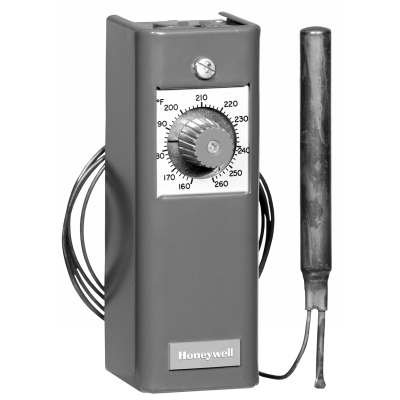
Figure 1: Front view of the Honeywell T991A1004/U Modulating Temperature Controller. This image shows the compact design and primary connection points of the device.
4. Setup and Installation
4.1 Unpacking and Inspection
Carefully remove the controller from its packaging. Inspect for any signs of shipping damage. If damage is found, contact your supplier immediately.
4.2 Mounting
- Mount the controller in a location free from excessive vibration, moisture, and corrosive atmospheres.
- Ensure adequate clearance for wiring and future servicing.
- Use appropriate mounting hardware to secure the controller firmly.
4.3 Wiring
Refer to the wiring diagram provided with the unit or on the product label. All wiring must comply with local and national electrical codes. Ensure proper grounding.
- Connect power supply wires to the designated terminals.
- Connect temperature sensor wires to the sensor input terminals.
- Connect control output wires to the controlled device (e.g., valve actuator, heater).
- Double-check all connections before applying power.
5. Operating Instructions
5.1 Initial Power-Up
After verifying all connections, apply power to the controller. The unit will typically perform a self-test. Observe any indicator lights or display messages.
5.2 Setting the Temperature Setpoint
Use the designated controls (e.g., dial, buttons) to adjust the desired temperature setpoint. Refer to the specific model's interface for detailed instructions on setpoint adjustment.
5.3 Monitoring Performance
Monitor the system's temperature and the controller's output to ensure stable and accurate temperature control. Adjust tuning parameters if necessary, following advanced configuration guidelines (if applicable to your model).
6. Maintenance
Regular maintenance ensures optimal performance and extends the lifespan of your Honeywell T991A1004/U controller.
- Periodic Inspection: Annually inspect all wiring connections for tightness and signs of wear or corrosion.
- Cleaning: Keep the controller's exterior clean and free of dust and debris. Use a soft, dry cloth. Do not use abrasive cleaners or solvents.
- Sensor Check: Periodically verify the accuracy of the temperature sensor. Replace if readings are inconsistent or inaccurate.
- Calibration: If precise temperature control is critical, consider professional calibration checks at recommended intervals.
7. Troubleshooting
Before contacting technical support, review the following common issues and solutions.
| Problem | Possible Cause | Solution |
|---|---|---|
| Controller not powering on | No power supply; loose wiring; blown fuse | Check power source; inspect wiring; replace fuse if necessary. |
| Inaccurate temperature readings | Faulty sensor; sensor not properly installed; electrical interference | Check sensor connection and placement; replace sensor; ensure proper shielding. |
| No control output | Wiring error; faulty output relay/component; setpoint issue | Verify output wiring; check controller settings; test output component. |
| Temperature oscillates widely | Improper tuning parameters; oversized control valve/heater | Adjust PID (Proportional-Integral-Derivative) settings; consult system design. |
8. Specifications
Key technical specifications for the Honeywell T991A1004/U Modulating Temperature Controller:
- Model Number: T991A1004/U-T991A-10
- Manufacturer: Honeywell
- ASIN: B06X9SFPZK
- Date First Available: February 22, 2017
- Product Type: Modulating Temperature Controller
- Size: 3 inch
- (Further specifications like input/output ranges, power supply, operating temperature, etc., would be listed here if available.)
9. Warranty and Support
Honeywell products are manufactured to high standards and are backed by a limited warranty. For specific warranty terms and conditions, please refer to the documentation included with your purchase or visit the official Honeywell website.
For technical assistance, troubleshooting beyond this manual, or to inquire about replacement parts, please contact Honeywell customer support. Contact information can typically be found on the product packaging or the Honeywell website.
- Online Support: www.honeywell.com/us/en/support
- Customer Service: Refer to your regional Honeywell contact information.


