1. Introduction
The hOmeLabs 3000 Sq. ft. Energy Star Dehumidifier is designed to efficiently remove excess moisture from the air in medium to large rooms, bedrooms, and home basements. This unit is Energy Star certified, ensuring effective moisture absorption while maintaining energy efficiency. It is capable of removing up to 35 pints of water per day (50 Pint 2012 DOE Standard).
This dehumidifier features a sleek design with convenient built-in wheels and handles for easy portability. Its quiet operation ensures minimal disruption to your living space.
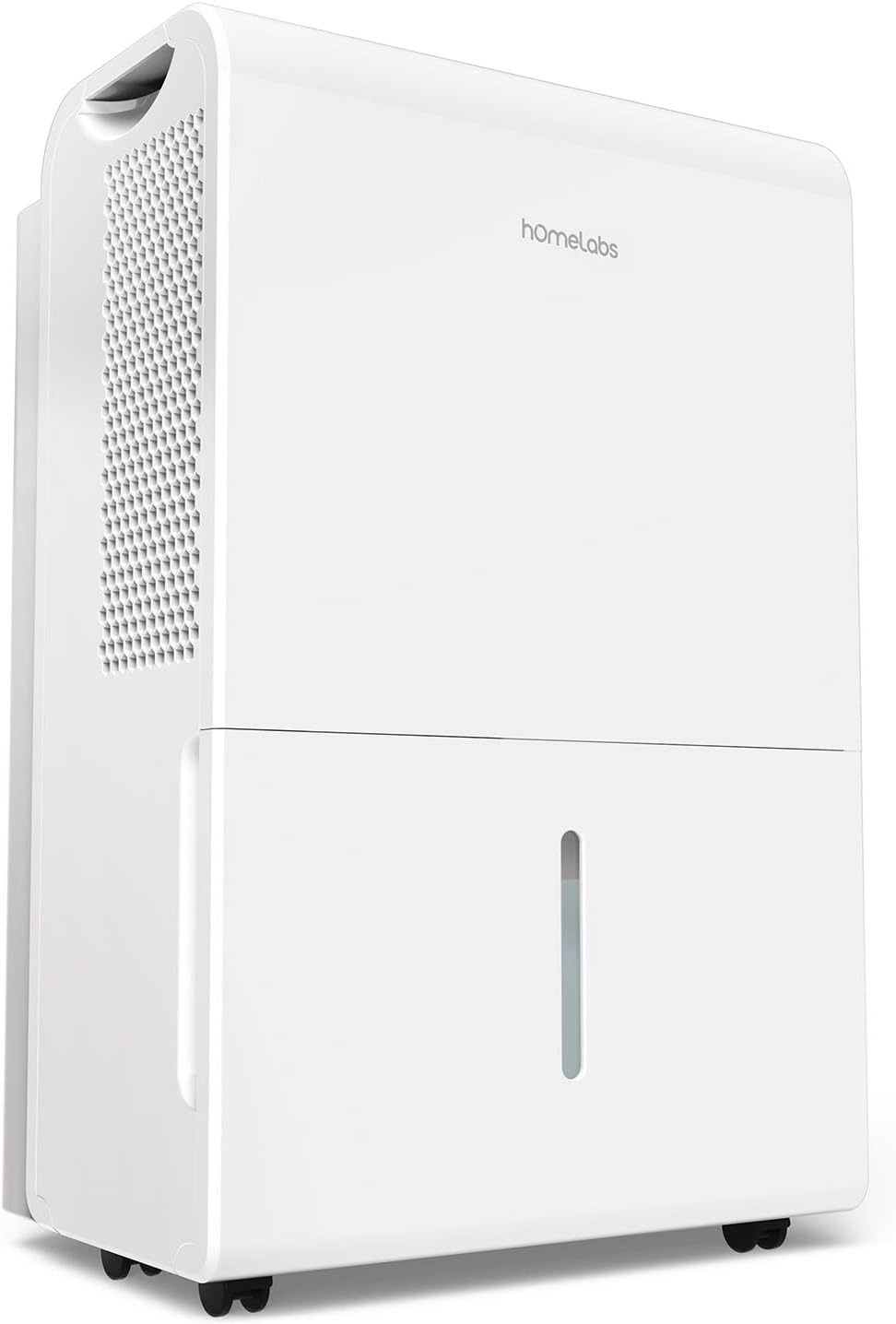
Figure 1: hOmeLabs 3000 Sq. ft. Energy Star Dehumidifier.

Figure 2: Illustration of humidity reduction from 85% to 35%.
2. Setup
Before operating your dehumidifier, please follow these setup instructions:
- Unpacking: Carefully remove the dehumidifier from its packaging. Retain all packaging materials for future storage or transport.
- Placement: Place the dehumidifier on a level surface in the desired location. Ensure there is at least 8 inches of space around the unit for proper airflow. This product is intended for spaces between 1,500 and 3,000 square feet. Avoid placing it in the same room as an evaporative cooler.
- Portability: The unit is equipped with built-in casters and handles for easy movement. Use these features to position the dehumidifier conveniently.
- Power Connection: Plug the dehumidifier into a grounded electrical outlet.
- Drainage Options: The dehumidifier offers two drainage options:
- Built-in Water Tank: The unit will collect moisture in its 1.8-gallon (1.6-gallon tank volume) internal water tank. When the tank is full, the unit will automatically shut off.
- Continuous Draining: For continuous operation without emptying the tank, connect a standard garden hose (not included, recommended ⅝" diameter with internally threaded end) to the drain hose outlet. Ensure the hose is sloped downwards to a suitable drain. Teflon tape can be used for extra security.

Figure 3: Built-in casters and handles for easy portability.

Figure 4: Flexible drainage options: built-in tank or gravity drain.
3. Operating Instructions
The hOmeLabs dehumidifier features a user-friendly digital control panel for easy operation.

Figure 5: Digital Control Panel for easy humidity level adjustment.
- Power On/Off: Press the Power button to turn the unit on or off.
- Setting Humidity Level: Use the up and down arrows on the control panel to adjust your desired humidity level. The unit will operate continuously until this level is reached.
- Continuous Operation: The dehumidifier can run a continuous 24-hour cycle. It will automatically shut off when the water tank is full.
- Turbo Mode: Activate Turbo mode to increase the fan speed from Normal Air CFM 165 to High Air CFM 188. This mode provides maximum moisture removal and odor reduction.
- Timer Function: Set the 1-24 hour timer for unattended operation.
- Comfort Mode: The unit can automatically set the ideal humidity level for comfort.

Figure 6: Effortless humidity control features.

Figure 7: Key functions of the control panel.
4. Maintenance
Regular maintenance ensures optimal performance and longevity of your dehumidifier.
- Emptying the Water Tank: When the water tank is full, the dehumidifier will automatically shut off and an indicator light will illuminate. Carefully remove the tank and empty the collected water. Reinsert the tank securely to resume operation.
- Filter Cleaning: The dehumidifier is equipped with a washable filter. It is recommended to clean the filter approximately once a month, or more frequently depending on usage and air quality. Refer to the filter indicator on the control panel. To clean, remove the filter, rinse it under running water, and allow it to air dry completely before reinserting.
- Continuous Drain Maintenance: If using the continuous drain option, periodically check the hose for kinks or blockages to ensure uninterrupted drainage.
- Exterior Cleaning: Wipe the exterior of the unit with a soft, damp cloth. Do not use harsh chemicals or abrasive cleaners.
5. Troubleshooting
If you encounter issues with your dehumidifier, refer to the following common problems and solutions:
| Problem | Possible Cause | Solution |
|---|---|---|
| Dehumidifier does not turn on. | No power, water tank full or not properly seated. | Ensure unit is plugged in. Check if the water tank is full and empty it, then ensure it is securely reinserted. |
| Unit is running but not collecting water. | Humidity level set too high, room temperature too low, air filter clogged. | Lower the desired humidity setting. Ensure room temperature is above 41°F (5°C). Clean the air filter. |
| Unit is making unusual noise. | Unit not on a level surface, fan obstruction. | Place the unit on a firm, level surface. Check for any obstructions around the fan or air inlets/outlets. |
| Unit emits warm air. | Normal operation. | Dehumidifiers naturally emit warm air as part of the moisture removal process. This is not a malfunction. |
| Unit automatically shuts off. | Water tank full, desired humidity reached, auto-defrost cycle. | Empty the water tank. The unit will restart when humidity rises or defrost cycle completes. |
If problems persist after attempting these solutions, please contact hOmeLabs customer support.
6. Specifications
| Feature | Detail |
|---|---|
| Brand | hOmeLabs |
| Model Name | HME020006N |
| Floor Area Coverage | 3000 Square Feet |
| Color | White |
| Dehumidification Capacity | 35 Pints per Day (50 Pint 2012 DOE Standard) |
| Water Tank Capacity | 1.8 Gallons (Tank Volume: 1.6 Gallons) |
| Product Dimensions (D x W x H) | 11"D x 15.4"W x 24.3"H |
| Item Weight | 40 Pounds |
| Number of Speeds | 2 |
| Operation Mode | Continuous |
| Air Flow Capacity | 1.8 Gallons (CFM 165 Normal / 188 High) |
| Upper Temperature Rating | 35 Degrees Celsius |
| Special Features | Continuous Draining, Portable, Automatic Restart, Automatic Defrost, Timer, Removable Tank, Automatic Shutoff, Washable Filter |
| UPC | 853893007058 |

Figure 8: Product dimensions and power cord length.
7. Warranty and Support
For detailed warranty information, please refer to the warranty card included with your product or visit the official hOmeLabs website. For technical support, troubleshooting assistance, or to inquire about replacement parts, please contact hOmeLabs customer service.
You can also refer to the official User Manual PDF for more comprehensive details: hOmeLabs Dehumidifier User Manual (PDF)


