
1. Introduction and Overview
The LD Systems Stinger 8A G3 is an active 2-way PA speaker engineered for professional audio applications. This robust system features a multi-purpose bass reflex construction, making it highly versatile for various sound reinforcement scenarios, including full-range sound, satellite configurations, or as a floor monitor. It is powered by a high-efficiency Class D amplifier, delivering a substantial 300 watts RMS output and a maximum sound pressure level (SPL) of 129 dB. The speaker is equipped with a custom-designed 8-inch woofer and a BMS compression driver, ensuring clear, punchy low-end and smooth, crisp high-frequency reproduction.
A key feature of the Stinger 8A G3 is its integrated DynX DSP technology, which optimizes audio performance through precise crossover and multiband limiter functions. This ensures accurate time alignment and pristine, distortion-free sound at all times. The HF waveguide, designed using BEM (Boundary Element Method) for numerical modeling of sound radiation, effectively reduces floor and ceiling reflections, eliminates side lobes, and achieves a controlled, uniform coverage pattern. The enclosure is constructed from rigid 12 mm birch ply and coated with ultra-tough polyurea for exceptional strength and durability, making it a reliable choice for demanding environments.

Figure 1: Front view of the LD Systems Stinger 8A G3 Active PA Speaker.
2. Safety Information
Please read and follow all safety instructions carefully before operating this product. Retain this manual for future reference.
- Electrical Safety: Always connect the speaker to a grounded power outlet. Do not expose the unit to rain or moisture. Disconnect power during lightning storms or when unused for long periods.
- Ventilation: Ensure adequate ventilation around the speaker. Do not block ventilation openings.
- Placement: Place the speaker on a stable, level surface or mount it securely using appropriate hardware. Avoid placing near heat sources or in direct sunlight.
- Handling: This product contains an 8-inch woofer and is designed for robust use. However, avoid dropping or subjecting it to severe impacts.
- Servicing: Do not attempt to service this product yourself. Refer all servicing to qualified service personnel.
3. Package Contents
Upon unpacking, please verify that all components are present and in good condition:
- LD Systems Stinger 8A G3 Active PA Speaker (1 unit)
- Power Cable
- User Manual (this document)
4. Product Features
The Stinger 8A G3 is equipped with a range of features designed for high-performance audio:
- 2-way active 8-inch bass reflex PA speaker system.
- High-efficiency 300 watts RMS digital power stage, capable of 129 dB maximum SPL.
- Multi-purpose design suitable for full-range, satellite, and monitor applications.
- Application presets for quick frequency response contouring to match different uses.
- BEM optimized HF waveguide for uniform sound coverage and reduced reflections.
- Features an 8-inch custom woofer and a BMS compression driver.
- Integrated DynX DSP technology for distortion-free performance and optimal sound.
- Two line/mic input channels with individual gain controls.
- Mono mix output for connecting to additional speakers or devices.
- Durable 12 mm birch ply cabinet with ultra-rugged polyurea finish.
- Multiple M10 suspension points for flexible installation.
- Shock-resistant steel front grille for speaker protection.
- 36 mm Dual-Tilt pole receptacle for 0° or 5° mounting angles.
- Bluetooth connectivity for wireless audio streaming and app control.
5. Setup
Proper setup ensures optimal performance and safety.
5.1 Initial Placement
Position the speaker in a location that allows for clear sound projection and adequate ventilation. Avoid placing it directly against walls or in corners if possible, as this can affect bass response. The Stinger 8A G3 can be placed upright, on its side as a floor monitor, or mounted on a pole.

Figure 2: The Stinger 8A G3 positioned as a floor monitor.
5.2 Pole Mounting
For elevated sound projection, the speaker features a 36 mm Dual-Tilt pole receptacle. This allows for two different mounting angles: 0° (straight up) or 5° (tilted downwards). Ensure the speaker pole is stable and rated to support the weight of the Stinger 8A G3 (approximately 23.5 lbs / 10.7 kg).

Figure 3: Dual-Tilt pole receptacle offering 0° and 5° mounting angles.
5.3 Power Connection
Connect the supplied power cable to the power input on the rear panel of the speaker, then plug it into a suitable grounded AC power outlet. Ensure the power switch is in the 'OFF' position before connecting power.
6. Operating Instructions
Familiarize yourself with the controls and connections on the rear panel for effective operation.
6.1 Rear Panel Overview
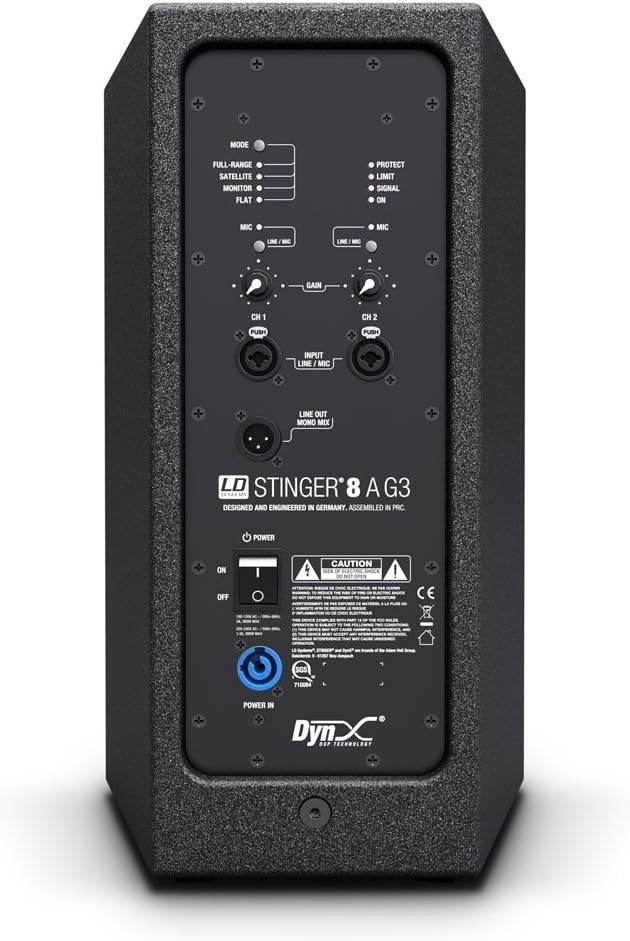
Figure 4: Detailed view of the Stinger 8A G3 rear control panel.
The rear panel provides all necessary inputs, outputs, and controls for the speaker. This includes:
- Input Channels (CH 1 & CH 2): Two combination XLR/TRS inputs for connecting microphones or line-level sources. Each channel has an independent gain control.
- Line Out (Mono Mix): An XLR output for sending a mixed signal to another speaker or audio device.
- Mode Selector: Allows selection of application presets (Full-range, Satellite, Monitor, Flat) to optimize frequency response.
- Bluetooth Section: Controls for pairing and managing Bluetooth audio devices.
- Power Switch: Turns the unit on or off.
- Power Input: For connecting the AC power cable.
6.2 Powering On/Off
- Ensure all connections are secure and gain controls are set to minimum.
- Flip the Power Switch to the 'ON' position. The power indicator LED will illuminate.
- To power off, set the Power Switch to 'OFF'.
6.3 Connecting Audio Sources
Use XLR or 1/4-inch TRS cables to connect your audio sources (e.g., mixer, microphone, instrument) to Input CH 1 or CH 2. Adjust the individual gain controls for each channel to achieve the desired input level. The 'Signal' LED indicates the presence of an audio signal, while the 'Limit' LED warns of signal clipping.
6.4 Bluetooth Connectivity
The Stinger 8A G3 supports Bluetooth for wireless audio streaming. Refer to the Bluetooth section on the rear panel for pairing instructions. Additionally, a dedicated phone application can provide advanced control over various speaker functions and settings.
7. DynX DSP Technology and Applications
The integrated DynX DSP technology enhances the speaker's performance and versatility:
- Crossover and Multiband Limiter: These functions ensure optimal frequency distribution and prevent distortion, even at high volumes, by protecting the speaker components.
- Application Presets: Use the 'Mode' selector to choose from pre-configured sound profiles:
- Full-range: Optimized for standalone use, providing a balanced frequency response.
- Satellite: Tailored for use with a subwoofer, rolling off low frequencies to avoid overlap.
- Monitor: Adjusted for stage monitoring, often with reduced bass and enhanced mid-range clarity.
- Flat: Provides a neutral frequency response for precise sound reproduction or custom equalization.
8. Maintenance
Regular maintenance helps prolong the life and performance of your speaker.
- Cleaning: Use a soft, dry cloth to clean the exterior of the speaker. Do not use abrasive cleaners or solvents.
- Grille: Periodically check the steel front grille for any damage or obstructions.
- Storage: When not in use, store the speaker in a dry, dust-free environment.
- Inspection: Regularly inspect cables and connections for wear or damage.
9. Troubleshooting
If you encounter issues with your Stinger 8A G3, refer to the following common troubleshooting steps:
- No Power: Ensure the power cable is securely connected to both the speaker and a working power outlet. Check the power switch position.
- No Sound: Verify that audio sources are properly connected and functioning. Check input gain levels and master volume. Ensure the correct 'Mode' preset is selected.
- Distorted Sound: Reduce input gain levels to prevent clipping (check the 'Limit' LED). Ensure cables are not damaged.
- Bluetooth Connection Issues: Ensure the speaker is in pairing mode and your device's Bluetooth is enabled. Move closer to the speaker to reduce interference.
If problems persist, consult the official LD Systems support resources or a qualified technician.
10. Specifications
| Feature | Specification |
|---|---|
| Model Name | Stinger 8A G3 |
| Speaker Type | 2-way Active PA Speaker |
| Woofer Diameter | 8 Inches |
| Power Output (RMS) | 300 Watts |
| Power Output (Peak) | 800 Watts |
| Maximum SPL | 129 dB |
| Enclosure Material | Birch Ply |
| Connectivity | XLR, Bluetooth |
| Product Dimensions (D x W x H) | 11" x 10" x 18" |
| Item Weight | 23.5 pounds (10.7 Kilograms) |
| Pole Receptacle | 36 mm Dual-Tilt (0°/5°) |
| Control Method | Touch, Bluetooth App |
11. Warranty and Support
The LD Systems Stinger 8A G3 comes with a limited warranty. For comprehensive details regarding warranty terms, conditions, and duration, please refer to the official documentation provided with your product or visit the authorized LD Systems website. Keep your proof of purchase for warranty claims.
Optional protection plans may be available for extended coverage beyond the standard manufacturer's warranty. These plans can offer additional benefits and peace of mind. For information on available protection plans, please consult your retailer or the relevant service provider.
For technical support, service inquiries, or to access additional resources, please visit the official LD Systems support portal or contact their customer service department.


