Introduction
This manual provides comprehensive instructions for the setup, operation, and maintenance of the reiie H9+ Mini Keyboard. This 2.4GHz wireless mini handheld keyboard features a touchpad and LED backlight, offering a convenient input solution for various devices including PCs, Smart TVs, Android TV Boxes, and more.
Please read this manual thoroughly before using the product to ensure proper functionality and to prevent damage.
Package Contents
- 1x reiie H9+ Wireless Mini Keyboard
- 1x USB Wireless Receiver
- 1x USB Charging Cable
- 1x User Manual
Product Overview
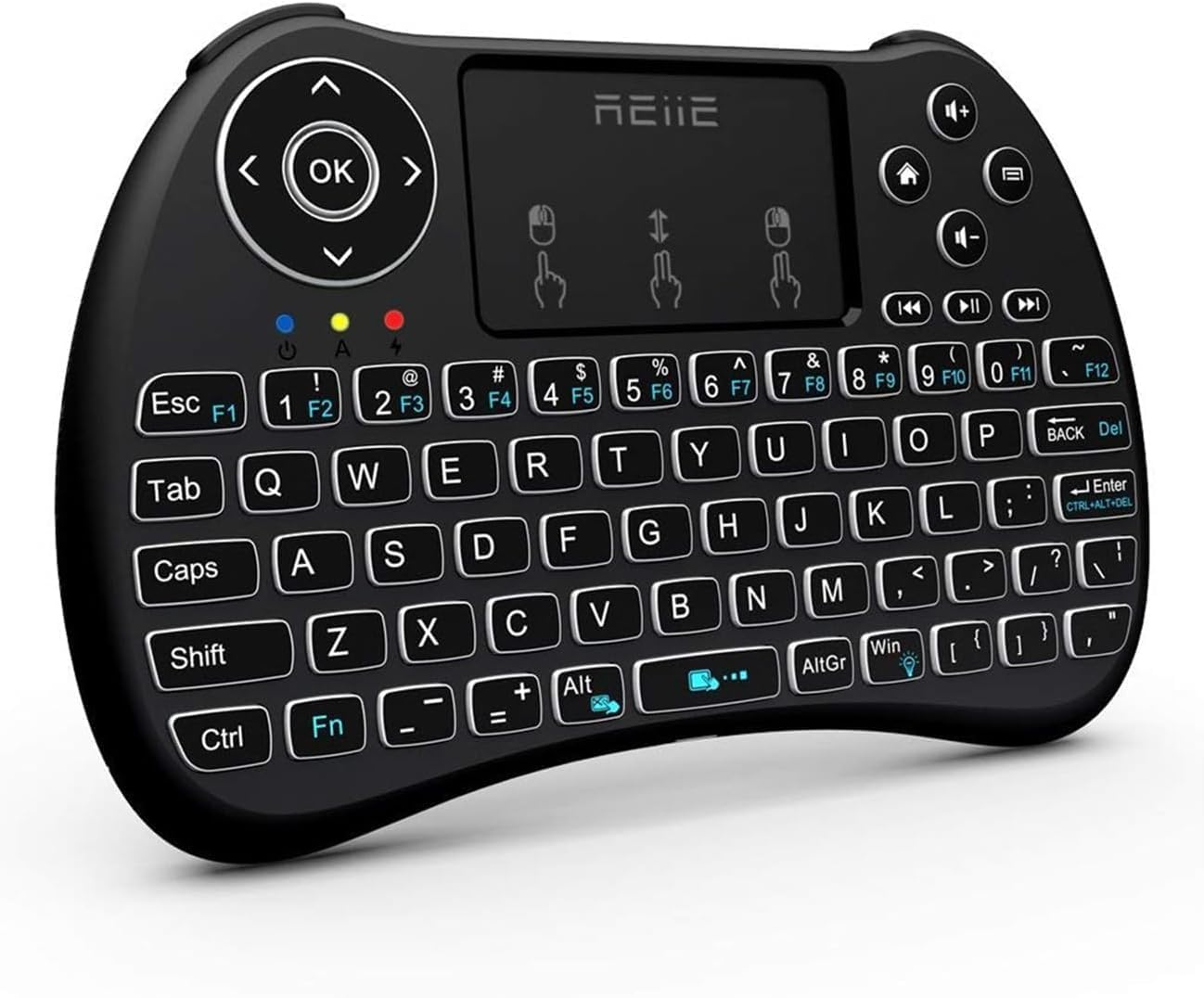
Figure 1: Front view of the reiie H9+ Mini Keyboard, showing the QWERTY layout, touchpad, and navigation buttons.
The reiie H9+ Mini Keyboard integrates a full QWERTY keyboard, a multi-finger touchpad, and media control keys into a compact, handheld design. It operates on a 2.4GHz wireless connection via a USB receiver.
Key Features:
- 2.4GHz Wireless Connectivity: Provides a stable connection up to 15 meters.
- Integrated Touchpad: Supports multi-finger gestures for navigation.
- LED Backlight: Allows for use in low-light conditions.
- Rechargeable Battery: Built-in Lithium Ion battery for extended use.
- Compact Design: Ergonomic and portable for comfortable handling.

Figure 2: The keyboard with its LED backlight activated, highlighting the keys and media controls. The 'Fn+Win' key combination activates the backlight.

Figure 3: Rear view of the keyboard, illustrating the battery compartment, the USB receiver storage slot, and the charging port.
Setup
- Initial Charging: Before first use, fully charge the keyboard for at least 1 hour using the provided USB charging cable. Connect the small end of the cable to the keyboard's charging port (located on the back, near the power switch) and the other end to a USB power source (e.g., computer USB port, USB wall adapter). The charging indicator light will illuminate during charging and turn off when fully charged.
- Locate USB Receiver: The USB wireless receiver is stored in the battery compartment on the back of the keyboard. Gently open the battery cover to retrieve it.
- Connect Receiver: Insert the USB wireless receiver into an available USB port on your device (PC, Smart TV, Android TV Box, etc.).
- Power On: Slide the power switch on the back of the keyboard from "OFF" to "ON".
- Automatic Connection: The keyboard should automatically connect to your device. No additional drivers are typically required for most operating systems.

Figure 4: Illustration of the mini USB receiver and the charging port, emphasizing the wireless connection range of up to 15 meters.
Operating Instructions
Keyboard Functions:
- Typing: Use the QWERTY keyboard layout for text input.
- Function Keys (Fn): Press and hold the Fn key, then press a corresponding F-key (F1-F12) or other marked keys to access secondary functions (e.g., media controls, backlight toggle).
- Backlight Control: Press Fn + Win to toggle the LED backlight on/off.
- Media Controls: Dedicated buttons for play/pause, next track, previous track, volume up/down, and mute are located on the upper right side.

Figure 5: Diagram illustrating various shortcut key combinations, including Fn + number keys for F-functions, and Fn + Alt to close the touchpad.
Touchpad Functions:
- Single Finger Tap: Functions as a left mouse click.
- Two-Finger Tap: Functions as a right mouse click.
- Two-Finger Drag: Scrolls up or down.
- Touchpad Lock: Press Fn + Alt to lock or unlock the touchpad function.

Figure 6: Visual representation of multi-finger touchpad gestures for left click, right click, and scrolling.
Compatibility:
The H9+ Mini Keyboard is compatible with a wide range of devices and operating systems, including:
- PC (Windows 7, 8, 10, Linux)
- Smart TV
- Android TV Box
- Raspberry Pi 2
- Pad
- HTPC/IPTV

Figure 7: The reiie H9+ Mini Keyboard shown with various compatible devices such as Smart TV, laptop, notebook, projector, and TV box.

Figure 8: A user demonstrating interaction with a Smart TV using the reiie H9+ Mini Keyboard, highlighting its handheld convenience.
Maintenance
- Cleaning: Use a soft, dry cloth to clean the surface of the keyboard. For stubborn dirt, a slightly damp cloth can be used, ensuring no moisture enters the device.
- Storage: When not in use for extended periods, turn off the keyboard to conserve battery life. Store it in a cool, dry place away from direct sunlight and extreme temperatures.
- Battery Care: Recharge the battery regularly, even if not fully depleted, to maintain optimal battery health. Avoid completely draining the battery frequently.
- USB Receiver: Keep the USB receiver stored securely in its designated slot on the keyboard's back when not in use to prevent loss.
Troubleshooting
- Keyboard Not Responding:
- Ensure the keyboard is powered on.
- Check if the USB receiver is securely plugged into the device.
- Recharge the keyboard battery. Low battery can cause unstable connections or non-responsiveness.
- Try plugging the USB receiver into a different USB port on your device.
- Restart your device.
- Touchpad Not Working:
- Ensure the keyboard battery is fully charged. The touchpad requires more power than the keys, so it may stop working before the keys do if the battery is low.
- Check if the touchpad is locked. Press Fn + Alt to unlock it.
- Backlight Not Working:
- Press Fn + Win to toggle the backlight.
- Ensure the keyboard battery is sufficiently charged.
- Short Wireless Range or Intermittent Connection:
- Ensure there are no large metallic objects or other 2.4GHz wireless devices interfering with the signal between the keyboard and the receiver.
- Move closer to the USB receiver.
- Recharge the keyboard battery.
Specifications
| Brand | reiie |
| Model | H9+ |
| Connectivity Technology | 2.4 GHz RF Wireless |
| Operating System Compatibility | Linux, Windows 10, Windows 7, Windows 8 |
| Hardware Platform | PC |
| Special Features | Backlit, Hotkeys and Media Keys, Rechargeable, Trackpad |
| Power Source | Battery Powered (1 Lithium Ion battery included) |
| Item Weight | 5 ounces (approx. 141.75 grams) |
| Product Dimensions (LxWxH) | 7.17 x 4.13 x 0.91 inches (approx. 18.2 x 10.5 x 2.3 cm) |
| Color | Black |

Figure 9: Detailed dimensions of the reiie H9+ Mini Keyboard, showing its length of 146.8mm (5.77 inches) and width of 97.5mm (3.83 inches).
Warranty and Support
For warranty information and technical support, please refer to the official reiie website or contact their customer service directly. Details may be provided on the product packaging or through the seller's information channel.
As an emerging intelligent electronic brand, reiie aims to provide customers with quality and convenient intelligent electronic use experience. For further assistance, please visit the reiie Store on Amazon.


