
1. Introduction
Thank you for choosing the V-Guard Induction Cooktop VIC 2000. This appliance is designed for efficient and safe cooking with its advanced induction technology. Please read this manual carefully before operating the cooktop to ensure proper use, maintenance, and to prevent any damage or injury.
2. Important Safety Instructions
WARNING: To reduce the risk of fire, electric shock, injury to persons, or damage to the appliance, observe the following safety precautions:
- Do not immerse the appliance, cord, or plug in water or other liquids.
- Ensure the voltage indicated on the appliance corresponds to your local mains voltage before connecting.
- Do not operate the cooktop if the power cord or plug is damaged, or if the appliance malfunctions or has been damaged in any manner.
- Keep the appliance out of reach of children.
- Use only induction-compatible cookware. Non-induction cookware will not heat.
- Do not place metallic objects such as knives, forks, spoons, lids, cans, or aluminum foil on the cooktop surface, as they can become hot.
- Ensure adequate ventilation around the cooktop during operation.
- The surface remains hot after use. Please do not touch immediately.
- Do not place the cooktop on or near hot gas or electric burners, or in a heated oven.
- Unplug from the outlet when not in use and before cleaning.
3. Product Overview
The V-Guard VIC 2000 Induction Cooktop features a sleek design with feather-touch controls and a digital LED display for easy operation.
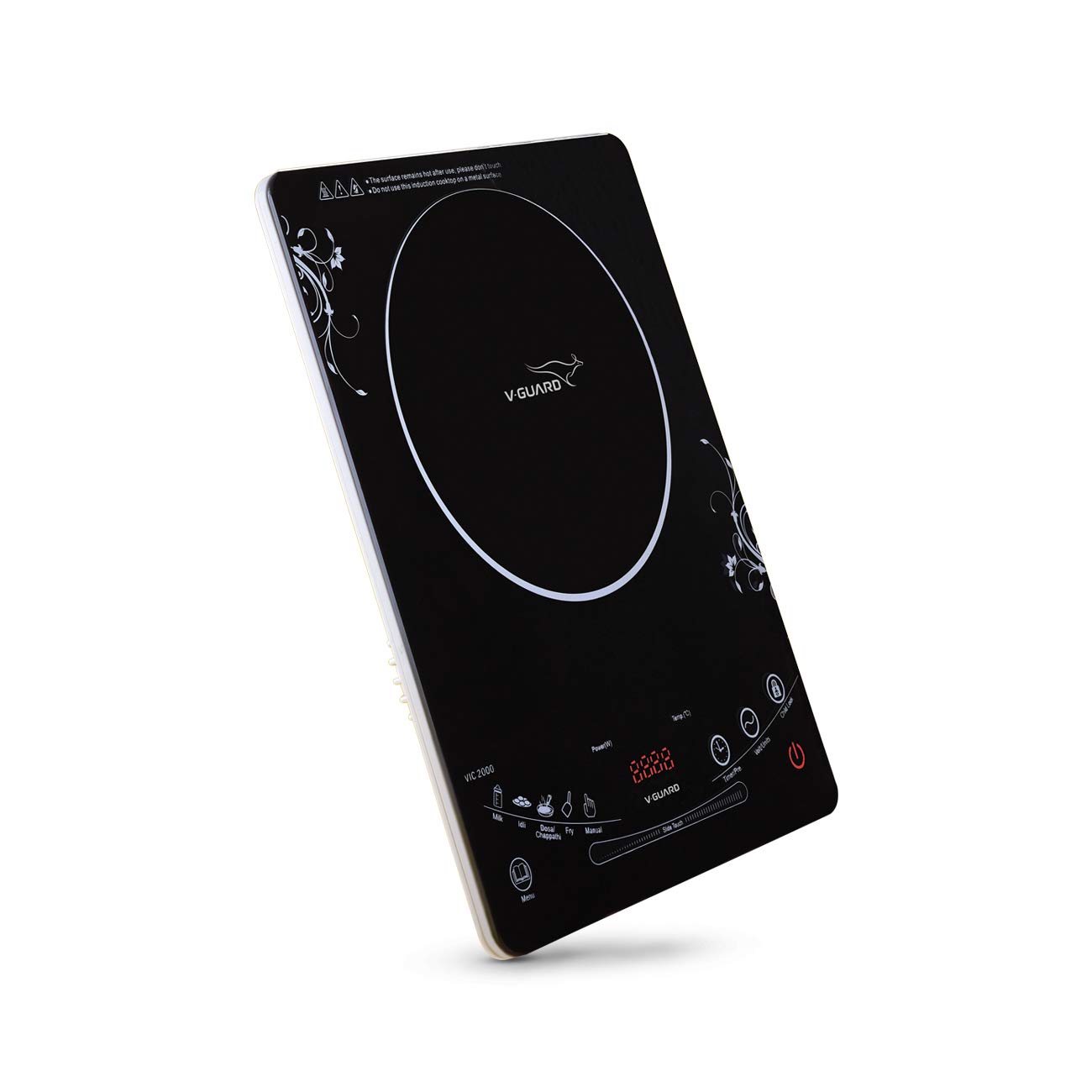
Figure 3.1: Front view of the V-Guard Induction Cooktop VIC 2000, showing the control panel and cooking zone.
Key Features:
- Feather Touch Design: Responsive and easy-to-clean control panel.
- 4 Digit LED Display: Clearly shows power, temperature, and timer settings. Includes voltage indication.
- 4 Hour Timer: Allows for precise cooking duration control.
- Indian Menu Preset Functions: Dedicated settings for Dosa/Chappathi and Idli, simplifying common Indian cooking tasks.
- Eight Levels of Power Settings: Provides versatile cooking options.
- Child Lock: Enhances safety by preventing accidental operation.

Figure 3.2: Close-up of the digital LED display and feather-touch controls, reflecting a sleek glass body.

Figure 3.3: Detailed view of the VIC 2000 control panel, illustrating various function buttons and the power slider.
4. Setup
- Unpacking: Carefully remove the induction cooktop from its packaging. Retain packaging for future storage or transport.
- Placement: Place the cooktop on a stable, flat, heat-resistant surface. Ensure there is sufficient space around the unit for proper ventilation (at least 10 cm from walls or other appliances). Do not block the air vents located on the bottom or sides of the unit.
- Power Connection: Plug the power cord into a grounded electrical outlet. Ensure the outlet voltage matches the cooktop's requirements (2000 Watts).
- Initial Check: Before first use, wipe the ceramic glass surface with a soft, damp cloth.
5. Operating Instructions
5.1 Compatible Cookware
The V-Guard VIC 2000 works only with induction-compatible cookware. Look for the induction symbol on the bottom of your pots and pans. Compatible materials include cast iron, enameled iron, stainless steel with a magnetic bottom, or flat-bottomed pots/pans with a diameter between 12 cm and 26 cm.
5.2 Basic Operation
- Power On: Place an induction-compatible pot or pan with food on the center of the cooking zone. Press the On/Off button. The LED display will light up.
- Select Cooking Mode:
- Manual Mode: Press the Manual button. Adjust the power level using the touch slider or dedicated power buttons (if available). The cooktop offers eight levels of power settings.
- Preset Indian Menu: Press the Menu button to cycle through preset functions like Dosa/Chappathi or Idli. The cooktop will automatically adjust power and temperature for optimal results.
- Timer Function: Press the Timer/Prep button to set the cooking duration. Use the adjustment controls to set the desired time up to 4 hours. The cooktop will automatically switch off once the timer expires.
- Child Lock: To activate the child lock, press and hold the Child Lock button for a few seconds. This will prevent accidental changes to settings. Repeat the action to deactivate.
- Power Off: After cooking, press the On/Off button to turn off the cooktop. The fan may continue to run for a short period to cool down the internal components.
6. Maintenance and Cleaning
Regular cleaning and maintenance will prolong the life of your V-Guard Induction Cooktop.
- Before Cleaning: Always unplug the cooktop from the power outlet and allow it to cool completely before cleaning.
- Cooktop Surface: Wipe the ceramic glass surface with a soft, damp cloth and a mild detergent. For stubborn stains, use a non-abrasive ceramic cooktop cleaner. Do not use abrasive pads, scouring powders, or corrosive cleaners.
- Control Panel: Wipe the feather-touch control panel with a soft, damp cloth. Ensure no liquid enters the control area.
- Exterior: Clean the exterior housing with a soft, damp cloth.
- Storage: When not in use for extended periods, store the cooktop in a dry place, away from direct sunlight and moisture.
7. Troubleshooting
If you encounter issues with your V-Guard Induction Cooktop, refer to the following common problems and solutions:
| Problem | Possible Cause | Solution |
|---|---|---|
| Cooktop does not turn on. | No power supply; Power cord not plugged in; Main switch off. | Check power outlet and plug connection. Ensure main switch is on. |
| Cookware is not heating. | Non-induction compatible cookware; Cookware too small/large; No cookware detected. | Use induction-compatible cookware. Ensure cookware diameter is within 12-26 cm and centered on the cooking zone. |
| Display shows "E5" error. | Overheating of the cooktop surface. | Turn off the cooktop and allow it to cool down. Ensure proper ventilation. Check if the cookware is empty or if the power level is too high for an extended period. |
| Fan continues to run after turning off. | Normal cooling process. | This is normal. The fan will stop automatically once the internal components have cooled sufficiently. |
| Controls are unresponsive. | Child lock activated; Moisture on control panel. | Deactivate child lock by pressing and holding the Child Lock button. Wipe the control panel dry. |
If the problem persists after trying these solutions, please contact V-Guard customer support.
8. Specifications
| Feature | Detail |
|---|---|
| Model Number | VIC-2000 |
| Brand | V-Guard |
| Power Consumption | 2000 Watts |
| Material | Crystal Glass |
| Color | Black |
| Product Dimensions (D x W x H) | 29D x 37W x 3.9H Centimeters |
| Number of Heating Elements | 1 |
| Controls Type | Touch |
| Included Components | Induction cooktop |
Note: Specifications are subject to change without prior notice for product improvement.
9. Warranty and Support
V-Guard products are manufactured to the highest quality standards. For warranty information, service, or technical support, please refer to the warranty card included with your product or visit the official V-Guard website. Keep your purchase receipt as proof of purchase for warranty claims.
For further assistance, you may contact V-Guard customer service through their official channels.