
Introduction
This manual provides detailed instructions for the proper use, maintenance, and troubleshooting of your HM Digital EC-3M EC Meter. The EC-3M is designed for testing electrical conductivity and temperature in water, offering reliable measurements for various applications.
Safety Information
WARNING: Item must be operated by an adult. Keep this away from babies and children. The item contains electronic components inside; please keep the electronic components dry.

Image: A warning label indicating that the device should be operated by adults, kept away from children, and kept dry due to internal electronic components. Text is provided in English, German, French, Spanish, Italian, Swedish, Dutch, and Polish.
Product Overview
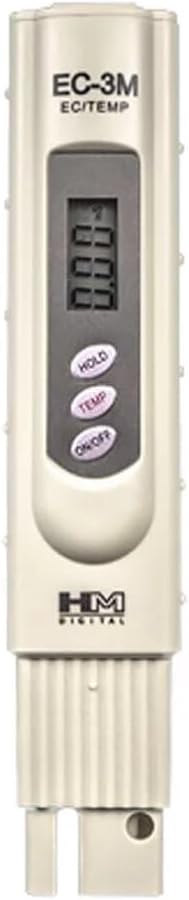
Image: Front view of the HM Digital EC-3M EC Meter. The meter is light-colored with a digital display at the top, showing '0.00'. Below the display are three oval-shaped buttons: 'HOLD', 'TEMP', and 'ON/OFF'. The HM Digital logo is visible near the bottom. The probe is located at the very bottom of the device.
The HM Digital EC-3M EC Meter features a clear digital display, intuitive control buttons, and a robust probe for accurate measurements. Key components include:
- Digital Display: Shows EC (Electrical Conductivity) and temperature readings.
- HOLD Button: Freezes the current reading on the display for convenient recording.
- TEMP Button: Toggles between temperature display and EC display, or adjusts temperature units if applicable.
- ON/OFF Button: Powers the device on or off.
- Electrode Probe: The sensing element that is submerged in the liquid for measurement.
Setup
Before first use, ensure the batteries are correctly installed.
- Battery Installation: The EC-3M requires 2 LR44 batteries, which are included. Locate the battery compartment, typically at the top or back of the device. Open the compartment, insert the batteries according to the polarity indicators (+/-), and close the compartment securely.
- Initial Rinse: Before taking your first measurement, rinse the electrode probe with distilled or deionized water to remove any manufacturing residues.
Operating Instructions
Basic Operation
- Power On/Off: Press the 'ON/OFF' button to turn the meter on or off.
- Auto-Off Function: The meter features an auto-off function that automatically switches off after 10 minutes of non-use to conserve battery life.
- Hold Function: Press the 'HOLD' button to freeze the current measurement on the display. Press it again to release the hold and resume live readings.
- Measuring Range: The meter has a measuring range of 0.00-9.99 mS (milliSiemens).
Measurement Procedure
- Turn on the EC-3M meter by pressing the 'ON/OFF' button.
- Remove the protective cap from the electrode probe.
- Immerse the electrode probe into the water sample you wish to test. Ensure the probe is fully submerged but do not submerge the entire meter.
- Gently stir the meter to remove any air bubbles and allow the reading to stabilize.
- Read the EC value displayed on the screen. If you need to record the value, press the 'HOLD' button.
- To view the temperature, press the 'TEMP' button.
- After measurement, rinse the electrode probe thoroughly with distilled or deionized water.
- Replace the protective cap and turn off the meter.
Maintenance
Proper maintenance ensures the longevity and accuracy of your EC-3M meter.
- Cleaning: Always rinse the electrode probe with distilled or deionized water after each use. Do not use abrasive materials or harsh chemicals.
- Storage: Store the meter with its protective cap on in a cool, dry place. As the device contains electronic components, it is crucial to keep it dry.
- Battery Replacement: If the display becomes dim or the meter does not power on, replace the batteries. Ensure correct polarity.
- Calibration: For optimal accuracy, periodic calibration with standard EC solutions is recommended. Refer to specific calibration instructions if provided with your calibration solutions.
Troubleshooting
If you encounter issues with your EC-3M meter, refer to the following common problems and solutions:
| Problem | Possible Cause | Solution |
|---|---|---|
| Meter does not turn on | Dead or incorrectly installed batteries | Replace batteries with new LR44 batteries, ensuring correct polarity. |
| Inaccurate or fluctuating readings | Dirty electrode, air bubbles, or meter needs calibration | Clean the electrode, gently stir the sample, or perform calibration. |
| Display shows '---' or 'Err' | Reading out of range or sensor issue | Ensure the sample is within the meter's measuring range. If problem persists, contact support. |
Specifications
| Feature | Detail |
|---|---|
| Brand Name | HM Digital |
| Model | EC-3M |
| Measuring Range | 0.00-9.99 mS |
| Batteries | 2 LR44 batteries (included) |
| Item Weight | 2.56 ounces |
| Package Dimensions (L x W x H) | 6.61 x 2.32 x 1.65 inches |
| Auto-Off Function | Yes, after 10 minutes of non-use |
| Hold Function | Yes |
| Manufacturer | HM Digital |
Warranty and Support
For warranty information or technical support, please refer to the documentation included with your purchase or visit the official HM Digital website. Keep your purchase receipt as proof of purchase for any warranty claims.
