
1. Product Overview
The MAUL 2339290 Clipboard is a practical and robust solution for organizing and carrying documents. Designed for A4-sized paper, it features a durable foil coating, a strong lever clip, an integrated inner pocket, and a retractable hanging eyelet for versatile use.
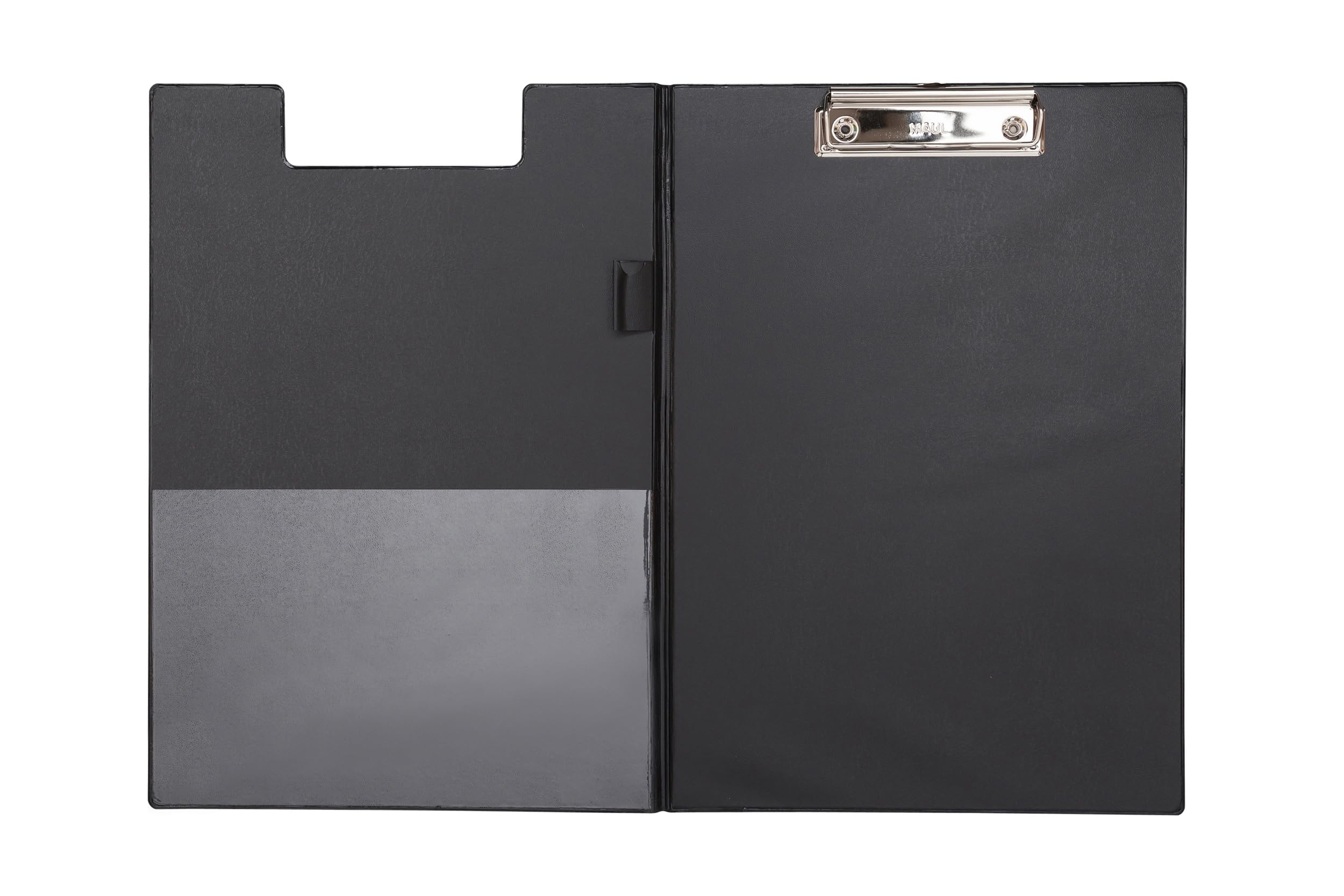
Image 1.1: The MAUL 2339290 Clipboard in its closed state.
Key Features
- Convenient Design: Made from sturdy cardboard with a protective foil coating, ensuring a lightweight yet robust construction.
- Powerful Clip: Features a flat, nickel-plated lever clip with a grip, designed for easy opening and secure document retention.
- Practical Hanging Option: Includes a retractable hanging eyelet for convenient storage or display on a wall.
- Ample Capacity: Maximum clamping width of approximately 0.8 cm, capable of holding up to 40 sheets of DIN A4, 80 g paper.
- Document Protection: The clipboard's cover provides privacy and protection for your documents.
2. Components
The MAUL 2339290 Clipboard consists of the following main components:
- Clipboard Body: The main structure, made of cardboard with a black foil coating.
- Lever Clip: A nickel-plated metal clip located at the top, designed to hold paper securely.
- Inner Pocket: A transparent pocket on the left interior side for additional documents or small items.
- Pen Holder: An integrated loop on the right interior side to secure a writing instrument.
- Hanging Eyelet: A retractable metal loop at the top of the clip for hanging.

Image 2.1: Interior view of the clipboard, highlighting the inner pocket and pen holder.

Image 2.2: Detailed view of the lever clip.
3. Setup
The MAUL 2339290 Clipboard requires minimal setup.
- Prepare Documents: Gather the A4-sized papers you wish to secure.
- Open the Clip: Press the grip on the lever clip to open the clamping mechanism.
- Insert Paper: Carefully slide your documents under the open clip. Ensure they are aligned correctly.
- Release the Clip: Release the grip to allow the clip to securely hold the papers in place.
- Utilize Inner Pocket: Place any additional loose papers, notes, or small flat items into the transparent inner pocket on the left side.
- Secure Pen: Insert a pen or pencil into the integrated pen holder loop.
4. Operating Instructions
Using your MAUL clipboard is straightforward:
- Writing Surface: Use the rigid surface of the clipboard as a stable base for writing or drawing, even when standing.
- Document Security: The strong lever clip ensures that your documents remain firmly in place during transport or use.
- Privacy and Protection: Close the clipboard cover to protect your documents from dust, damage, and prying eyes.
- Hanging Function: To hang the clipboard, pull out the retractable eyelet located at the top of the clip. Hang it on a hook or nail. Push the eyelet back in when not needed.

Image 4.1: The clip securely holding documents.
5. Maintenance
To ensure the longevity and appearance of your MAUL clipboard, follow these simple maintenance guidelines:
- Cleaning: Wipe the foil-coated surface with a soft, damp cloth. Avoid abrasive cleaners or solvents, as these can damage the coating.
- Clip Care: The nickel-plated clip is designed for durability. If it becomes dirty, wipe it with a dry cloth. Avoid bending or forcing the clip mechanism.
- Storage: Store the clipboard in a dry environment, away from direct sunlight or extreme temperatures, to prevent material degradation.
- Avoid Overloading: Do not exceed the maximum clamping capacity of 40 sheets (80 g paper) to prevent strain on the clip and potential damage to the clipboard.
6. Troubleshooting
Most issues with the MAUL clipboard are minor and easily resolved:
- Papers not held securely:
- Ensure the paper stack does not exceed the maximum capacity of 0.8 cm (approx. 40 sheets of 80 g paper).
- Check that the clip is fully closed after inserting papers.
- Clip feels stiff:
- Ensure no debris is lodged in the clip mechanism. Gently clean if necessary.
- Cover not closing properly:
- Verify that no items in the inner pocket or under the clip are preventing the cover from closing flat.
7. Specifications
| Feature | Detail |
|---|---|
| Brand | MAUL |
| Model Number | 2339290 |
| Product Dimensions (Closed) | 32.5 x 23.5 x 1.5 cm |
| Product Weight | 230 g |
| Color | Black |
| Covering Material | PVC |
| Material Type | Cardboard |
| Clamping Capacity | 50 sheets (approx. 40 sheets of 80 g A4 paper) |
| Closure Type | Lever clip |
| Sheet Size | A4 |
| GTIN | 04002390050838 |
| Country of Origin | China |

Image 7.1: Approximate dimensions of the clipboard when open.
8. Warranty and Support
MAUL stands by the quality and durability of its products. As a family-owned business with over 110 years of experience, MAUL is committed to providing reliable products and excellent customer service.
- Quality Assurance: Each MAUL product undergoes intensive hardware and functional tests to ensure quality and safety.
- Customer Service: For any questions, concerns, or support needs regarding your MAUL 2339290 Clipboard, please refer to the retailer where the product was purchased or visit the official MAUL website for contact information.
- Environmental Responsibility: MAUL operates with respect for the environment, from product idea to disposal, and is ISO 14001 certified.


