
1. Introduction
This manual provides instructions for the setup and operation of your ZdalaMit XRS551-C replacement remote control. This remote is designed to function as a direct replacement for various VIZIO Home Theater Soundbar models, offering seamless control without the need for programming or pairing.
2. Package Contents
- 1 x ZdalaMit XRS551-C Replacement Remote Control
Note: AAA batteries and a user manual are not included in the package. This digital manual serves as your comprehensive guide.
3. Setup: Battery Installation
To begin using your remote control, you must install two AAA batteries. Follow these steps:
- Locate the battery compartment on the back of the remote control.
- Slide the battery compartment cover downwards and remove it.
- Insert two 1.5V AAA batteries, ensuring the positive (+) and negative (-) terminals align correctly with the markings inside the compartment.
- Replace the battery compartment cover by sliding it back into place until it clicks securely.
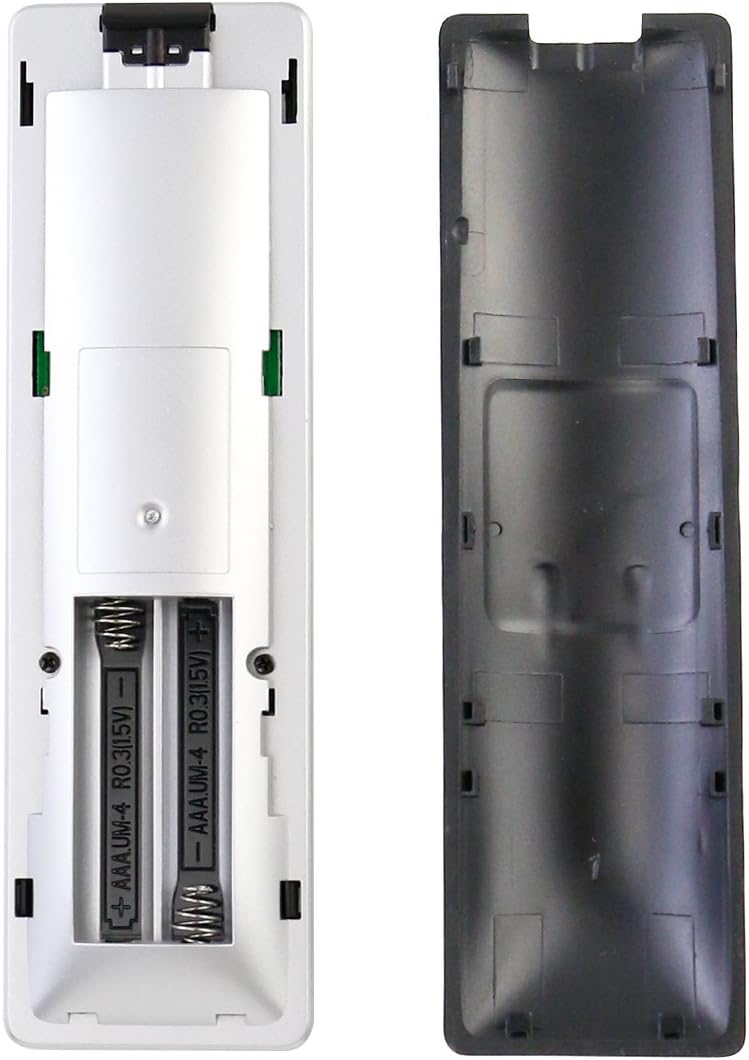
Figure 3.1: Battery compartment with AAA batteries installed. Ensure correct polarity.
Once batteries are installed, the remote is ready for immediate use with compatible VIZIO soundbars; no programming or pairing is required.
4. Operating Instructions
The ZdalaMit XRS551-C remote control provides essential functions for your VIZIO soundbar. Refer to the image below for button layout and descriptions.

Figure 4.1: Front view of the ZdalaMit XRS551-C Remote Control.
Button Functions:
- Power (⏻): Turns the soundbar on or off.
- INPUT: Cycles through available audio input sources (e.g., Optical, Bluetooth, AUX).
- MENU: Accesses the soundbar's menu for settings adjustments.
- Navigation Arrows (▲ ▼ ◀ ▶): Used to navigate through menu options.
- Play/Pause (⏸): Controls playback for media (e.g., Bluetooth audio).
- Previous Track (⏮): Skips to the previous track.
- Next Track (⏭): Skips to the next track.
- Volume Down (-): Decreases the soundbar's volume.
- Mute (🔇): Mutes or unmutes the soundbar's audio.
- Volume Up (+): Increases the soundbar's volume.
5. Compatibility
The ZdalaMit XRS551-C replacement remote control is compatible with the following VIZIO Home Theater Soundbar models:
- SB3851C0
- SB3851-C0
- SB3851C0M
- SB3851-C0M
- SB3851D0
- SB3851-D0
- SB4051C0
- SB4051-C0
- SB4051D5
- SB4051-D5
6. Specifications
| Feature | Detail |
|---|---|
| Model Number | XRS551-C |
| Power Supply | 2 x 1.5V AAA Batteries (Not Included) |
| Connectivity Technology | Infrared (IR) |
| Maximum Range | 33 Feet (approximately 10 meters) |
| Number of Buttons | 11 |
| Color | Black |
| Product Dimensions | 13.97 x 3.81 x 1.4 cm |
| Weight | 20 g |
| Compatible Devices | VIZIO Soundbar Home Theater Systems |

Figure 6.1: Remote control dimensions for reference.
7. Troubleshooting
If your ZdalaMit XRS551-C remote control is not functioning as expected, consider the following:
- Check Batteries: Ensure that the AAA batteries are inserted correctly with the proper polarity (+/-). Replace old batteries with new ones if the remote is unresponsive.
- Line of Sight: The remote control operates using infrared (IR) technology. Ensure there is a clear line of sight between the remote and the soundbar's IR receiver. Obstructions can block the signal.
- Remote Compatibility: Verify that your VIZIO soundbar model is listed in the compatibility section (Section 5) of this manual.
- Soundbar Power: Ensure your VIZIO soundbar is powered on and not in standby mode.
8. Maintenance
To ensure the longevity and optimal performance of your remote control, follow these maintenance guidelines:
- Cleaning: Wipe the remote control with a soft, dry cloth. Avoid using liquid cleaners or abrasive materials, as they may damage the surface or internal components.
- Battery Care: If the remote will not be used for an extended period, remove the batteries to prevent leakage, which can damage the remote.
- Storage: Store the remote in a cool, dry place away from direct sunlight, extreme temperatures, and high humidity.
- Avoid Drops: Protect the remote from physical impact, as drops can damage internal circuitry.
9. Support
For any queries or assistance regarding your ZdalaMit XRS551-C replacement remote control, please contact the seller or manufacturer directly. They can provide further support and guidance.