
LG WT7200CW
LG WT7200CW 5.0 Cu. Ft. High Efficiency Top Load Washer User Manual
Model: WT7200CW
Introduction
This manual provides essential information for the safe and efficient operation, installation, maintenance, and troubleshooting of your LG WT7200CW 5.0 Cu. Ft. High Efficiency Top Load Washer. Please read this manual thoroughly before using the appliance and retain it for future reference.
Important Safety Instructions
WARNING:
- To reduce the risk of fire, electric shock, or injury to persons, read all instructions before operating this appliance.
- Do not wash articles that have been previously cleaned in, washed in, soaked in, or spotted with gasoline, dry-cleaning solvents, or other flammable or explosive substances as they emit vapors that could ignite or explode.
- Do not allow children to play on or in the appliance. Close supervision of children is necessary when the appliance is used near children.
- Do not reach into the appliance if the tub or agitator is moving.
- Do not install or store this appliance where it will be exposed to the weather.
- Do not repair or replace any part of the appliance or attempt any servicing unless specifically recommended in this manual or in published user-repair instructions that you understand and have the skills to carry out.
- Always disconnect the appliance from the power supply before attempting any service.
Setup and Installation
Unpacking and Location
Carefully remove all packaging materials. Ensure the washer is placed on a solid, level surface to prevent vibration and noise during operation. The location must have access to hot and cold water supply, a drain, and a grounded electrical outlet.
Connecting Water Hoses
Connect the hot water supply hose to the hot water inlet on the back of the washer and the cold water supply hose to the cold water inlet. Ensure all connections are tight to prevent leaks. Turn on the water supply and check for leaks.
Connecting Drain Hose
Securely attach the drain hose to the drain outlet on the washer and route it to a standpipe or laundry tub. Ensure the hose is properly secured to prevent it from dislodging during the drain cycle.
Leveling the Washer
Use a level to ensure the washer is perfectly balanced. Adjust the leveling feet at the bottom of the washer as needed. A properly leveled washer will operate more quietly and efficiently.
Power Connection
Plug the washer's power cord into a grounded 110-volt (AC) electrical outlet. Do not use extension cords or adapters.

Figure 1: Angled view of the LG WT7200CW Top Load Washer, showing its overall design and top-load access.
Operating Instructions
Control Panel Overview
The control panel allows you to select wash cycles, adjust settings, and start/pause the washer. Familiarize yourself with the various buttons and indicators.
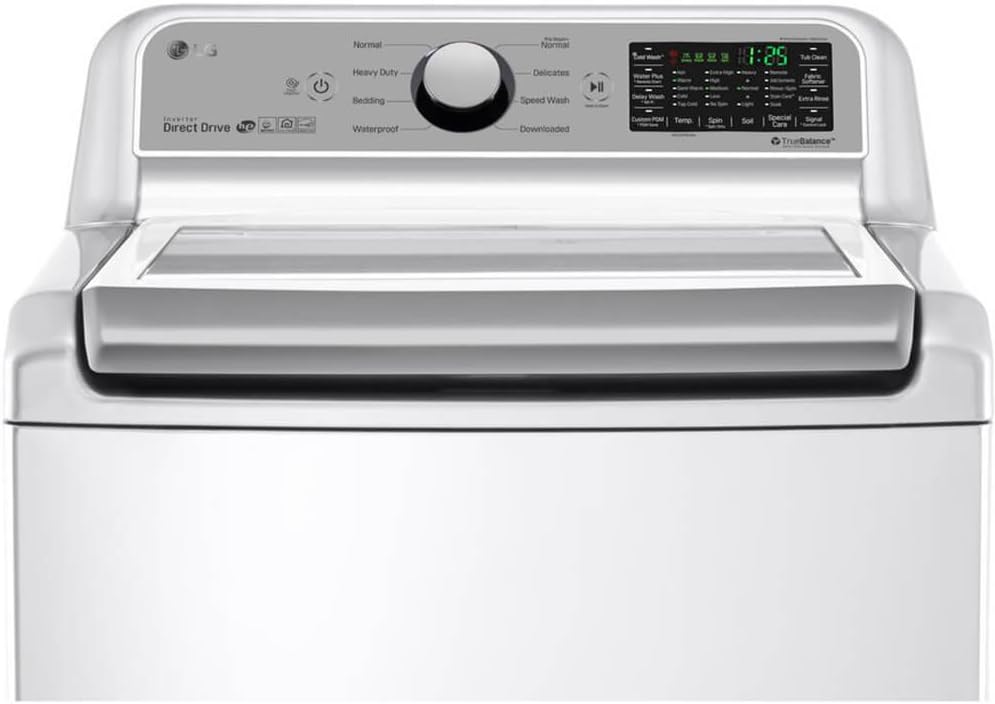
Figure 2: Close-up of the LG WT7200CW washer's control panel, displaying cycle selection knob and digital display with various options.
Loading Laundry
Open the top lid and load clothes loosely into the tub. Do not overload the washer, as this can affect cleaning performance and cause excessive vibration. Distribute items evenly around the tub.
Adding Detergent, Fabric Softener, and Bleach
Add the appropriate amount of high-efficiency (HE) detergent to the main detergent dispenser. Pour liquid fabric softener into its designated compartment. If using bleach, add it to the bleach dispenser. Do not overfill dispensers.
Selecting a Wash Cycle
Turn the cycle selector knob to choose the desired wash cycle. Available cycles include: Normal, Heavy Duty, Delicates, Bedding, Waterproof, Speed Wash, and Downloaded. Refer to the cycle guide in the full manual for detailed descriptions.
Adjusting Wash Options
After selecting a cycle, you can customize options such as water temperature (Hot, Warm, Semi Warm, Cold, Tap Cold), spin speed (Extra High, High, Medium, Normal, Low, No Spin), soil level (Heavy, Normal, Light), and additional features like Water Plus, Delay Wash, and Extra Rinse.
Starting a Cycle
Press the Start/Pause button to begin the wash cycle. The washer will automatically sense the load size and fill with the appropriate amount of water.
Maintenance and Care
Cleaning the Dispenser Drawers
Regularly clean the detergent, fabric softener, and bleach dispensers to prevent residue buildup. Remove the drawers, rinse them under warm water, and use a soft brush if necessary. Dry thoroughly before reinserting.
Cleaning the Washer Tub (Tub Clean)
To maintain optimal performance and prevent odors, run the Tub Clean cycle periodically. Add a tub cleaner or bleach to the dispenser, close the lid, and select the Tub Clean cycle. Follow the instructions on the tub cleaner product.
Cleaning the Exterior
Wipe the exterior surfaces of the washer with a soft, damp cloth. Avoid using abrasive cleaners or solvents that could damage the finish.
Winterizing the Washer
If the washer is stored in an area subject to freezing temperatures, follow the winterizing procedure in the full product manual to prevent damage from frozen water in hoses and internal components.
Troubleshooting Guide
Before contacting customer service, review the following common issues and solutions:
- Washer does not start: Ensure the power cord is securely plugged in, the lid is closed, and the Start/Pause button has been pressed. Check if a circuit breaker has tripped.
- Excessive vibration or noise: Verify the washer is level and all four leveling feet are making firm contact with the floor. Ensure the shipping bolts (if applicable) have been removed. Avoid overloading the tub.
- Water leaks: Check that water inlet hoses are tightly connected and not damaged. Ensure the drain hose is properly installed and not clogged.
- Poor cleaning results: Do not overload the washer. Use the correct amount of HE detergent. Select the appropriate wash cycle and options for the load type and soil level.
- Error codes: If an error code appears on the display, refer to the full product manual for specific code meanings and troubleshooting steps. Often, turning off the washer, waiting a few minutes, and restarting can resolve minor errors.
Specifications
| Feature | Detail |
|---|---|
| Brand | LG |
| Model Name | WT7200CW |
| Capacity | 5.0 Cubic Feet |
| Access Location | Top Load |
| Color | White |
| Special Feature | High Efficiency |
| Cycle Options | Normal, Heavy Duty, Delicates, Bedding, Waterproof, Speed Wash, Downloaded |
| Item Weight | 168 Pounds |
| Controls Type | Knob |
| Recommended Uses | Residential |
| Operation Mode | Fully Automatic |
| Max Rotational Speed | 1300 RPM |
| Voltage | 110 Volts (AC) |
| Installation Type | Freestanding |
| Washer Dispenser Options | Detergent, Fabric Softener, Bleach |
| Drum Material | Stainless Steel |
| UPC | 048231020275 |
Warranty Information
Your LG WT7200CW washer is covered by a limited warranty. For detailed information regarding warranty coverage, terms, and conditions, please refer to the warranty card included with your product or visit the official LG website. Keep your proof of purchase for warranty claims.
Customer Support
For technical assistance, service requests, or to order replacement parts, please contact LG Customer Service. You can find contact information, including phone numbers and online support options, on the official LG website or in the documentation provided with your appliance.
Online resources may include FAQs, troubleshooting guides, and downloadable manuals.
Ask a question about this manual
Ask about setup, troubleshooting, compatibility, parts, safety, or missing instructions. Manuals+ will review the question and use this page’s manual context to help answer it.