
1. Introduction
This manual provides essential information for the safe and effective use of your Fujifilm Instax Mini 9 Instant Camera. Please read these instructions thoroughly before using the camera to ensure proper operation and to maximize your enjoyment of the product.
2. What's in the Box
Upon opening your Instax Mini 9 package, verify that all components are present:
- Instax Mini 9 Camera Body
- Close-up Lens Adapter
- Hand Strap
- 2 x AA-size Alkaline Batteries
- User Manual (this document)
3. Parts of the Camera
Familiarize yourself with the various parts of your Instax Mini 9 camera:
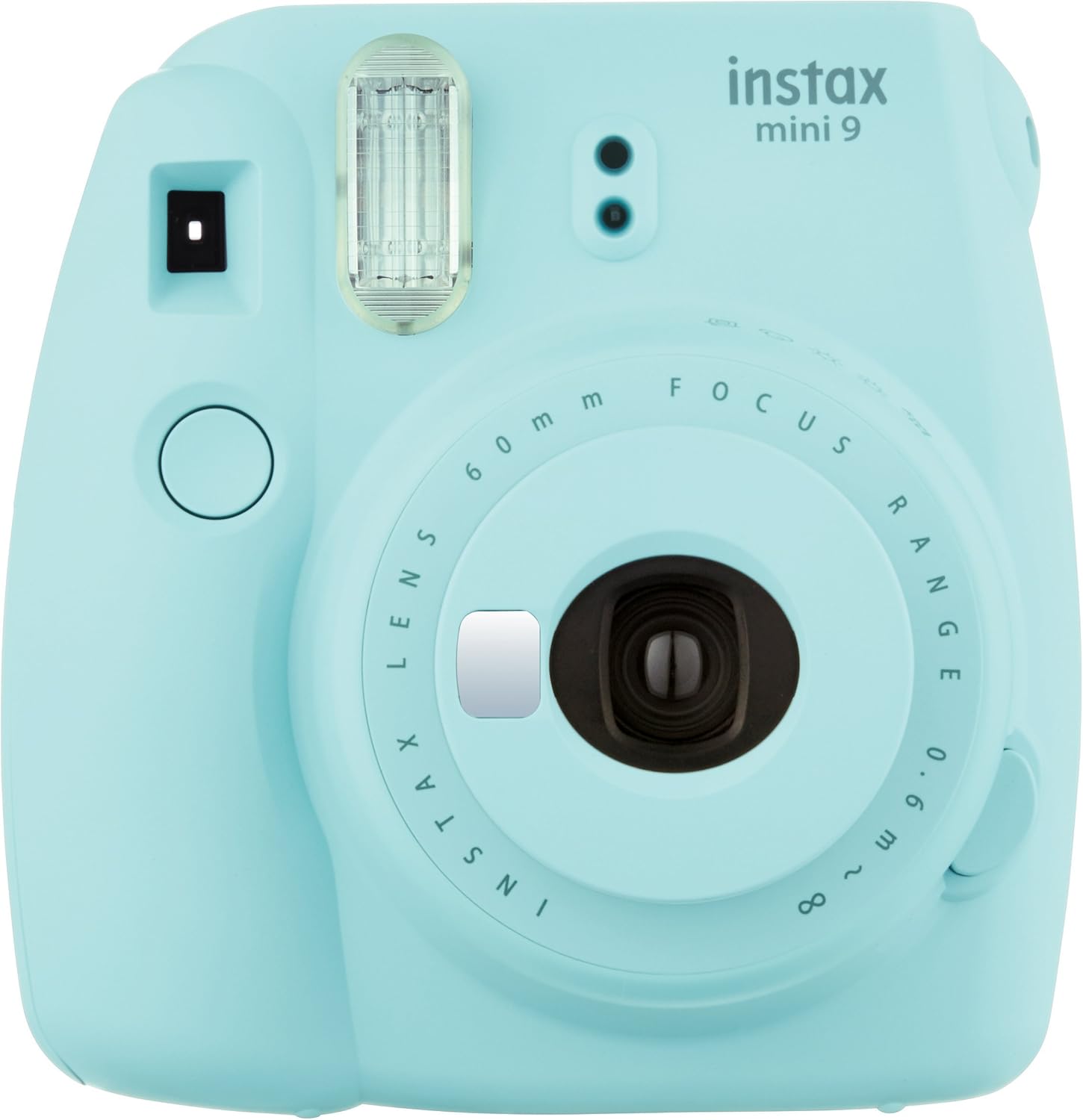
Figure 3.1: Front view of the Fujifilm Instax Mini 9 camera. This image displays the front of the camera, highlighting the lens, flash, and shutter button.

Figure 3.2: Back view of the Fujifilm Instax Mini 9 camera. This image shows the rear of the camera, featuring the film compartment door and viewfinder.

Figure 3.3: Side view of the Fujifilm Instax Mini 9 camera with lens extended. This image illustrates the lens in its extended position for taking photographs.
- Flash Lamp: Emits light for illumination.
- Light Sensor: Detects ambient light for exposure measurement.
- Viewfinder: Used to frame your shots.
- Shutter Button: Press to take a photo.
- Lens: Captures the image.
- Power Button: Extends the lens to turn the camera on.
- Exposure Adjustment Dial: Selects the appropriate brightness setting.
- Film Ejection Slot: Where printed photos emerge.
- Film Counter: Indicates the number of remaining films.
- Film Compartment Cover: Protects the film pack.
- Battery Compartment Cover: Secures the batteries.
- Selfie Mirror: Located next to the lens for self-portraits.
4. Setup
4.1. Battery Installation
- Open the battery compartment cover located on the side of the camera.
- Insert two AA-size alkaline batteries, ensuring correct polarity (+/-) as indicated inside the compartment.
- Close the battery compartment cover securely.
4.2. Film Loading
Use only Fujifilm Instax Mini Instant Film.
- Open the film compartment cover on the back of the camera.
- Align the yellow mark on the film pack with the yellow mark on the camera.
- Insert the film pack straight into the compartment. Do not press down on the film pack.
- Close the film compartment cover. The film counter will display 'S' (Start).
- Press the shutter button once to eject the black film cover. The film counter will then display '10', indicating 10 exposures remaining.
Note: Do not open the film compartment cover until all 10 films have been used, as this will expose the film and render it unusable.
5. Operating the Camera
5.1. Powering On/Off
- To Power On: Press the power button located next to the lens. The lens will extend.
- To Power Off: Push the extended lens back into the camera body.
5.2. Taking a Photo
- Turn on the camera.
- Look through the viewfinder to frame your subject.
- Press the shutter button firmly. The photo will be ejected from the film ejection slot.
5.3. Exposure Adjustment
The Instax Mini 9 features automatic exposure measurement. A flashing LED light on the exposure adjustment dial indicates the recommended brightness setting for your environment.
- Observe the flashing LED on the exposure adjustment dial.
- Rotate the dial to align the mark with the flashing LED.
- For brighter pictures with a soft look (High-Key mode), select the High-Key setting on the dial.
5.4. Selfie Mode
The integrated selfie mirror allows for easy self-portraits.
- Turn on the camera.
- Position yourself in front of the camera, using the small mirror next to the lens to compose your shot.
- Press the shutter button.
5.5. Macro Mode (Close-up Photography)
For subjects between 35 cm and 50 cm, attach the included close-up lens adapter.
- Ensure the camera is off.
- Attach the close-up lens adapter to the camera lens.
- Turn on the camera.
- Position the camera 35-50 cm from your subject.
- Press the shutter button.
6. Maintenance
6.1. Cleaning
- Wipe the camera body with a soft, dry cloth.
- For the lens and viewfinder, use a lens cleaning cloth. Avoid abrasive materials.
- Do not use organic solvents such as thinner or alcohol to clean the camera.
6.2. Storage
- Store the camera in a cool, dry place away from direct sunlight and high temperatures.
- Remove batteries if the camera will not be used for an extended period.
7. Troubleshooting
If you encounter issues with your Instax Mini 9, refer to the following common problems and solutions:
| Problem | Possible Cause | Solution |
|---|---|---|
| Camera does not power on | Dead or incorrectly inserted batteries | Replace batteries with new AA-size alkaline batteries, ensuring correct polarity. |
| Photos are too dark/light | Incorrect exposure setting | Adjust the exposure dial to the recommended setting indicated by the flashing LED. |
| Film does not eject | Film compartment opened during use, or empty film pack | Ensure film compartment was not opened. Replace with a new film pack if empty. |
| Image is blurry | Subject too close/far, or camera shake | Maintain recommended shooting distance (0.6m to infinity). Use macro lens for 35-50cm. Hold camera steady. |
8. Specifications
| Brand | Fujifilm |
| Model Name | Instax Mini 9 |
| Film Format Type | Fujifilm Instax Mini Instant Film |
| Lens | 2 components, 2 elements, f=60mm, 1:12.7 |
| Viewfinder | Real image finder, 0.37x, with target spot |
| Shooting Range | 0.6m - ∞ (0.35m - 0.5m using macro lens adapter) |
| Shutter Speed | 1/60 sec. |
| Exposure Control | Manual switching system (LED indicator in exposure meter) |
| Flash | Constant firing flash (automatic light adjustment) |
| Power Supply | Two AA-size 1.5V alkaline batteries |
| Dimensions (W x H x D) | 116mm x 118.3mm x 68.2mm (3 x 5 x 5.5 inches) |
| Weight | 307g (without batteries, strap, and film pack) (14.1 ounces) |
| Special Feature | Auto Exposure, Selfie Mirror |
9. Safety Information
Please observe the following safety precautions:
- Do not disassemble, modify, or attempt to repair the camera yourself.
- Keep the camera away from water and moisture.
- Do not expose the camera to extreme temperatures or direct sunlight for prolonged periods.
- Keep batteries out of reach of children. If swallowed, seek medical attention immediately.
- Dispose of batteries and the camera according to local regulations.
10. Warranty and Support
For warranty information, technical support, or further assistance, please refer to the official Fujifilm website or contact Fujifilm customer service.
You can also access the official PDF user manual for more detailed information: Fujifilm Instax Mini 9 User Manual (PDF)
Visit the Fujifilm Brand Store for additional products and information: Fujifilm Store


