
1. Introduction
Thank you for choosing the DOMENS DMS-1580T Bill Counter. This machine is designed for efficient and accurate counting of banknotes, featuring multiple counterfeit detection methods to ensure the integrity of your cash handling. Please read this manual thoroughly before operating the device to ensure proper usage, optimal performance, and longevity of the product.

Image 1.1: The DOMENS DMS-1580T Bill Counter.
2. Product Overview
2.1 Key Features
- Multi-Detection Methods: UV (Ultraviolet), MG (Magnetic), IR (Infrared), DD (Dimensional Detection) for comprehensive counterfeit detection. Also detects half notes, double notes, chain notes, and slope notes.
- Multiple Operation Modes: Auto/Manual, Add, Batch, Single Denomination Value Counting, Detection, and Reset modes to suit various counting needs.
- Efficient and Accurate Counting: Counts at a speed of 1100 bills/min with low noise (less than 60dB).
- Single Denomination Value Counting: Calculates the total value of a single selected denomination (for US dollar only). Note: This function does not automatically recognize mixed denominations; bills must be separated by denomination.
- Color Changeable LCD Display: The display changes to red and emits an alarm when a counterfeit banknote is detected.
- Wide Voltage Adaptability: DC motor supports 85V-250V, suitable for various regions.
- Compact and Durable Design: Weighs 8.9 lbs, features 13 high-quality rubber wheels for accurate counting, and covered sensors to prolong lifespan.
2.2 Components
The DOMENS DMS-1580T Bill Counter consists of the following main components:
- Hopper: Where banknotes are placed for counting. Capacity: 300 new bills, 150 old bills.
- Stacker: Where counted banknotes are collected. Capacity: 150-200 bills.
- LCD Display: Shows counting results, error codes, and operational modes. Changes color upon counterfeit detection.
- Control Panel: Buttons for selecting modes, functions, and resetting.
- Sensors: Internal sensors for counting and counterfeit detection.
3. Setup
3.1 Unpacking
- Carefully remove the bill counter from its packaging.
- Check for any visible damage. If damage is found, do not operate the machine and contact customer support.
- Remove all protective films or packing materials from the machine.
3.2 Power Connection
- Ensure the power switch on the back of the machine is in the OFF position.
- Connect the provided power cable to the power input port on the machine.
- Plug the other end of the power cable into a suitable electrical outlet (85V-250V AC).
3.3 Initial Power On
- Flip the power switch to the ON position.
- The machine will perform a self-test. The LCD display will light up and show initial settings.
- The machine is now ready for operation.
4. Operation Modes
The DOMENS DMS-1580T offers several operational modes to facilitate various counting tasks.

Image 4.1: Control panel with mode selection buttons.
4.1 Auto/Manual Mode
- Auto Mode: The machine automatically starts counting when banknotes are placed in the hopper.
- Manual Mode: Press the "Reset" button to initiate counting after placing banknotes in the hopper.
4.2 Add Mode
In Add mode, the machine accumulates the count of multiple batches of banknotes. Each new batch counted is added to the previous total.
4.3 Batch Mode
Batch mode allows you to count banknotes into specific batch sizes (e.g., 10, 20, 25, 50, 100). The machine will stop counting once the preset batch quantity is reached.
4.4 Single Denomination Value Counting
This mode calculates the total monetary value of a stack of banknotes, provided all banknotes in the stack are of the same denomination. This function is for US dollar only. To use this feature, you must manually select the denomination before counting. The machine does not automatically recognize mixed denominations; separate bills of various denominations before using this mode.
4.5 Detection Mode
This mode activates the counterfeit detection features (UV, MG, IR, DD). If a suspicious banknote is detected, the machine will stop, the display will turn red, and an audible alarm will sound.
4.6 Reset Mode
Press the "Reset" button to clear the current count and restart the counting process.
5. Counterfeit Detection
The DMS-1580T employs multiple advanced detection methods to identify counterfeit banknotes, ensuring the security of your transactions.

Image 5.1: Overview of counterfeit detection methods.
5.1 Ultraviolet (UV) Detection
Detects UV security features embedded in genuine banknotes that are invisible to the naked eye.
5.2 Magnetic (MG) Detection
Scans for magnetic ink patterns present in genuine currency. This method is effective for detecting counterfeit bills that lack these magnetic properties.
5.3 Infrared (IR) Detection
Verifies the presence of infrared security features, which are often used in advanced counterfeit prevention.
5.4 Dimensional Detection (DD)
Measures the width of banknotes to ensure they conform to standard dimensions, identifying bills that are too wide or too narrow.
5.5 Other Detections
- Half Notes: Detects banknotes that are torn or incomplete.
- Double Notes: Identifies instances where two banknotes are stuck together and fed as one.
- Chain Notes: Detects banknotes that are linked together end-to-end.
- Slope Notes: Identifies banknotes that are fed into the machine at an incorrect angle.

Image 5.2: The color-changeable LCD display indicating a detection alert.
6. Specifications
| Feature | Specification |
|---|---|
| Counting Speed | ≥1100 pcs/min |
| Size of Countable Note | 1.97" x 3.94" - 3.15" x 7.2" Inches |
| Machine Dimensions | 11.26" x 9.33" x 5.75" Inches (28.6 x 23.7 x 14.61 cm) |
| Hopper Capacity | 300 new bills, 150 old bills |
| Stacker Capacity | 150-200 bills |
| Power Supply | DC 85V-250V |
| Power Consumption | ≤50W |
| Weight | 8.9 lbs (3.34 kg) |
| Noise Level | Less than 60dB |
| Material | ABS Plastic |
7. Maintenance
Regular maintenance ensures the optimal performance and extends the lifespan of your bill counter.
7.1 Cleaning
- Always turn off and unplug the machine before cleaning.
- Use the provided cleaning brush to remove dust and debris from the hopper, stacker, and internal sensors.
- Wipe the exterior of the machine with a soft, dry cloth. Do not use abrasive cleaners or solvents.
- Regular cleaning of the sensors is crucial for accurate counting and detection.
7.2 Rubber Ring Replacement
Over time, the silicon rubber rings may wear out, affecting feeding accuracy. Replace them as needed using the provided replacement ring. Refer to the detailed instructions in the included printed manual for specific steps.
7.3 Fuse Replacement
If the machine fails to power on, check the fuse. A replacement fuse is included in the package. Consult the printed manual for instructions on how to safely replace the fuse.
8. Troubleshooting
This section addresses common issues you might encounter with your DOMENS DMS-1580T Bill Counter.
| Problem | Possible Cause | Solution |
|---|---|---|
| Machine does not power on | Power cable not connected; Power switch off; Blown fuse | Ensure power cable is securely connected and switch is ON. Check and replace fuse if necessary. |
| Error code displayed / Alarm sounds / Display turns red | Counterfeit bill detected; Half note, double note, chain note, or slope note detected | Remove the suspicious banknote. Inspect the banknote for authenticity or proper condition. Press Reset to continue. |
| Bills jam frequently | Bills are crumpled or worn; Hopper is overloaded; Sensors are dirty; Worn rubber rings | Ensure bills are flat and neatly stacked. Do not overload the hopper. Clean sensors regularly. Consider replacing rubber rings. |
| Inaccurate counting | Dirty sensors; Bills are not properly aligned; Worn rubber rings | Clean sensors. Ensure bills are neatly stacked and aligned in the hopper. Replace worn rubber rings. |
| Struggles with new US $1 bills | New bills can sometimes be stiffer or have different texture | Try fanning the bills or running them through a few times. Ensure they are perfectly aligned. |
9. Package Contents
Upon unpacking, please verify that all the following items are included in your package:
- 1x DOMENS DMS-1580T Money Counter
- 1x Power Cable (US Plug)
- 1x Cleaning Brush
- 1x Replacement Silicon Rubber Ring
- 1x Replacement Fuse
- 1x Operation Manual (Printed)
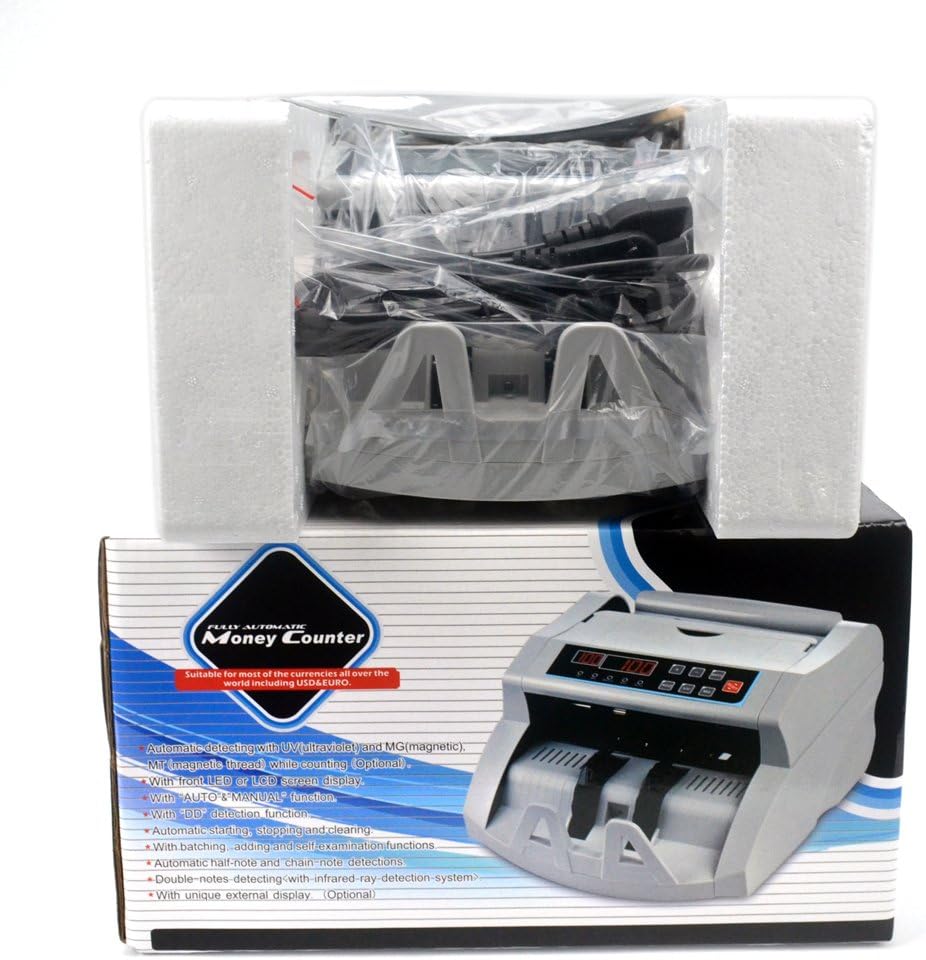
Image 9.1: Included accessories and components.
10. Warranty and Support
DOMENS is committed to providing high-quality products and customer satisfaction. While specific warranty details are not provided in this manual, we offer technical support for our products.
If you have any questions, encounter issues, or require technical assistance with your DMS-1580T Bill Counter, please feel free to contact our customer support. We aim to reply to all inquiries within 24 hours.


