
1. Introduction
The Sunhans SH24Gi1000-D2 is a dual-antenna WiFi signal booster designed to enhance the range and performance of your 2.4GHz wireless network. This indoor solution provides 1000mW (30dBm) output power and supports IEEE 802.11b/g/n (802.11n Draft 2.0) 2Tx2R wireless LANs, with data transfer rates up to 300Mbps. It features bi-directional, half-duplex, time division duplex, and MIMO modulation methods, ensuring efficient and reliable signal amplification. The booster is housed in a durable cast aluminum case, offering anti-interference properties and a compact, power-saving design.
2. Package Contents
Verify that all items are present in your package:
- 1 x SH24Gi1000-D2 WiFi Signal Booster
- 2 x RG316 Cable with SMA Connectors (20cm)
- 2 x 6dBi Omni Antenna
- 1 x 100-240V AC Power Supply (Output: 12V 2A)
- 1 x English User Manual

Image: Contents of the Sunhans SH24Gi1000-D2 package, including the booster unit, two antennas, two RG316 cables, and a power adapter.
3. Setup Instructions
Follow these steps to install your Sunhans SH24Gi1000-D2 WiFi Signal Booster:
- Remove Existing Antennas: Disconnect the two antennas from your AP (Access Point) router.
- Connect Booster to Router: Use the two provided RG316 cables to connect the 'TO RADIO' ports on the booster to the antenna ports on your AP router.
- Attach New Antennas: Connect the two 6dBi omni antennas to the 'TO ANTENNA' ports on the booster.
- Power On: Plug the power adapter into the booster's power input port and then into an electrical outlet. The booster is designed for plug-and-play operation.

Image: The Sunhans SH24Gi1000-D2 booster connected to a router via RG316 cables, with two external antennas attached to the booster. A power adapter is also shown connected.
Video: An official product video demonstrating the unboxing and setup process of the SH24Gi1000-D2 Sunhans 1000mW dual-antenna 2T2R WiFi booster. This video illustrates how to connect the booster to a router and attach the antennas.
4. Operating Instructions
The SH24Gi1000-D2 operates as a bi-directional amplifier, automatically switching between transmit and receive modes. Once properly installed and powered on, the booster will begin amplifying your WiFi signal. A green LED indicator will illuminate to show active transmission.
- Signal Activity LED: The booster features an LED that indicates signal activity, allowing you to confirm its operational status.
- Automatic Operation: The device automatically manages signal transmission and reception, requiring no manual configuration after initial setup.
- Optimal Input Power: For best performance, the input power range should be between 12-15dBm. Input power too low may result in reduced output, while excessively high input power (near or above 20dBm) can cause signal attenuation.
5. Maintenance
To ensure the longevity and optimal performance of your WiFi signal booster, consider the following maintenance tips:
- Keep Dry: Avoid exposing the device to moisture or liquids.
- Clean Gently: Use a soft, dry cloth to clean the exterior. Do not use harsh chemicals or abrasive cleaners.
- Proper Ventilation: Ensure the booster is placed in an area with adequate airflow to prevent overheating.
- Secure Connections: Periodically check that all cables and antennas are securely connected.
6. Troubleshooting
If you encounter issues with your Sunhans SH24Gi1000-D2, try the following:
- No Power: Ensure the power adapter is correctly plugged into both the booster and a working electrical outlet. Check the power adapter for any visible damage.
- Weak Signal / No Improvement:
- Verify all cable connections between the router, booster, and antennas are tight.
- Ensure the input power from your router is within the recommended range (0-20dBm, with 12-15dBm being optimal).
- Check for potential sources of interference (e.g., other electronic devices, thick walls).
- Confirm the antennas are correctly oriented for optimal signal propagation.
- Intermittent Connection: Check for loose connections or environmental factors that might be causing signal drops.
7. Specifications
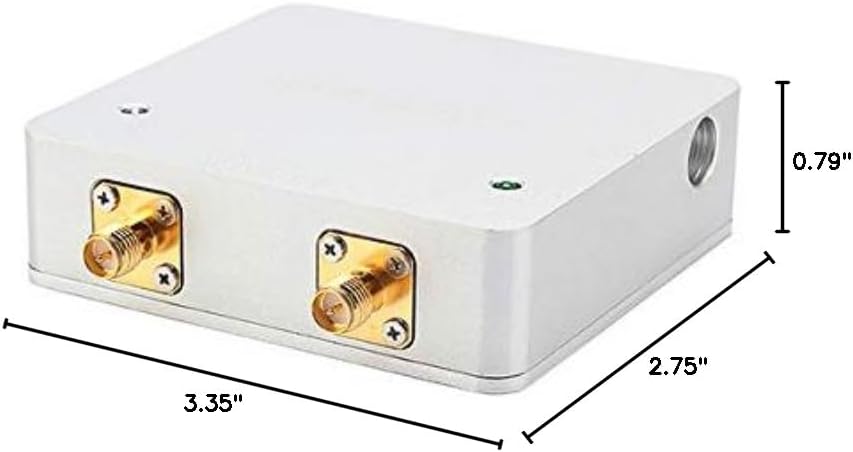
Image: The physical dimensions of the Sunhans SH24Gi1000-D2 booster, measuring 3.35 inches in length, 2.75 inches in width, and 0.79 inches in height.
| Feature | Description |
|---|---|
| Model Name | SH24Gi1000-D2 |
| Operating Range | 2.4 ~ 2.5 GHz |
| Data Transfer Rate | 300 Mbps (802.11b/g/n, 2Tx2R) |
| Modulation Method | Bi-directional, half-duplex, time division duplex, MIMO |
| Output Power | 30 ± 1dBm (1000mW) |
| Power Input | Min: 0dBm, Max: 20dBm |
| Transmit Gain | 12-14dB |
| Receiver Gain | 9-11dB |
| Noise Figure | ≤3.5dB typical |
| Switch Time Delay | < 1μs |
| Protection | 1/4 Wavelength Short |
| Power Supply | DC 12V @ 2A |
| LED Indicator | Transmit Active (Green) |
| Channel Width | 20 MHz or 40 MHz |
| Connector Type | To radio: SMA female (hole inside), To antenna: RP-SMA male (pin inside) |
| Storage Temperature | -20°C to +70°C ambient temperature |
| Operating Humidity | 5 - 90% maximum (non-condensing) |
| Material | Cast Aluminum |
| Product Dimensions | 0.79 x 2.75 x 3.35 inches |
| Item Weight | 6.3 ounces |
8. Warranty and Support
For warranty information and technical support, please refer to the documentation included with your purchase or contact Sunhans customer service directly. Keep your proof of purchase for warranty claims.


